DC10 E, DC20 E
DISASSEMBLING
27
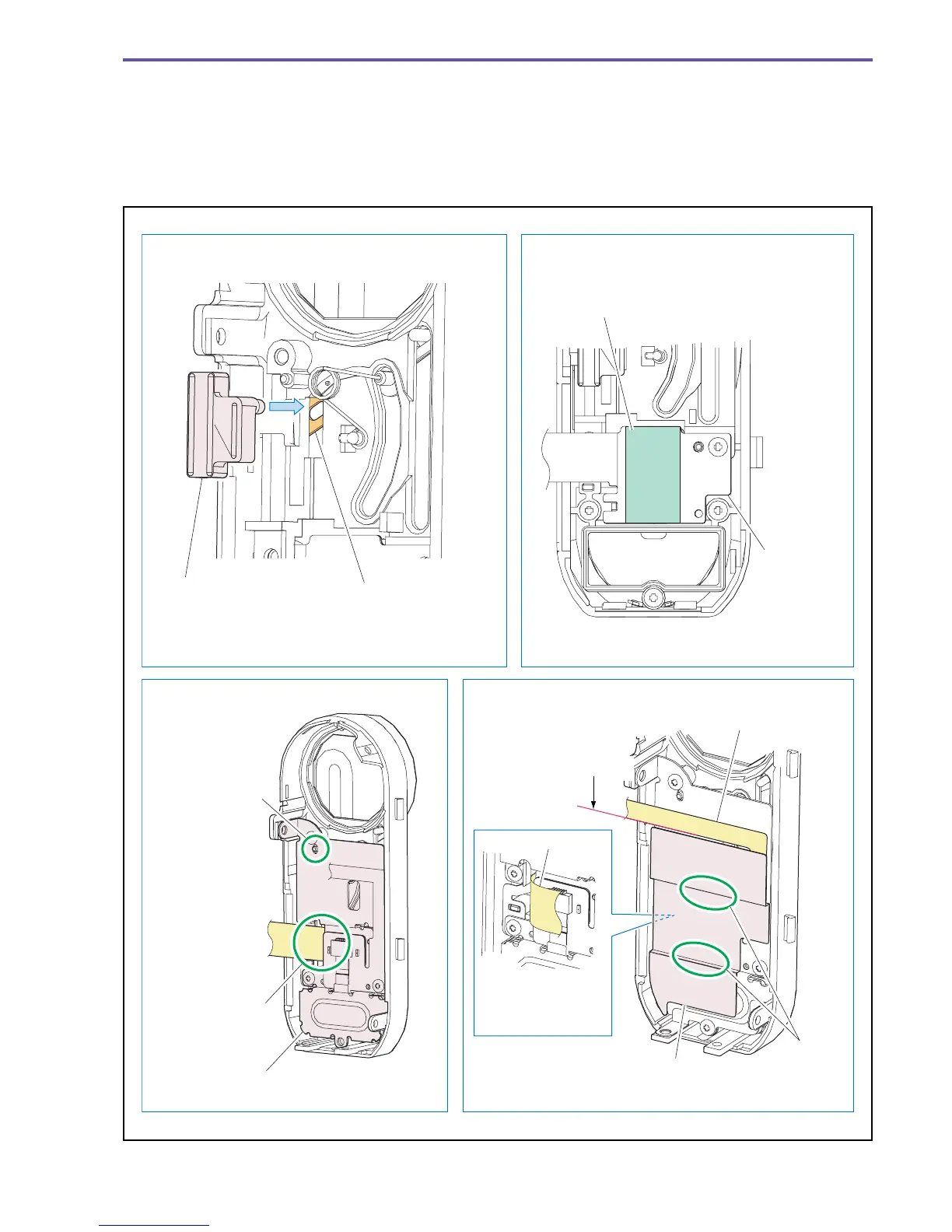
<Note on Reassembling>
(1) Attach the Barrier Slide Holder as shown in the figure below.
(2) Attach the LED Radiator Gum to the position indicated in the figure below. (DC20 E only)
(3) The Back Barrier Plate should be mounted as shown in the figure. After mounting it, slide the Barrier Slide Holder to check if the
Barrier opens/closes smoothly.
(4) Attach the Blindfold Sheet to the position indicated in the figure below.
Fig. 24
Note on Reassembling (3) Note on Reassembling (4)
Note on Reassembling (1) Note on Reassembling (2)
Barrier Slide Holder Barrier Arm Ass'y
Mount the Barrier Slide Holder with its convex
section inserted to the Barrier Arm Ass'y hole.
LED Radiator Gum
FRONT FPC
Back Barrier Plate section
Blindfold Sheet
Adjust to
the dowel.
Pass the flexible
cable through it.
FRONT FPC
DC20 E only
Flexible cable
The edge part of the
flexible cable should
be positioned on the
Blindfold Sheet.
Adjust to
the step
difference.
Fold the FRONT
FPC, and attach
the Blindfold Sheet.



 To Next Page