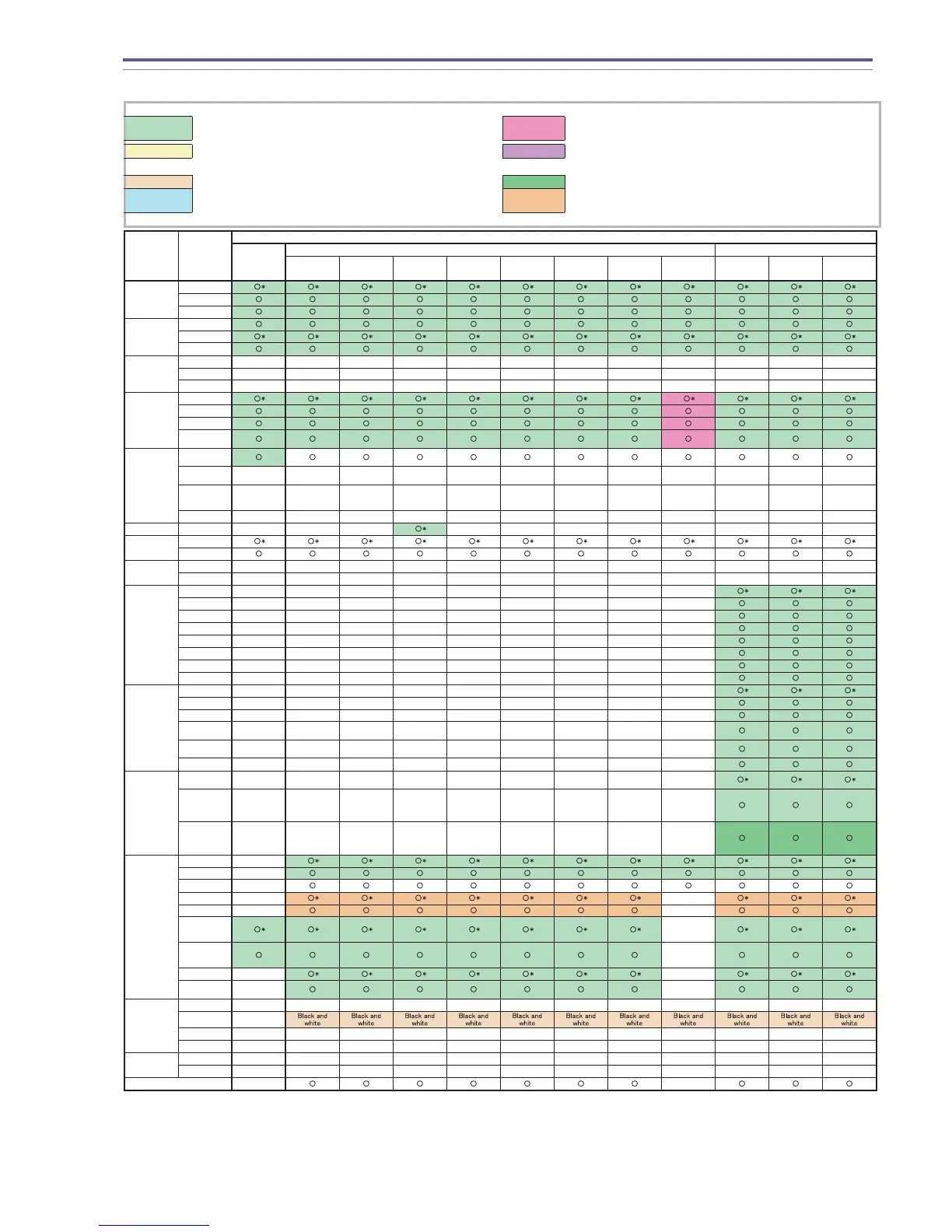
*:Initial setting –: Cannot be set
Backup is performed (not cancelled when power is shut off).
Settings can be changed, but operations are disabled. Backup is
performed.
Except when card simultaneous recording is OFF. Cannot be set
when card simultaneous recording is OFF. And backup is
performed.
Enabled when card simultaneous recording is ON. Settings can be
made when card simultaneous recording is OFF, but operation is
disabled. Backup is performed.
Effect function is black and white. Conditional backup is performed.
Settings can be changed, but operation is single shot.
Settings can be made when AF and Focus Priority is ON. Backup is
performed.
Disc Still Image
AUTO
SCN
P
Portrait Sports Night Snow Beach Sunset Spotlight Fireworks P Tv Av
Recording
pixels
Large
Medium
Small
Compression
ratio
Super Fine
Fine
Normal
Simultaneous
recording
640 x 480
OFF
––––––––––––
Fine
––––––––––––
Normal
––––––––––––
Flash
(DC20 E only)
Auto
Always On
OFF
Red-eye
Reduction
Drive mode
Single
shooting
Continuous
shooting
––––––––––––
High-speed
continuous
shooting
––––––––––––
AEB
––––––––––––
Night
Night
–––
––––––––
Mini video
light
OFF
ON
Digital Zoom
ON ––––––––––––
OFF ––––––––––––
White
balance
AUTO –––––––––
Sun –––––––––
Shade –––––––––
Cloudy –––––––––
Tungsten–––––––––
Fluorescent H–––––––––
Fluorescent–––––––––
MANUAL–––––––––
Color effects
OFF
–––––––––
Vivid
–––––––––
Neutral
–––––––––
Low
Sharpening
–––––––––
Soft Skin
Detail
–––––––––
Custom
–––––––––
Metering
system
Evaluative
metering
–––––––––
Center
weighted
average
metering
–––––––––
Spot metering
(Center or AF
frame
continuous)
–––––––––
AF
AF
–
MF
–
MF infinity
–
AiAF
–
–
Center fixed
–
–
AF auxiliary
light AUTO
–
AF auxiliary
light OFF
–
Focus Priority ON
– –
Focus Priority
OFF
–
–
Digital
Effects
Fader
––––––––––––
Effects
–
Multi-screen
––––––––––––
Card MIX
––––––––––––
Photo stitch
OFF
––––––––––––
ON
––––––––––––
EXP lock
–
–
(DC20 E only)
(DC20 E only)
(DC20 E only)



 To Next Page