DC10 E, DC20 E
DISASSEMBLING
31
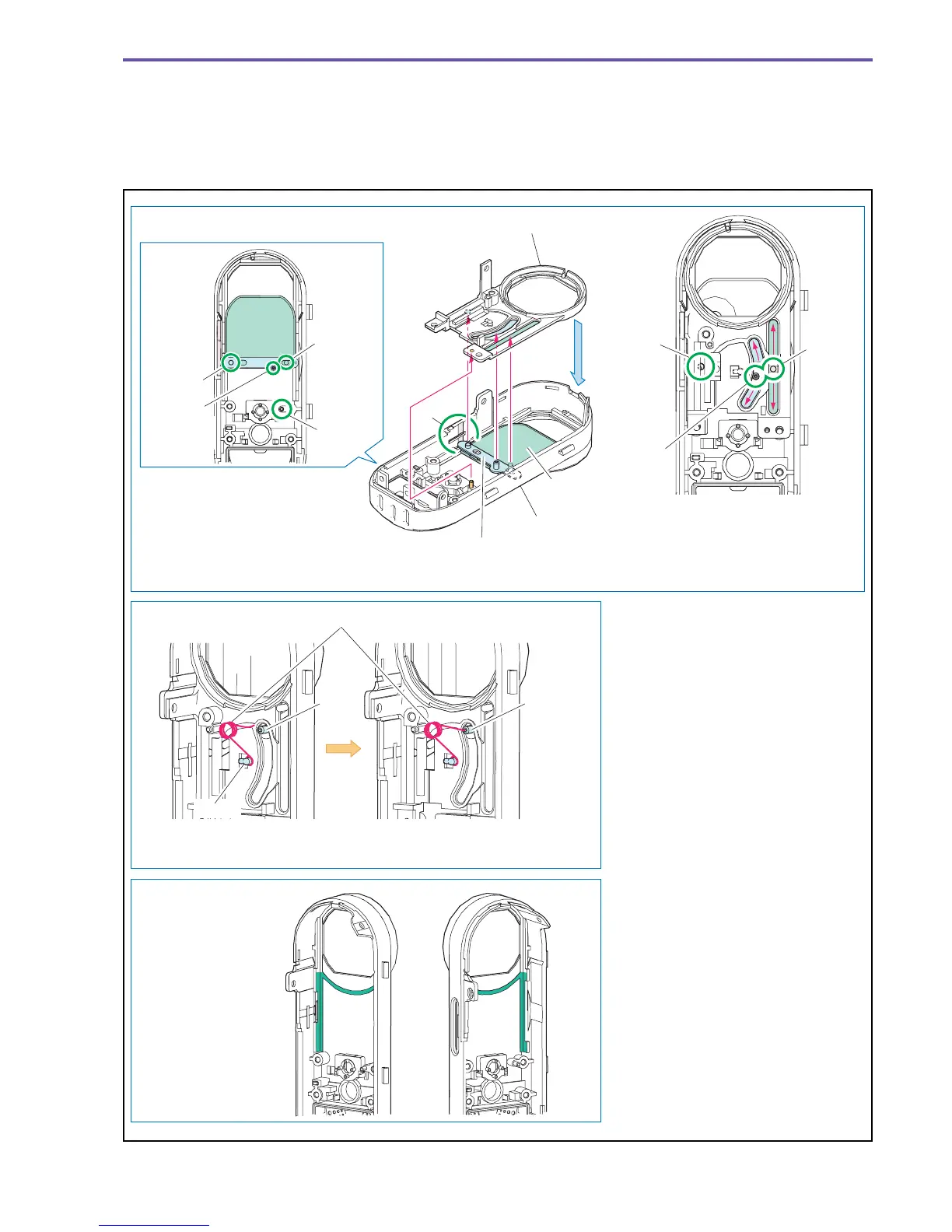
<Note on Reassembling>
(1) Attach the Lens Barrier, Barrier Arm Ass'y, and Barrier Bottom Holder as shown in the figure below.
(2) Attach the Spring as shown in the figure below.
<Instruction for Supply>
Front Cover Ass'y Rail section and side faces : Hanarl KS-39M (DY9-3053-000)
Fig. 28
Note on Reassembling (1)
Note on Reassembling (2)
Instruction for Supply
A
Barrier Bottom Holder
Front Cover Ass'y
Lens Barrier
Barrier Arm Ass'y
After mounting the Barrier Bottom
Holder, check if the dowels D and
E smoothly slide in the sliding
range with dowel C used as
supporting point.
Mount the Lens Barrier and the
Barrier Arm Ass'y using the groove
of section A of the Front Cover Ass'y.
Insert dowels C, D, E and F into the
holes and grooves of the Barrier
Bottom Holder, respectively.
Rib GRib G
Spring
Hook
Hang one side of the
spring on the hook.
Mount the spring by inserting its
tip into the hole of rib G.
Front Cover Ass'y
Rail section and
side faces
Hanarl : KS-39M
Dowel C
Dowel D
Dowel E
Dowel C
Dowel D
Dowel E
Dowel F



 To Next Page