Part 3: Repair Information
3.2 AF SENSOR POSITIONING (HORIZONTAL)
r---------------------------------------------------------------------------------,
!
Ctfi.ujj(•JH.
The
AF
sensor
position
must
be
adjusted
when
the
AF
sensor
unit
is
!
l replaced.
Adjustment
is
basically
similar
to
the
previous
EOS
cameras.
l
L---------------------------------------------------------------------------------~
PuRPosE:
To
align
the
center
position
of
the
AF
sensor
with
the
optical
axis. (Horizontal
adjustment
only.)
STANDARD
The
center
of
the
sensor
must
be
inside
the
central
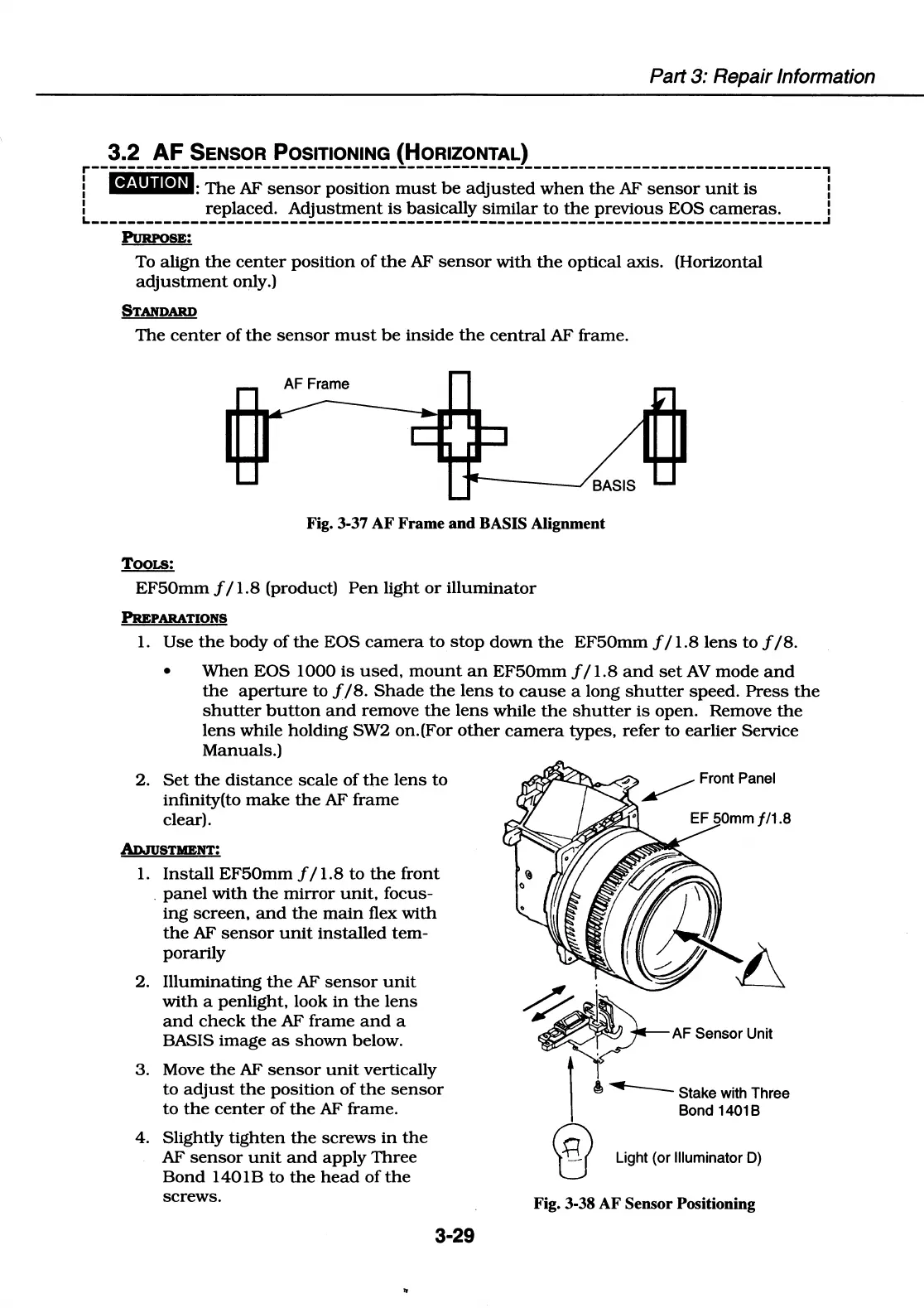
AF frame.
AF Frame
r----_/
BASIS
Fig. 3-37
AF
Frame and BASIS Alignment
TOOLS:
EF50mm
f I 1.8 (product)
Pen
light
or
illuminator
PREPARATIONS
1.
Use
the
body
of
the
EOS
camera
to
stop
down
the
EF50mm
f / 1.8
lens
to
f
/8.
•
When
EOS
1000
is
used,
mount
an
EF50mm
f / 1.8
and
set
AV
mode
and
the
aperture
to
f/8.
Shade
the
lens
to
cause
a
long
shutter
speed.
Press
the
shutter
button
and
remove
the
lens
while
the
shutter
is
open.
Remove
the
lens
while
holding
SW2
on.(For
other
camera
types, refer
to
earlier
Service
Manuals.)
2.
Set
the
distance
scale
of
the
lens
to
infinity(to
make
the
AF
frame
clear).
ADJuSTMENT:
1.
Install
EF50mm
f I 1.8
to
the
front
.
panel
with
the
mirror
unit,
focus-
ing
screen,
and
the
main
flex
with
the
AF
sensor
unit
installed
tem-
porarily
2.
Illuminating
the
AF
sensor
unit
with
a
penlight,
look
in
the
lens
and
check
the
AF
frame
and
a
BASIS
image
as
shown
below.
3.
Move
the
AF
sensor
unit
vertically
to
adjust
the
position
of
the
sensor
to
the
center
of
the
AF frame.
4. Slightly
tighten
the
screws
in
the
AF
sensor
unit
and
apply
Three
Bond
1401 B
to
the
head
of
the
screws.
3-29
AF Sensor Unit
i
~
Stake with Three
Bond 14018
Light (or llluminator
D)
Fig. 3-38 AF Sensor Positioning















 To Next Page