EasyManua.ls Logo

Canon EOS 50 E - AF Focus Adjustment

Canon EOS 50 E
207 pages
Print Icon
To Next Page IconTo Next Page
To Previous Page IconTo Previous Page
Loading...
Part 3: Repair Information
Al>JuSTMENT:
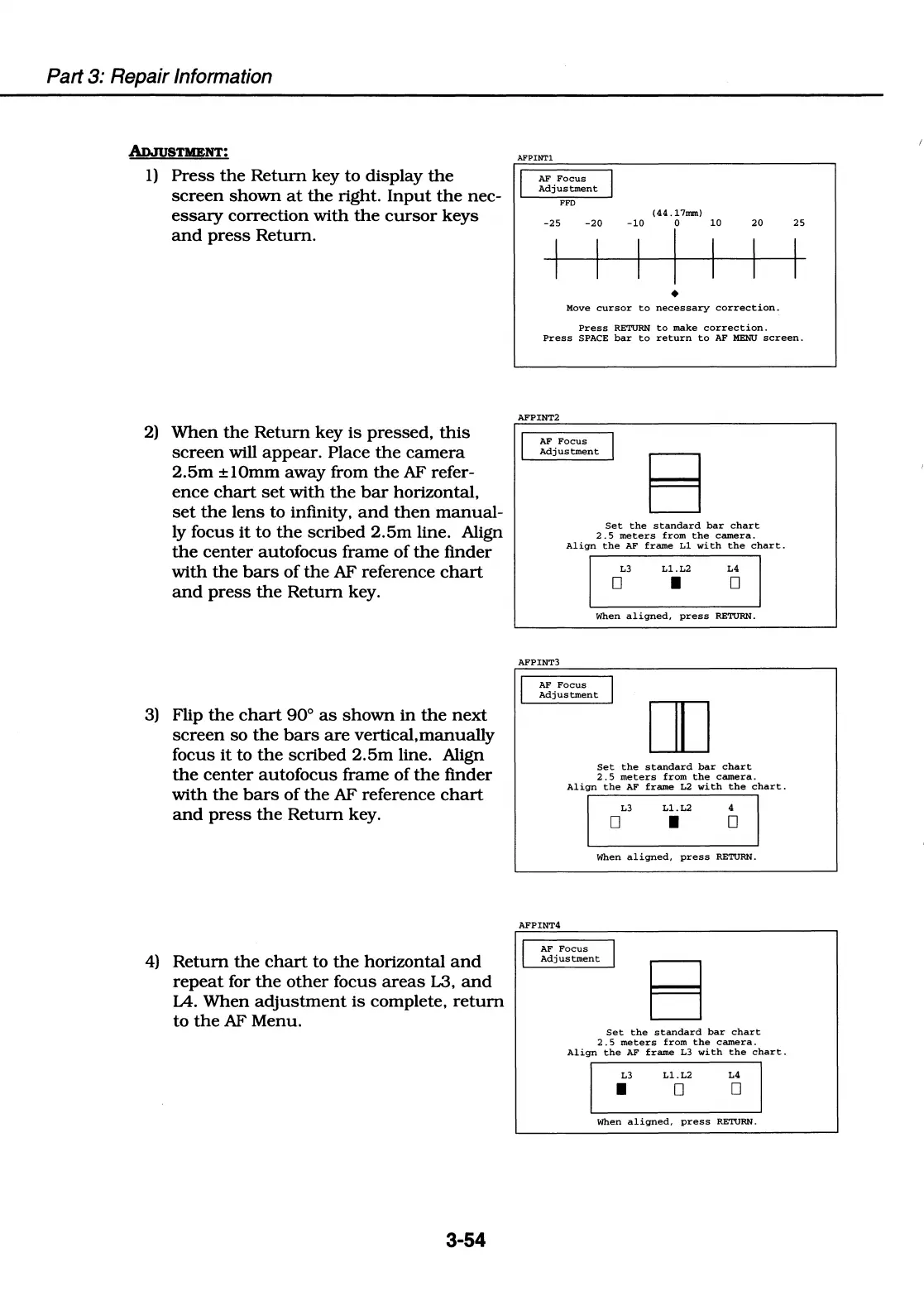
1)
Press
the
Return
key to
display
the
screen
shown
at
the
right.
Input
the
nec-
essary
correction
with
the
cursor
keys
and
press
Return.
2)
When
the
Return
key
is
pressed,
this
screen
will
appear.
Place
the
camera
2.5m
±lOmm
away
from
the
AF refer-
ence
chart
set
with
the
bar
horizontal,
set
the
lens
to infinity,
and
then
manual-
ly focus
it
to
the
scribed
2.5m
line. Align
the
center
autofocus
frame
of
the
finder
with
the
bars
of
the
AF reference
chart
and
press
the
Return
key.
3)
Flip
the
chart
90°
as
shown
in
the
next
screen
so
the
bars
are
vertical.manually
focus
it
to
the
scribed
2.5m
line. Align
the
center
autofocus
frame
of
the
finder
with
the
bars
of
the
AF reference
chart
and
press
the
Return
key.
4)
Return
the
chart
to
the
horizontal
and
repeat
for
the
other
focus
areas
L3,
and
IA.
When
adjustment
is
complete,
return
to
the
AF Menu.
3-54
AFPINTl
AF
Focus
Adjustment
FFD
-25
-20
-10
(44
.17nun)
0
10
20 25
I I I
I
I I I
Move
cursor
to
necessary
correction.
Press
RETURN
to
make
correction.
Press
SPACE
bar
to
return
to
AF
MENU
screen.
AFPINT2
AF
Focus
Adjustment
B
Set
the
standard
bar
chart
2.
5
meters
from
the
camera.
Align
the
AF
frame
Ll
with
the
chart.
L3
Ll.L2
L4
D I
D
When
aligned,
press
RETURN.
AFPINT3
AF
Focus
Adjustment
AFPINT4
DD
Set
the
standard
bar
chart
2.5
meters
from
the
camera.
Align
the
AF
frame
L2
with
the
chart.
L3
Ll.L2
4
D
I D
When
aligned,
press
RETURN.
AF
Focus
Adjustment
B
Set
the
standard
bar
chart
2.
5
meters
from
the
camera.
Align
the
AF
frame
L3
with
the
chart.
L3
Ll.L2
L4
I
D
D
When
aligned,
press
RETURN.

Table of Contents

Related product manuals