EasyManua.ls Logo

Canon EOS 50 E - Battery Installation

Canon EOS 50 E
207 pages
Print Icon
To Next Page IconTo Next Page
To Previous Page IconTo Previous Page
Loading...
Part
2:
Technical Information
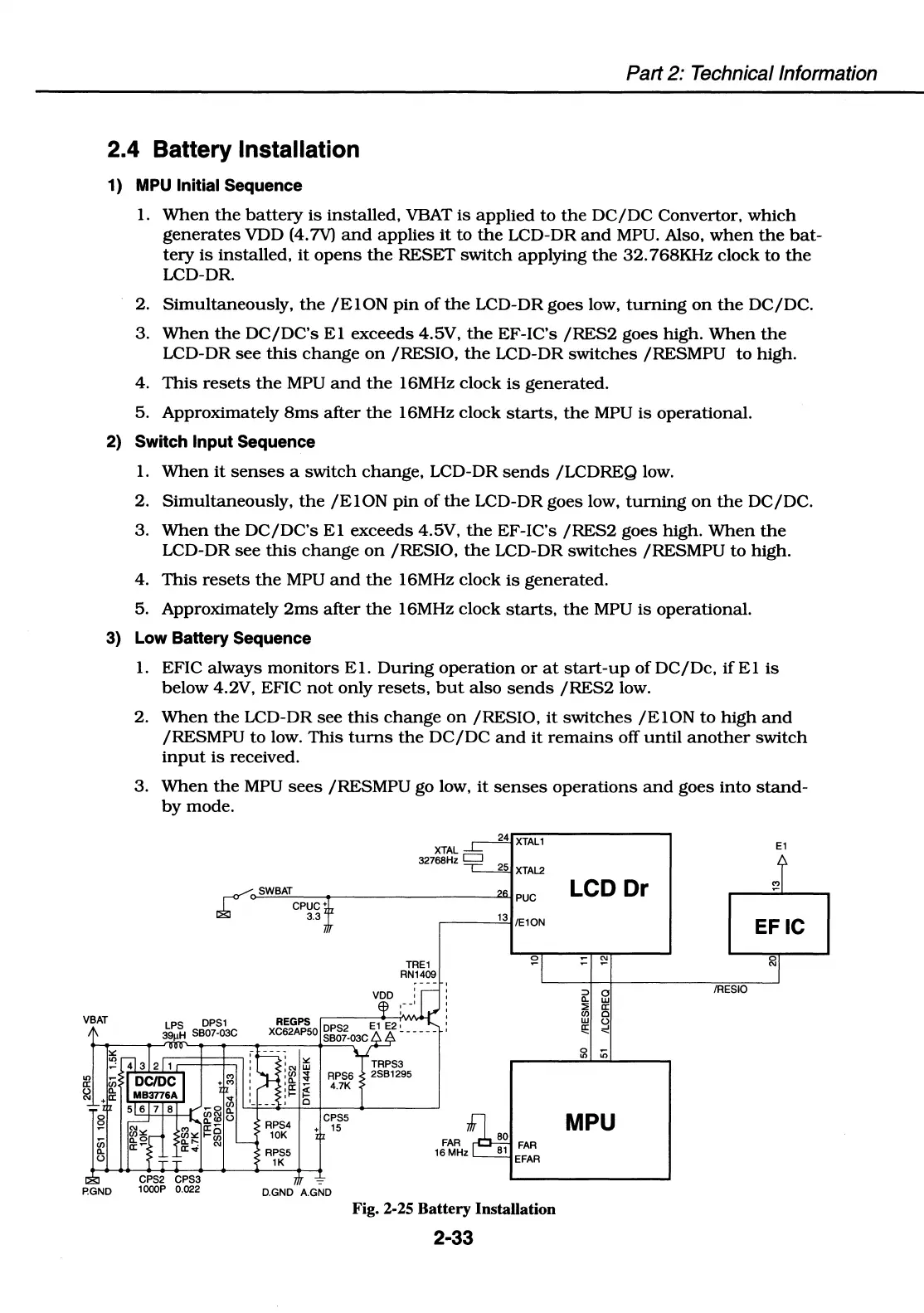
2.4 Battery Installation
1)
MPU
Initial Sequence
1.
When
the
battery
is
installed,
VBAT
is
applied
to
the
DC/DC
Convertor,
which
generates
VDD (4.7V)
and
applies
it
to
the
LCD-DR
and
MPU. Also,
when
the
bat-
tery
is
installed,
it
opens
the
RESET
switch
applying
the
32.
768KHz
clock
to
the
LCD-DR.
2.
Simultaneously,
the
/El
ON
pin
of
the
LCD-DR
goes
low,
turning
on
the
DC/DC.
3.
When
the
DC/DC's
El
exceeds
4.5V,
the
EF-IC's
/RES2
goes
high.
When
the
LCD-DR
see
this
change
on
/RESIO,
the
LCD-DR
switches
/RESMPU
to
high.
4.
This
resets
the
MPU
and
the
16MHz
clock
is
generated.
5.
Approximately
8ms
after
the
16MHz
clock
starts,
the
MPU
is
operational.
2) Switch Input Sequence
1.
When
it
senses
a
switch
change,
LCD-DR
sends
/LCDREQ
low.
2.
Simultaneously,
the
/El
ON
pin
of
the
LCD-DR
goes
low,
turning
on
the
DC/DC.
3.
When
the
DC/DC's
El
exceeds
4.5V.
the
EF-IC's
/RES2
goes
high.
When
the
LCD-DR
see
this
change
on
/RESIO,
the
LCD-DR
switches
/RESMPU
to
high.
4.
This
resets
the
MPU
and
the
16MHz
clock
is
generated.
5.
Approximately
2ms
after
the
16MHz
clock
starts.
the
MPU
is
operational.
3)
Low
Battery Sequence
VBAT
P.GND
1.
EFIC
always
monitors
El.
During
operation
or
at
start-up
ofDC/Dc,
if
El
is
below
4.2V, EFIC
not
only
resets,
but
also
sends
/RES2
low.
2.
When
the
LCD-DR
see
this
change
on
/RESIO,
it
switches
/ElON
to
high
and
/RESMPU
to
low.
This
turns
the
DC/DC
and
it
remains
off
until
another
switch
input
is
received.
3.
When
the
MPU
sees
/RESMPU
go low,
it
senses
operations
and
goes
into
stand-
by
mode.
r°"" SWBAT
~
cPuc•
3.3
:
"'
TRE1
RN1409
PUC
~-~
1
-=-o
3
/E10N
•"'
w
:~
~
RPS6
:I!:
~
4.7K
TRPS3
2S61295
RPSS
1K
0
CPSS
+
15
-
D.GND A.GND
Fig. 2-25 Battery Installation
2-33
LCD Dr
:::,
0
n.
w
:;;
a:
C/J
0
~
~
MPU
E1
EFIC
/RESIO

Table of Contents

Related product manuals