EasyManua.ls Logo

Canon EOS 50 E - Shutter Release

Canon EOS 50 E
207 pages
Print Icon
To Next Page IconTo Next Page
To Previous Page IconTo Previous Page
Loading...
Part
2:
Technical Information
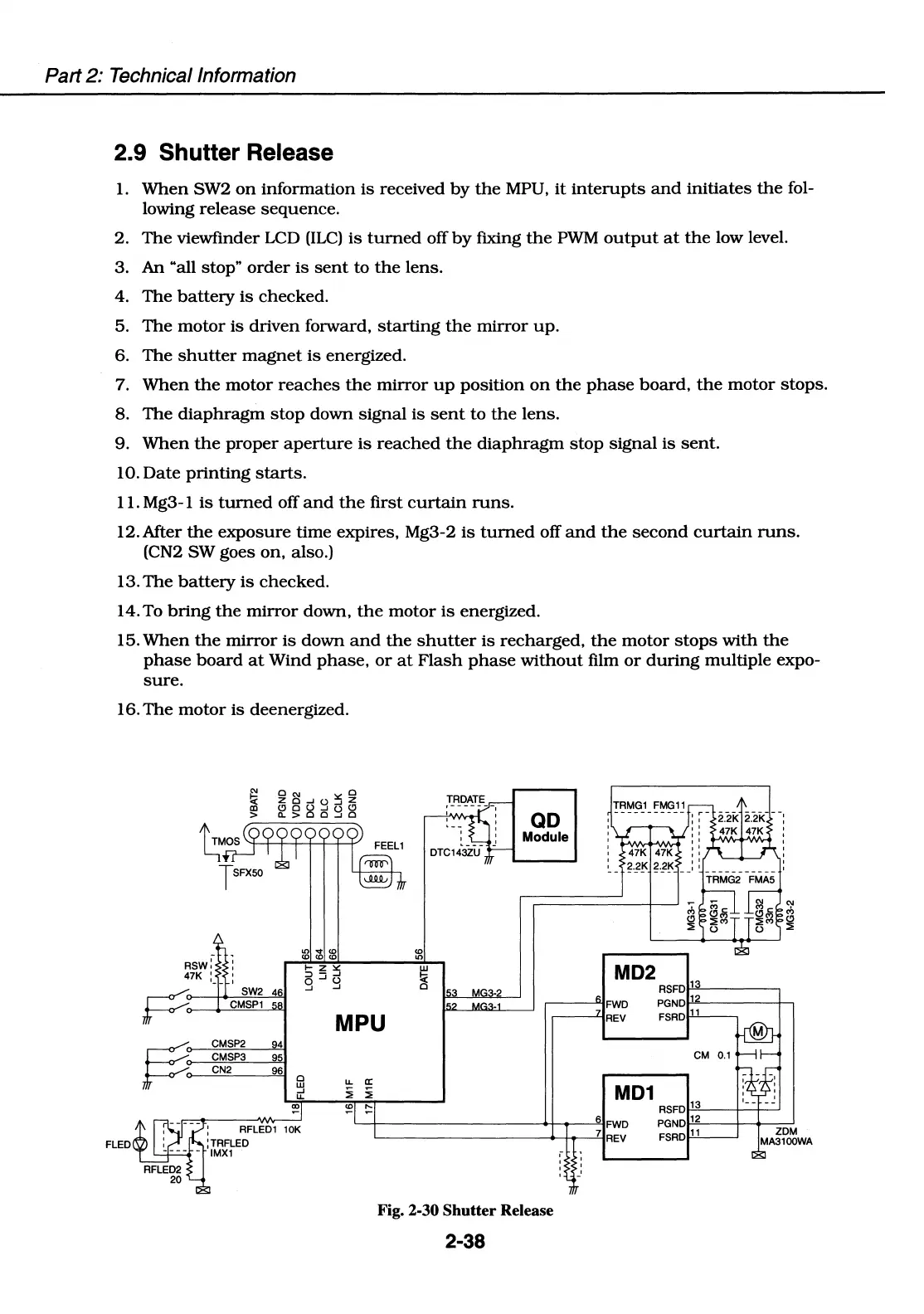
2.9 Shutter Release
1.
When
SW2
on
information
is
received
by
the
MPU,
it
interupts
and
initiates
the
fol-
lowing release
sequence.
2.
The
viewfinder
LCD
(ILC)
is
turned
off
by
fixing
the
PWM
output
at
the
low level.
3.
An
"all stop"
order
is
sent
to
the
lens.
4.
The
battery
is
checked.
5.
The
motor
is
driven
forward,
starting
the
mirror
up.
6.
The
shutter
magnet
is
energized.
7.
When
the
motor
reaches
the
mirror
up
position
on
the
phase
board,
the
motor
stops.
8.
The
diaphragm
stop
down
signal
is
sent
to
the
lens.
9.
When
the
proper
aperture
is
reached
the
diaphragm
stop
signal
is
sent.
10.
Date
printing
starts.
11. Mg3- l
is
turned
off
and
the
first
curtain
runs.
12.After
the
exposure
time expires, Mg3-2
is
turned
off
and
the
second
curtain
runs.
(CN2 SW goes
on,
also.)
13.
The
battery
is
checked.
14. To
bring
the
mirror
down,
the
motor
is
energized.
15.
When
the
mirror
is
down
and
the
shutter
is
recharged,
the
motor
stops
with
the
phase
board
at
Wind
phase,
or
at
Flash
phase
without
film
or
during
multiple expo-
sure.
16.
The
motor
is
deenergized.
~
SW2 46
"'
....
(0
(0 (0 (0
(0
"'
w
!;,:
0
G1
FMG11
QD
Module
I
I-----------
TRMG2
FMA5
MD2
RSFDl-"
1
"--------
~--FWD
PGNDl--"
12
=------+--,
~
cr----+--"C!!!:MS:,,:.P_,_1
-""I
MPU
---L-IREV
FSRDl-'-
1
~-
CMSP2
94
CMSP3
95
CN2
96
0
LL
w
...J
i
LL
~
~
FLED
CM
0.1
a:
i
MD1
~
RSFDl--"
13
"--------j---j~
~+-----------~>+---..-------"-1
6
FWD
PGNDl-"
12
=---+-+----'
~--------....__tt----'-1
7
REV
FSRD>-'--
11
~~
Fig. 2-30 Shutter Release
2-38

Table of Contents

Related product manuals