EasyManua.ls Logo

Canon EOS 50 E - Defocus Data Check

Canon EOS 50 E
207 pages
Print Icon
To Next Page IconTo Next Page
To Previous Page IconTo Previous Page
Loading...
Part 3: Repair Information
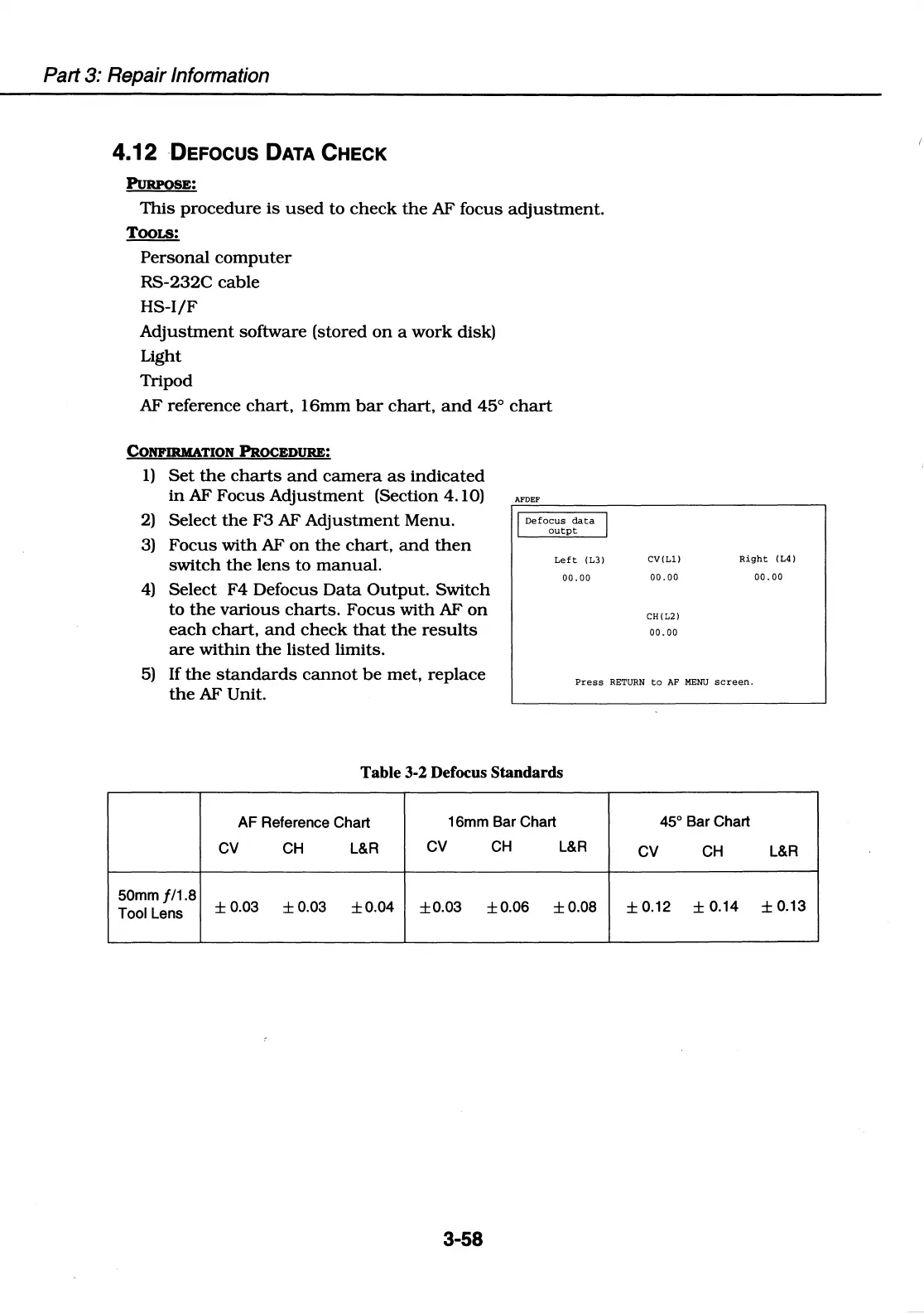
4.12 DEFOCUS DATA CHECK
This
procedure
is
used
to
check
the
AF focus
adjustment.
TOOLS:
Personal
computer
RS-232C
cable
HS-1/F
Adjustment
software (stored
on
a
work
disk)
Light
Tripod
AF reference
chart,
16mm
bar
chart,
and
45°
chart
CONFIRMATION
PROCEDURE:
I)
Set
the
charts
and
camera
as
indicated
in
AF
Focus
Adjustment
(Section 4.10)
2)
Select
the
F3
AF
Adjustment
Menu.
3)
Focus
with
AF
on
the
chart,
and
then
switch
the
lens
to
manual.
4)
Select
F4
Defocus
Data
Output.
Switch
to
the
various
charts.
Focus
with
AF
on
each
chart,
and
check
that
the
results
are
within
the
listed
limits.
AFDEF
I
Defocus
data
I
outpt
Left
(L3)
00.
00
CV(Ll)
00.00
CH(L2)
00.
00
Right
(L4)
00.
00
5)
If
the
standards
cannot
be
met,
replace
the
AF Unit.
Press
RETURN
to
AF
MENU
screen.
Table 3-2 Defocus Standards
AF
Reference Chart
16mm
Bar Chart
45°
Bar Chart
CV
CH
L&R
CV
CH
L&R
CV
CH
L&R
50mm
//1.8
±0.03
±0.03
±0.04
±0.03 ±0.06
±0.08
±0.12
± 0.14
±0.13
Tool
lens
3-58

Table of Contents

Related product manuals