EasyManua.ls Logo

Canon EOS 50 E - Autoloading

Canon EOS 50 E
207 pages
Print Icon
To Next Page IconTo Next Page
To Previous Page IconTo Previous Page
Loading...
Part
2:
Technical Information
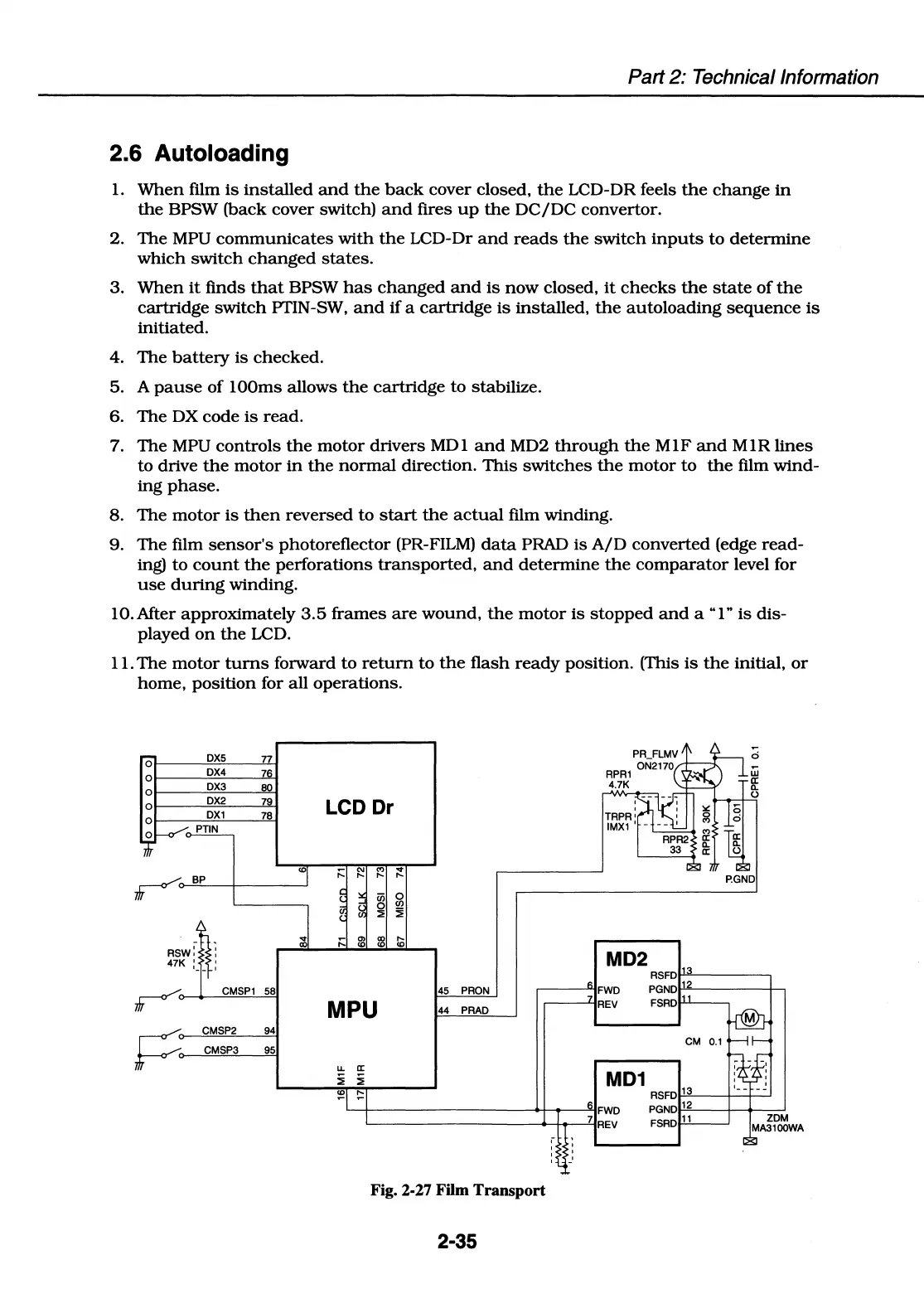
2.6 Autoloading
1.
When
film
is
installed
and
the
back
cover closed,
the
LCD-DR feels
the
change
in
the
BPSW (back cover switch)
and
fires
up
the
DC/DC
convector.
2.
The
MPU
communicates
with
the
LCD-Dr
and
reads
the
switch
inputs
to
determine
which
switch
changed
states.
3.
When
it
finds
that
BPSW
has
changed
and
is
now
closed,
it
checks
the
state
of
the
cartridge
switch
PTIN-SW,
and
if
a
cartridge
is
installed,
the
autoloading
sequence
is
initiated.
4.
The
battery
is
checked.
5. A
pause
of
lOOms allows
the
cartridge
to
stabilize.
6.
The
DX
code
is
read.
7.
The
MPU
controls
the
motor
drivers
MDI
and
MD2
through
the
MlF
and
MIR
lines
to drive
the
motor
in
the
normal
direction.
This
switches
the
motor
to
the
film
wind-
ing
phase.
8.
The
motor
is
then
reversed
to
start
the
actual
film winding.
9.
The
film
sensor's
photoreflector (PR-FILM)
data
PRAD
is
A/D
converted (edge
read-
ing)
to
count
the
perforations
transported,
and
determine
the
comparator
level for
use
during
winding.
IO.After
approximately
3.5
frames
are
wound,
the
motor
is
stopped
and
a
"l"
is
dis-
played
on
the
LCD.
11.
The
motor
turns
forward to
return
to
the
flash
ready
position. (This
is
the
initial,
or
home,
position for all
operations.
0
DX5
77
0
DX4
76
0
DX3
80
DX2
7
LCD Dr
78
<D
;:::
"'
"'
...
re
BP
,._
,._
,._
cii
0
0
Cl)
::.
~
P.GND
...
;:::
.,,
CX)
,._
Rsw:
'
a,
<D <D <D
'
47K :
'
-- '
MD2
RSFD'""
1
~--~
re
CMSP1
58
45
PRON
MPU
44
PRAD
~----.FWD
PGND>-"
12
~----+-.
~--'-IREV
FSRDP--'---~
~
CMSP2
94
CMSP3
95
u.
a:
i i
CM
0.1
MD1
~
~
RSFD>-'-'
13
~----<----<>---'
'--!------------<.+---o-----"-1
6
FWD
PGND>-"
12
~--+--+-~
'------------+-+..-----'-1
7
REV
FSRDl-'-ll.,_____,
Fig. 2-27 Film Transport
2-35

Table of Contents

Related product manuals