EasyManua.ls Logo

Canon EOS 50 E - Page 161

Canon EOS 50 E
207 pages
Print Icon
To Next Page IconTo Next Page
To Previous Page IconTo Previous Page
Loading...
Part 3: Repair Information
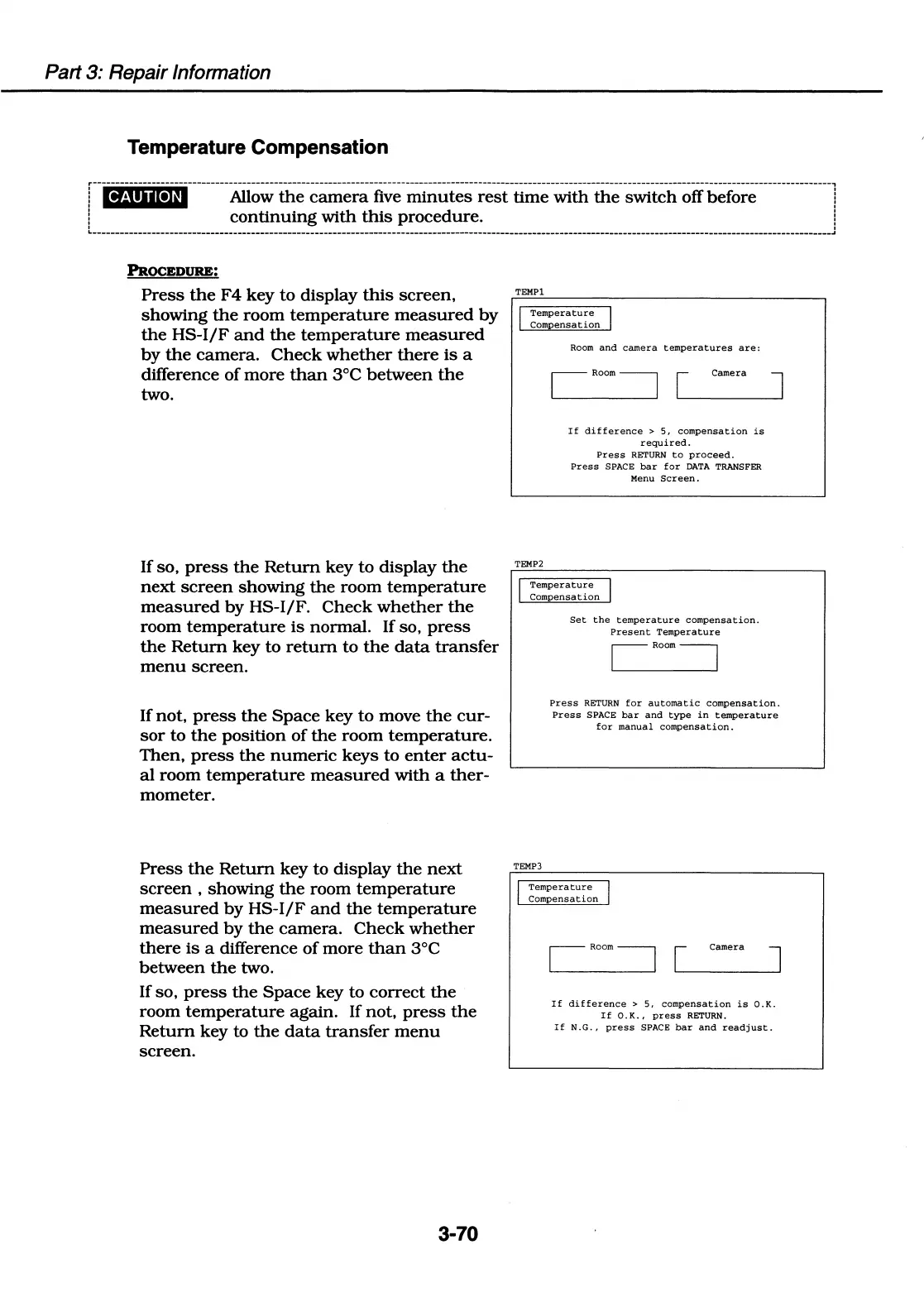
Temperature Compensation
@4'i•r~;;-.---------Afl_o_w_th_e_~;;;;;-ii;;--m-1-·n_u_t_~;-~~~t-ti~;-;ith--th;--~~-tc_h_o_ff_b;f~~~----------------1
continuing
with
this
procedure.
:
-------------------------
______________
..
PROCEDURE:
Press
the
F4
key
to
display
this
screen,
showing
the
room
temperature
measured
by
the
HS-1/F
and
the
temperature
measured
by
the
camera.
Check
whether
there
is
a
difference
of
more
than
3°C
between
the
two.
If
so,
press
the
Return
key to
display
the
next
screen
showing
the
room
temperature
measured
by
HS-1/F.
Check
whether
the
room
temperature
is
normal.
If
so,
press
the
Return
key
to
return
to
the
data
transfer
menu
screen.
If
not,
press
the
Space
key
to
move
the
cur-
sor
to
the
position
of
the
room
temperature.
Then,
press
the
numeric
keys
to
enter
actu-
al
room
temperature
measured
with
a
ther-
mometer.
Press
the
Return
key
to
display
the
next
screen
,
showing
the
room
temperature
measured
by
HS-1/F
and
the
temperature
measured
by
the
camera.
Check
whether
there
is
a difference
of
more
than
3°C
between
the
two.
If
so,
press
the
Space
key to
correct
the
room
temperature
again.
If
not,
press
the
Return
key
to
the
data
transfer
menu
screen.
3-70
TEMPl
Temperature
Com
ensation
TEMP2
Room
and
camera
temperatures
are:
If
difference
>
5,
compensation
is
required.
Press
RETURN
to
proceed.
Press
SPACE
bar
for
DATA
TRANSFER
Menu
Screen.
Temperature
Compensation
TEMP)
Set
the
temperature
compensation.
Present
Temperature
CRoom7
Press
RETURN
for
automatic
compensation.
Press
SPACE
bar
and
type
in
temperature
for
manual
compensation.
Temperature
Compensation
C
Room
7
~[
_came-ra
~]
If
difference
>
5,
compensation
is
O.K.
If
0.
K.,
press
RETURN.
If
N.G.,
press
SPACE
bar
and
readjust.

Table of Contents

Related product manuals