Use video cassettes marked with an
f
(or
g
for G15Hi/G20Hi).
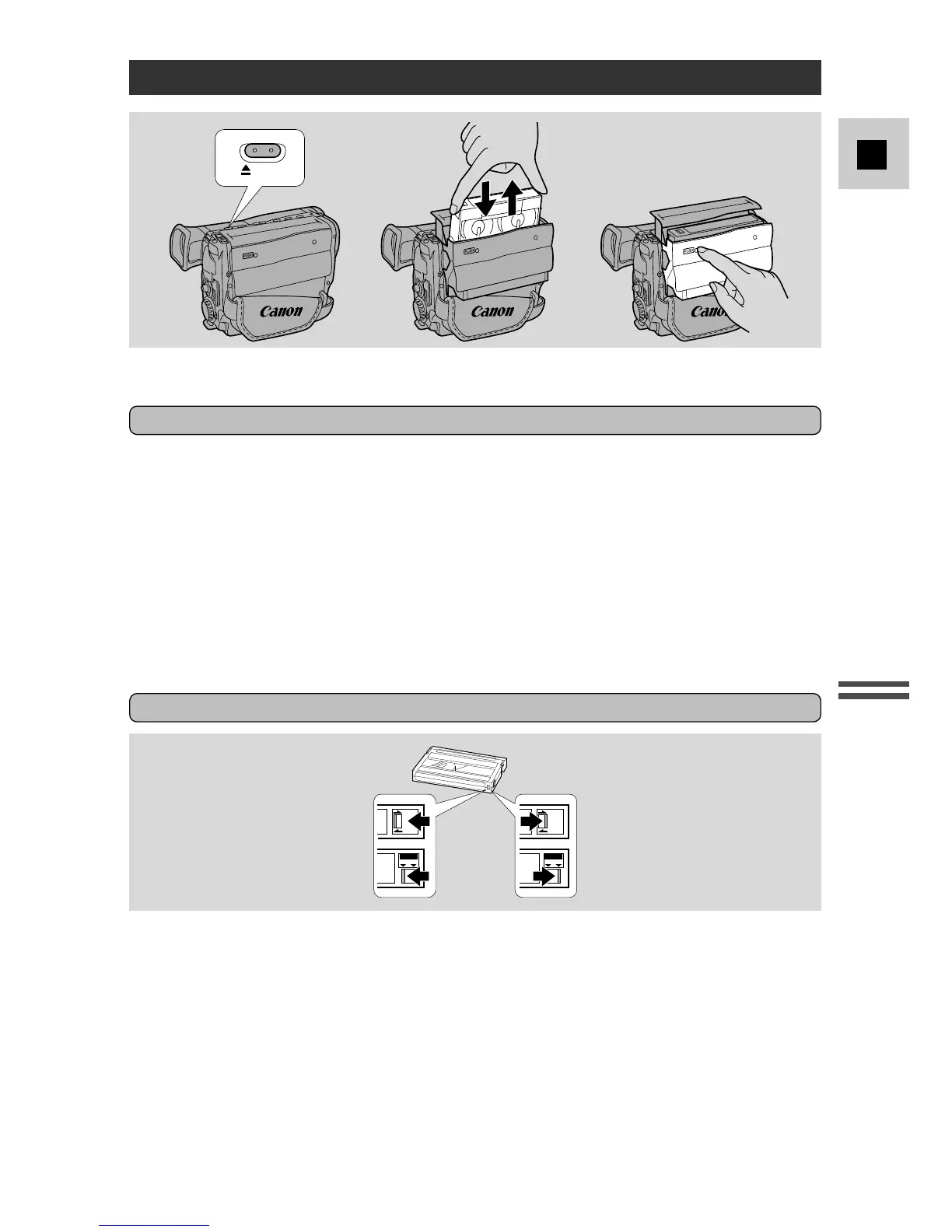
Loading and unloading
1. Make sure that you have attached or connected a power source.
2. Press the 5 EJECT button and wait for the cassette compartment to
open.
3. Load/unload the cassette.
• Insert the cassette gently with the window facing out.
• Remove the cassette by pulling it straight out.
4. Press the P mark on the compartment until it clicks, and wait for it
to close.
• Never push down the top of the compartment.
Protecting tapes from accidental erasure
To protect your recordings from accidental erasure, slide the red switch on the
cassette so that it covers the hole. (This switch position is usually labeled SAVE
or ERASE OFF.) If you load this cassette and power on the camera, “v” flashes
in the viewfinder.
If you want to record on the cassette again, slide the red switch back so the hole is
open. (This position is usually labeled REC or ERASE ON.)



 To Next Page