19
Quick Overview
E
Connecting for Playback on a TV Screen
You can connect the camera to a TV or VCR in order to play back your
recordings. You will need to attach a power source to the camera (see p. 8).
See your TV or VCR instruction manual for further details.
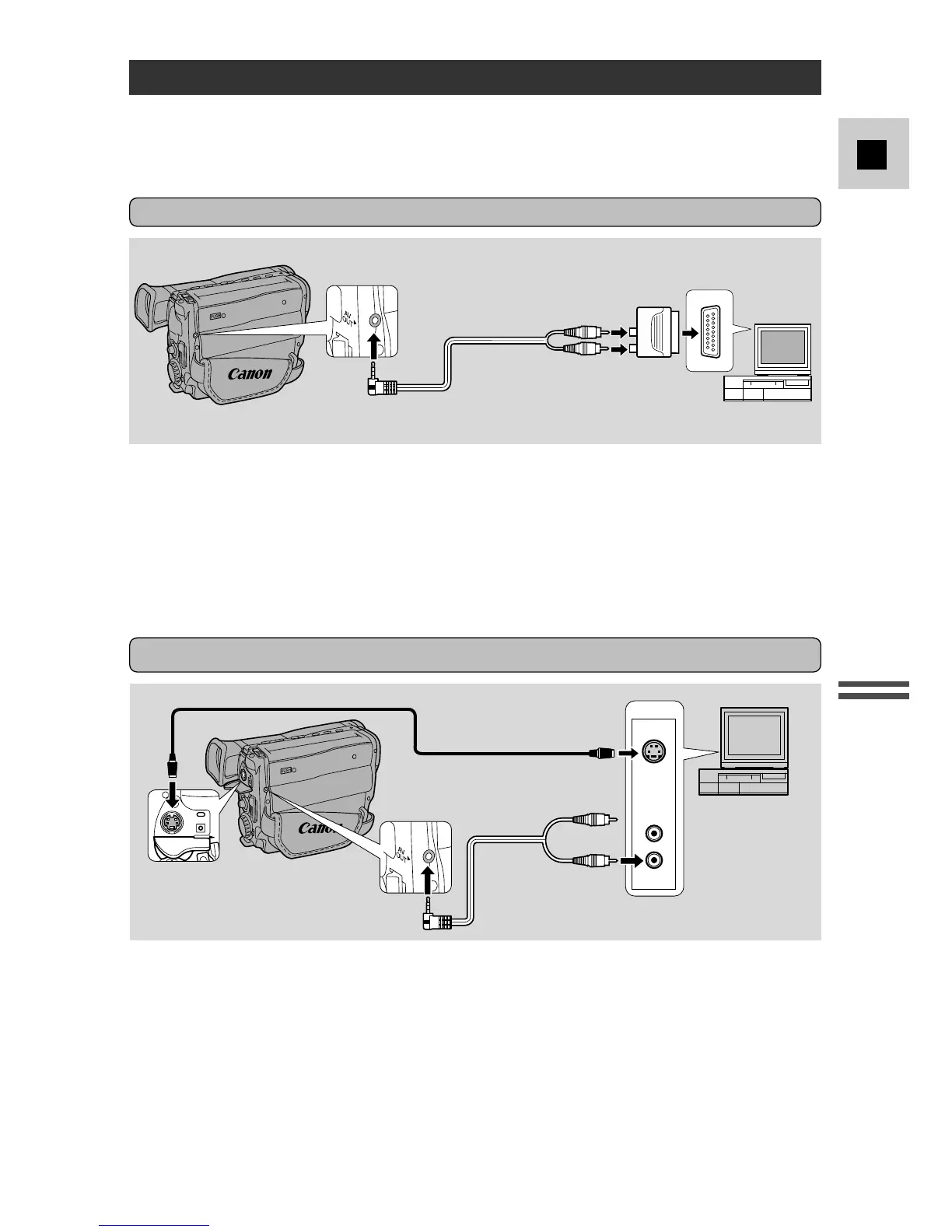
• Use the optional S-150 S-video Cable to connect the S-video terminal. Use the
C-250 AV Cable white plug to connect the audio terminal.
• Set the TV/VIDEO selector on the television to VIDEO.
• If you are connecting the camera to a VCR, set the input selector on the VCR to
LINE.
INPUT
VIDEO
AUDIO
S-VIDEO
S-150 S-video Cable
C-250 AV Cable
If your TV (or VCR) has an S-video input terminal (for G15Hi/G20Hi)
C-250 AV Cable
AUDIO
(R)
AUDIO
(L/ MONO)
VIDEO
PC-A5
SCART
Adapter
• Connect the PC-A5 SCART adapter to the TV or VCR’s SCART terminal.
• Connect the camera to the adapter. Connect the camera by using the C-250 AV
Cable. Connect the white plug to the white audio terminal 7 (left). Connect the
yellow plug to the yellow video terminal 0.
• Set the TV/VIDEO selector on the television to VIDEO.
• If you are connecting the camera to a VCR, set the input selector on the VCR to
LINE.
If your TV (or VCR) has a SCART terminal (without S-video)



 To Next Page