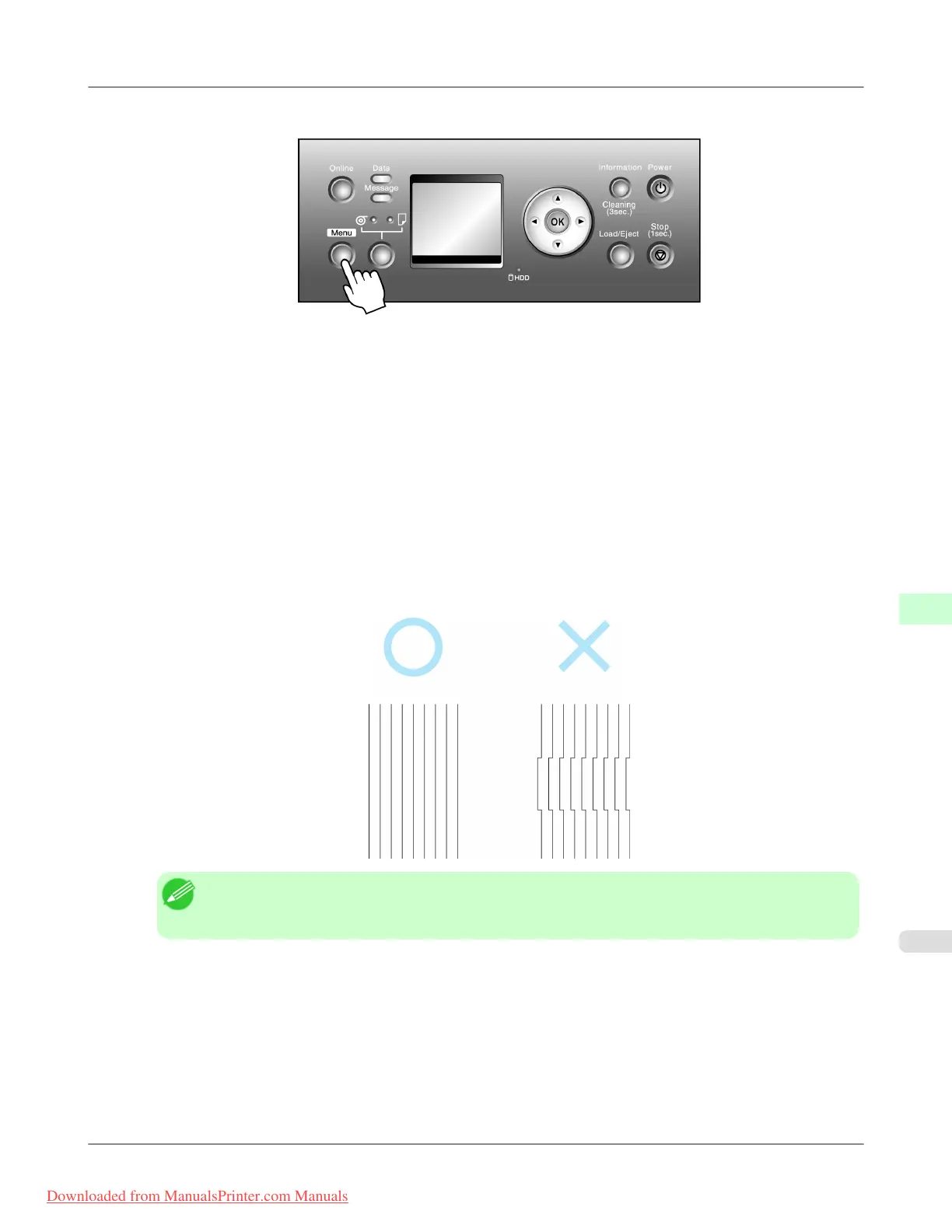
2. Press the Menu button to display MAIN MENU.
3. Press ▲ or ▼ to select Adjust Printer, and then press the ▶ button.
4. Press ▲ or ▼ to select Manual Head Adj, and then press the ▶ button.
5. Press ▲ or ▼ to select Yes, and then press the OK button.
A test pattern is printed for printhead adjustment.
6. Press ▲ or ▼ to select D, and then press the ▶ button.
7. Press ▲ or ▼ to select D-1, and then press the ▶ button.
8. Examine test pattern D-1 for printhead adjustment and determine the number of the pattern with straight lines.
Note
• If
lines seem straightest in two patterns but you cannot decide which one is better, choose an inter-
mediate value. For example, choose 11 if you cannot decide whether pattern 10 or 12 is better.
9. Press ▲ or ▼ to select the pattern number, and then press the OK button.
10. Repeat steps 7 and 9 to specify the adjustment value for D-2 to D-5 and D-7 to D-11.
11. Press the ◀ button.
12. Press ▲ or ▼ to select Register Setting, and then press the ▶ button.
Adjustments for Better Print Quality
>
Adjusting the Printhead
>
iPF815 Manual Straightening of Lines and Colors (Manual Head Adj)
8
671
Downloaded from ManualsPrinter.com Manuals




 To Next Page