22
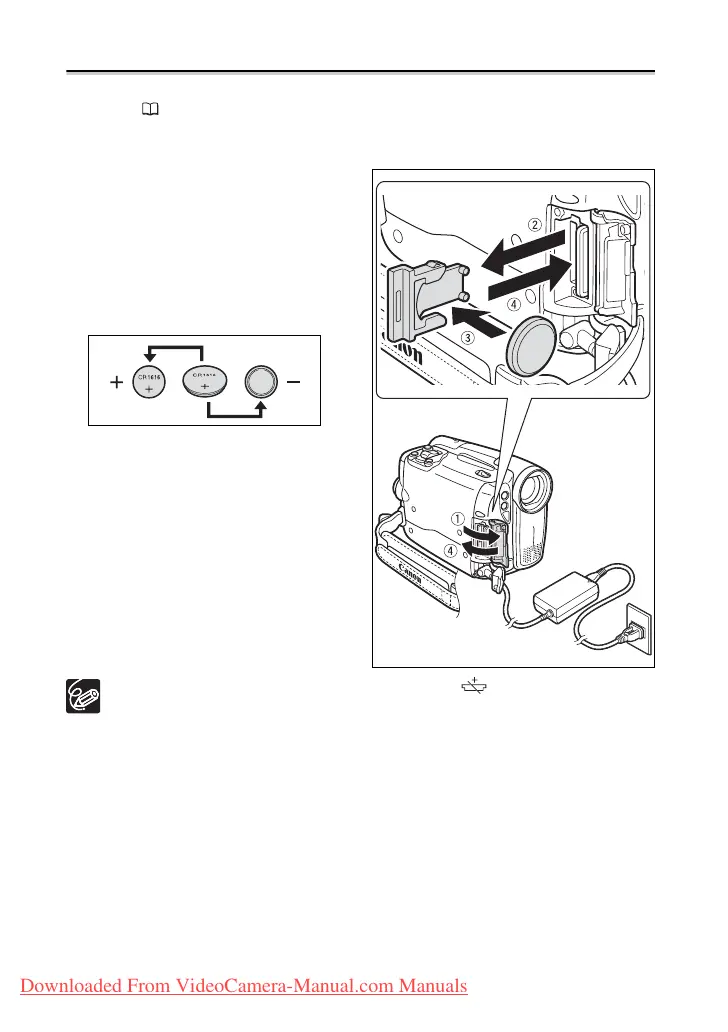
Step 6: Installing the Backup Battery
The backup battery (lithium button battery CR1616) allows the camcorder to retain the
date, time (
25) and other camcorder settings while the power source is disconnected.
Connect a power source to the camcorder when replacing the backup battery to retain the
settings.
1. Open the memory slot/backup
battery compartment cover.
2. Pull out the backup battery holder
using a flat screwdriver or a
similar tool.
3. Insert the backup battery in the
holder with the + side facing
down.
4. Insert the battery holder and push
it in until it clicks, then close the
cover.
The backup battery has a life span of about a year. “ ” flashes in red to inform
you that it needs to be replaced.
Downloaded From VideoCamera-Manual.com Manuals



 To Next Page