12
Screen Displays
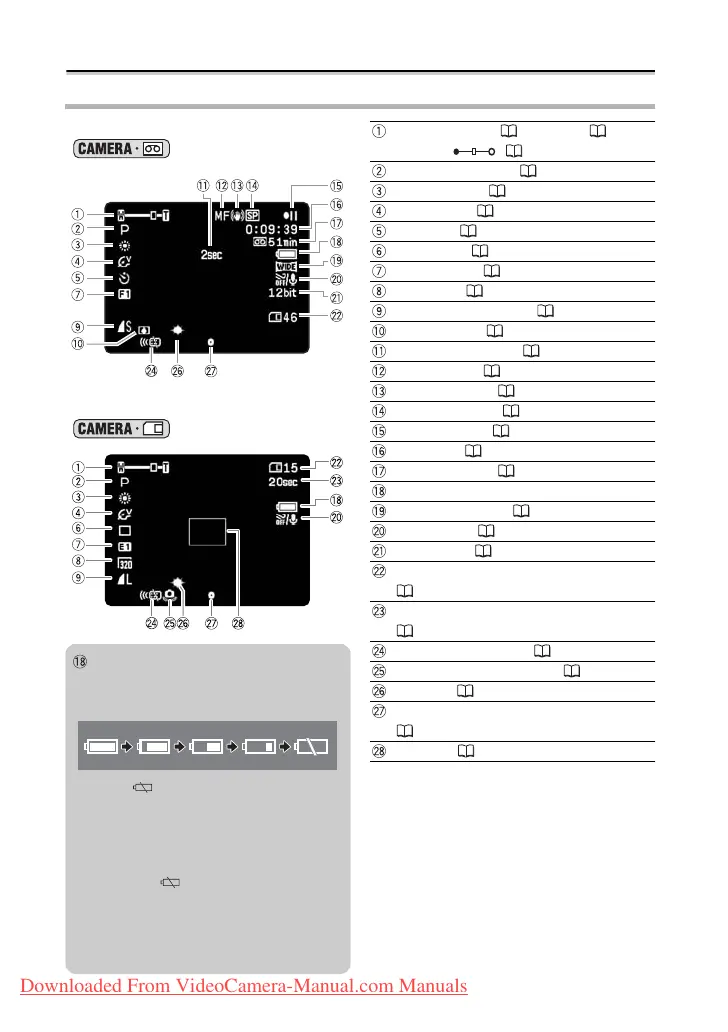
Screen Displays during Recording
When recording movies on a tape
()
Operating mode ( 4), Zoom ( 33),
Exposure ( 47)
Recording program ( 43)
White balance ( 55)
Image effect ( 57)
Self-timer ( 51)
Drive mode ( 79)
Digital effects ( 58)
Movie size ( 75)
Still image quality/size ( 75)
Condensation ( 113)
Recording reminder ( 28)
Manual focus ( 48)
Image stabilizer ( 64)
When recording on a memory card
()
Recording mode ( 65)
Tape operation ( 13)
Time code ( 28)
Remaining tape ( 28)
Remaining battery charge
Widescreen mode ( 35)
Wind screen ( 69)
Audio mode ( 66)
Remaining card capacity for still images
( 32)
Remaining card capacity for movies
( 32)
Remote sensor mode ( 67)
Camcorder shake warning ( 64)
LED light ( 50)
AF/AE locked during still image recording
( 30)
AF frame ( 78)
Remaining battery charge
The battery symbol indicates the charge
status of the battery pack.
• When “ ” starts flashing in red
replace the battery pack with a fully
charged one.
• When you attach an empty battery
pack, the power may turn off without
displaying “ ”.
• Depending on the conditions under
which the camcorder and the battery
pack are used, the actual battery
charge may not be indicated accurately.
Downloaded From VideoCamera-Manual.com Manuals



 To Next Page