66
If you play back a tape that has been recorded in LP mode with another digital device
on this camcorder, or vice versa, picture and sound may become distorted.
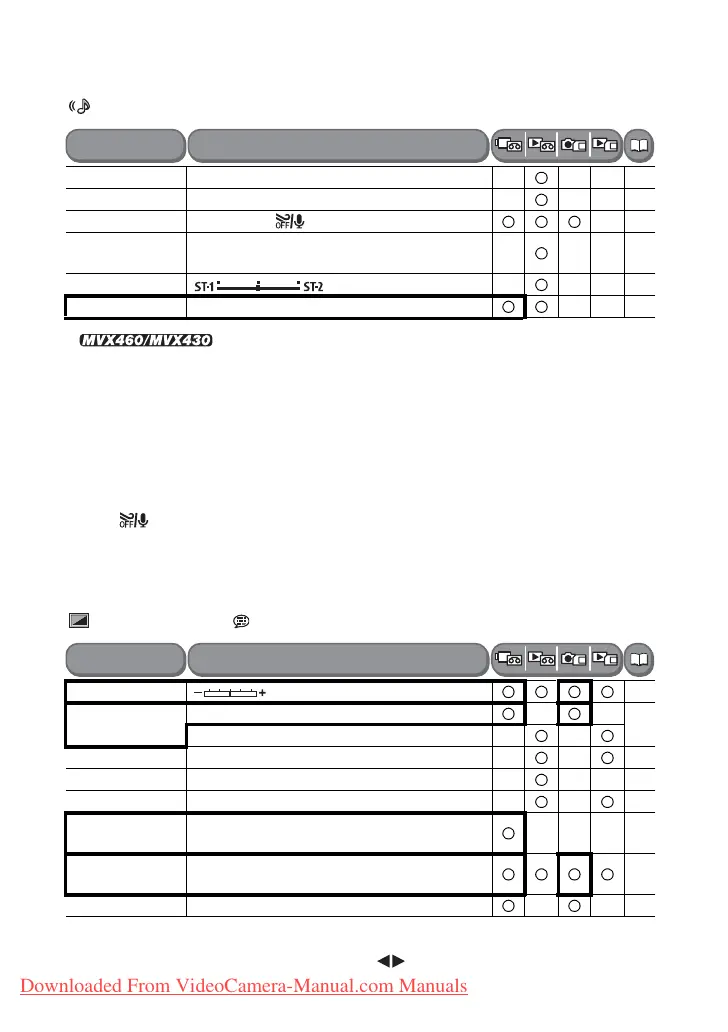
AUDIO SETUP
2
only
OUTPUT CH: Switches the output channels when playing back a tape with audio
recorded on two channels.
[L/R]: Stereo: L+R channels / Bilingual: Main+Sub.
[L/L]: Stereo: L channel / Bilingual: Main.
[R/R]: Stereo: R channel / Bilingual: Sub.
WIND SCREEN:
When an external microphone is connected the setting will automatically reset to
[OFF ].
AUDIO MODE: Switches the audio recording mode.
[16bit] records in high sound quality.
Select [12bit] if you plan to dub audio later.
DISPLAY SETUP/
BRIGHTNESS: Adjusts the brightness of the LCD screen.
Adjust the LCD brightness with the joystick ( ).
OUTPUT CH L/R, L/L, R/R
-
AUDIO DUB.
2
AUDIO IN, MIC. IN 94
WIND SCREEN AUTO, OFF
69
12bit AUDIO STEREO1, STEREO2, MIX/FIXED, MIX/
VAR.
95
MIX BALANCE
95
AUDIO MODE 16bit, 12bit
-
BRIGHTNESS
-
TV SCREEN ON, OFF
-
ON, OFF
DISPLAYS ON, OFF<PLAYBK> -
6SEC.DATE ON, OFF
-
DATA CODE DATE, TIME, DATE&TIME
71
LEVEL
MARKER
ON, OFF
-
LANGUAGE List of languages depends on the language
set.
24
DEMO MODE ON, OFF
-
Menu Items
Setting Options
Menu Items
Setting Options
Downloaded From VideoCamera-Manual.com Manuals



 To Next Page