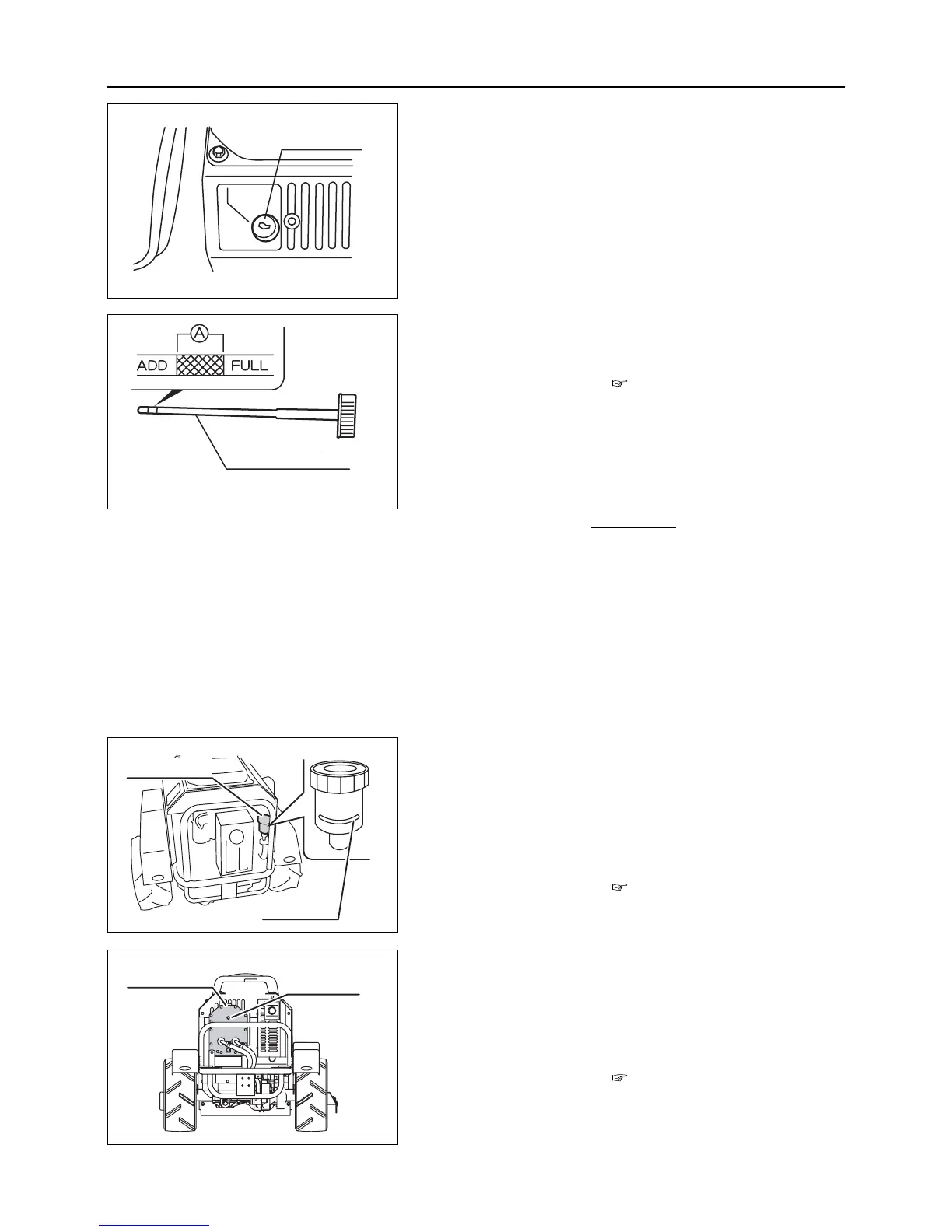
2. Check oil level. If it is not within the range A, fill engine
oil from oil filler.
Oil to be used : page 30
Amount of engine oil :
Within the range A with oil gauge fully insert-
ed
(Do not exceed [FULL].)
Fully insert and tighten oil level gauge securely
after checking and filling is done.
6.1.3 Inspecting and Filling HST Oil
On the model without charge pump
1. Inspect the amount of HST oil in HST oil tank. If it is
less than the specified amount, open oil tank cap and add
HST oil.
Oil to be used : page 30
Amount of HST oil :
To the "Upper Limit" line when oil is cool
On the model with charge pump
1. Inspect the amount of HST oil in HST oil tank. If it is
less than the specified amount, open oil tank cap and add
HST oil.
Oil to be used : page 30
Amount of HST oil :
Up to the check bolt when oil is cool
– 15 –
6
Operation
6.1.2 Inspecting and Filling Engine Oil
1. Pull out oil level gauge. Clean gauge with clean cloth.
Reinsert oil level gauge to check oil level.
Oil level gauge
Oil level gauge



 To Next Page