▲
▲
16
■
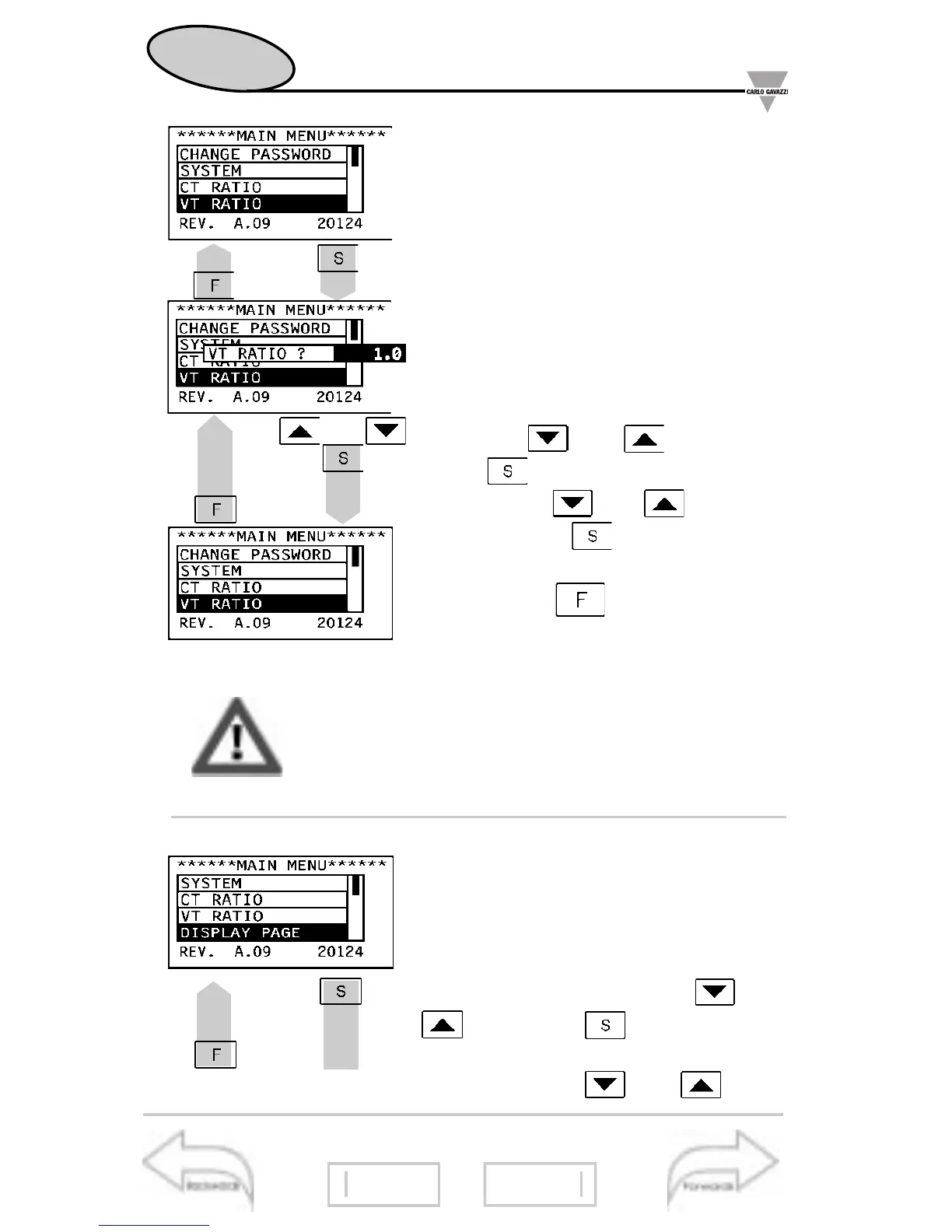
VT ratio
This function allows the user to se-
lect the multiplier value of the VT.
Example: if the primary of the VT
(voltage transformer) being con-
nected is 20kV and the secondary
is 100V, the VT ratio will be 200
(given by 20000/100). If there is no
VT, the ratio will be “1.0”.
Choose the function VT RATIO by
means of and ; to confirm
press ; then select the desired
value by the and keys and
confirm with . To reset your
choice and go back to the main
menu, press .
■
Display page
This function allows you to select the
variables to be displayed on page
00. Choose the DISPLAY PAGE
function by means of the and
keys; press to confirm, then
select the desired section of the dis-
play using the and keys;
Changing the VT ratio, all the MIN/MAX values,
all events and partial energy meters are reset.
Pass 1000
11
13
1.2..
..2.1
21
Event selection
Let’s start
18


 To Next Page
 Loading...