40 | Page
Carlson RT4 User Manual
4. Hold the RT4 horizontally with the docking pin contacts facing down.
Place it over the dock alignment pins and press down unl you feel
and hear the lock engage.
5. The RT4 charges more quickly if the power sengs are set up to
allow the RT4 to enter a low power mode when it is not in use, but is
plugged in. To adjust this seng, go to the Start menu, then Sengs >
System > Power & sleep.
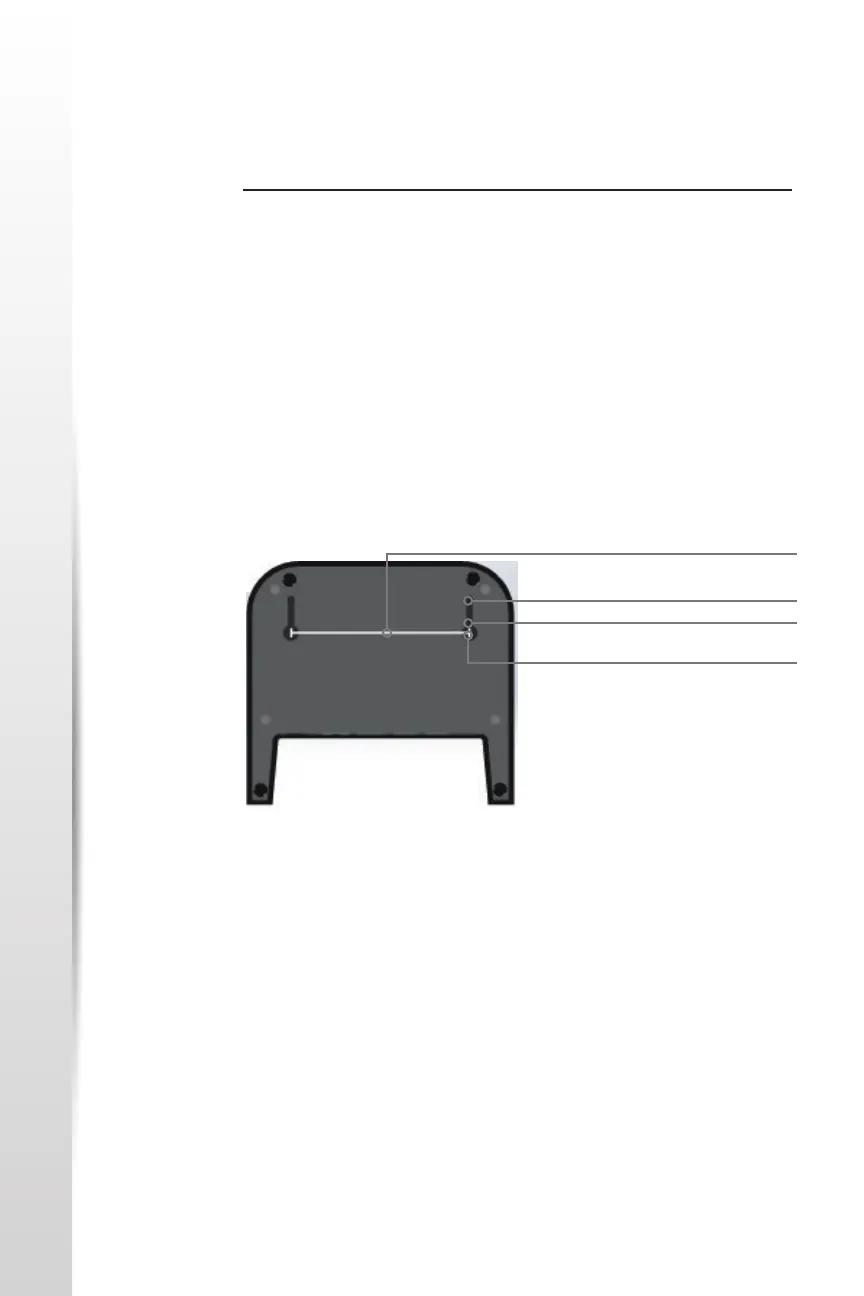
Mounng the Dock to a Surface
The Oce Docking Staon is freestanding. It can also be mounted to a
surface like a desk or shelf. There are keyhole slots on the boom for this
purpose.
Ethernet Specicaons
• 10/100/1000 Mbps twisted-pair Ethernet
• IEEE802.3/802.3u/802.3ab 10BASE-T, 100BASE-TX, and 1000BASE-T
• Manages twisted pair crossover detecon and correcon
• Full-duplex and half-duplex capability (only full-duplex operaon at
1000 Mbps)
Maintenance and Environmental Issues
• The dock is intended for indoor use only.
• Temperatures should be between 0°C to 50°C.
• Avoid using the dock in situaons where water can enter the
connector ports. It is not sealed against water and must be kept dry.
4” (101.5 mm)
.350” (8.89 mm)
.175” (4.445 mm)
.125” (3.175 mm)



 To Next Page