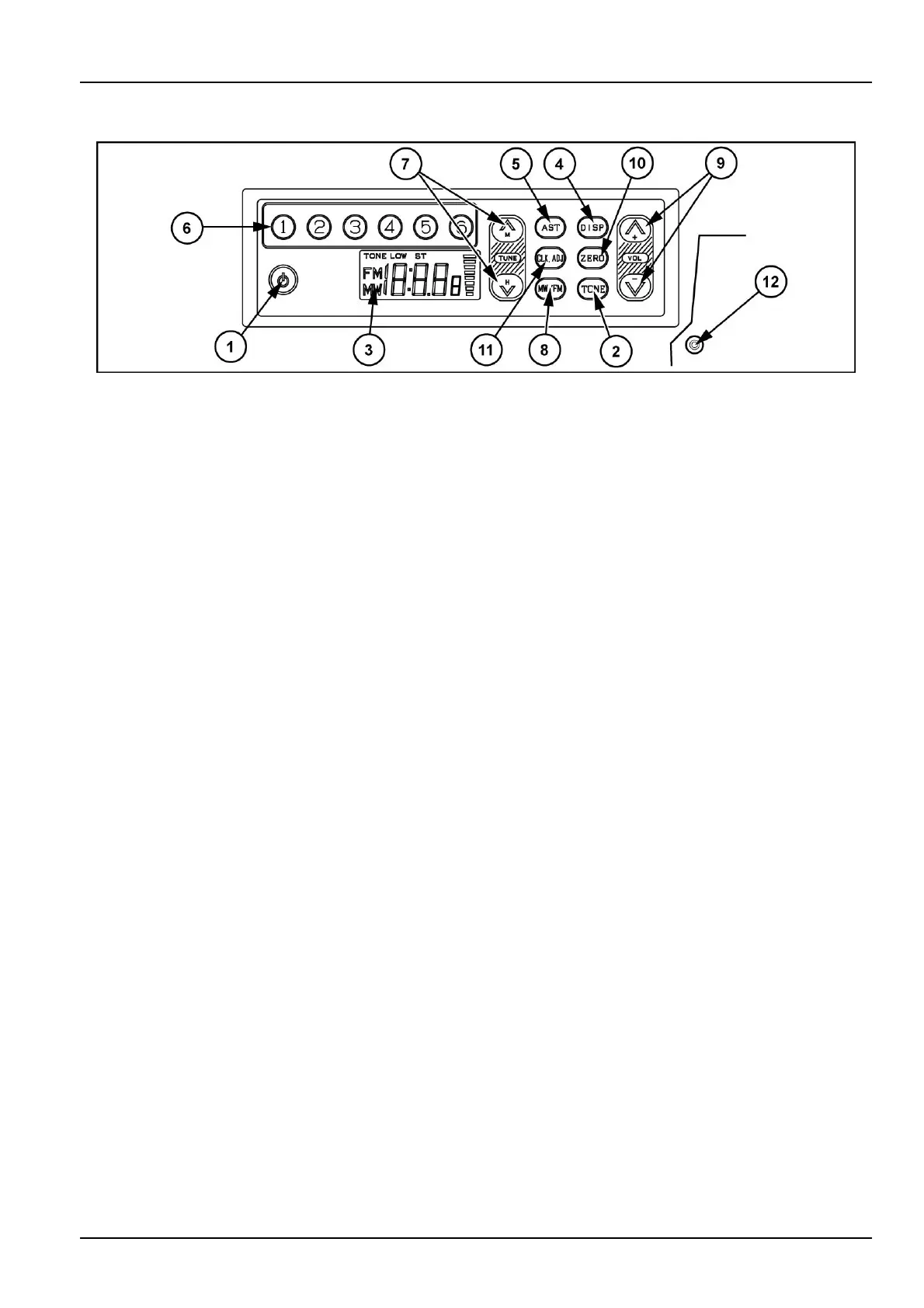
3-CONTROLS/INSTRUMENTS
Cabradio
L7XJ42-0011
1.Powerbutton
PressthisbuttontopowerON.
PressagaintopowerOFF.
2.Tonebutton
Pressingthisbuttontodecreasehighfrequencysound
andindicate"Tonelow"ondisplay.
3.LCD(liquidcrystaldisplay)
Thedisplayindicatesthereceivingfrequency,time
and/orfunctions.
4.Clockbutton
Inaradiomode,pressingthisbuttontoindicatecur-
renttimeandpressingagaintoresumefrequencydis-
play.
After6secondsoftimedisplay,automaticallychange
tofrequencydisplay.
NOTE:Batteryback-upmodelsdonothaveclockfunction
andthebuttonisdisabled.
5.AST(Auto-storememory)
Pressingthisbuttonandreleasewillautomatically
scanthecurrentbandandstoreavailablestationsto
presetmemory1to6.
6.Presetbutton(1to6)
OnestationeachintheFMandMWbands,respec-
tively,canbepresetforeachofthesekeys,1to6.
Refertothesection"Presettingdesiredstations"
7.Tuningbutton
Pressingeitheronthetoporonthebottombutton
shiftsthereceivingfrequencystepbystep.
Pressingthebuttonmorethan2seconds,Seekfunc-
tionwillstartandndnextavailablestationandthen
stopatthefrequency.
DuringSeek,pressingthebuttonwillstoptheSeek.
8.Bandselectbutton
PressingthisbuttonwillchangeoverbetweenFMand
MWmode.
Thedisplayindicatesthereceivingbandandthefre-
quency.
NOTE:MWonlymodelsdonothavethisfunctionandthe
buttonisdisabled.
9.Volumecontrolbuttons
Pressingonthetopbuttonincreasesthesoundvol-
umeandonthebottombuttontodecreasethesound
volume.
Pressingeitherbuttonscontinuously,changessound
volumecontinuously.
10.Zerosetbutton
WhenthetimeisbetweenXXhours55minutesand
59minutes,orbetweenXXhours1minuteand5min-
utes,pressingthisbuttontoadjusttimeT oX:00
minuteand00second.
11.AUXButton
Pressingthisbuttonwillchangeoverbetweenradio
functionandAUXfunction.
DuringAUXmode,AUXwillbeindicatedonthedis-
play.
12.AUX-injack(locatedatoutsideofcabradio)
Insertstereomini-plugcableandconnecttohead-
phonejackofprotableaudioproducts.
3-55



 To Next Page