Apex2
13
Set the flow rate
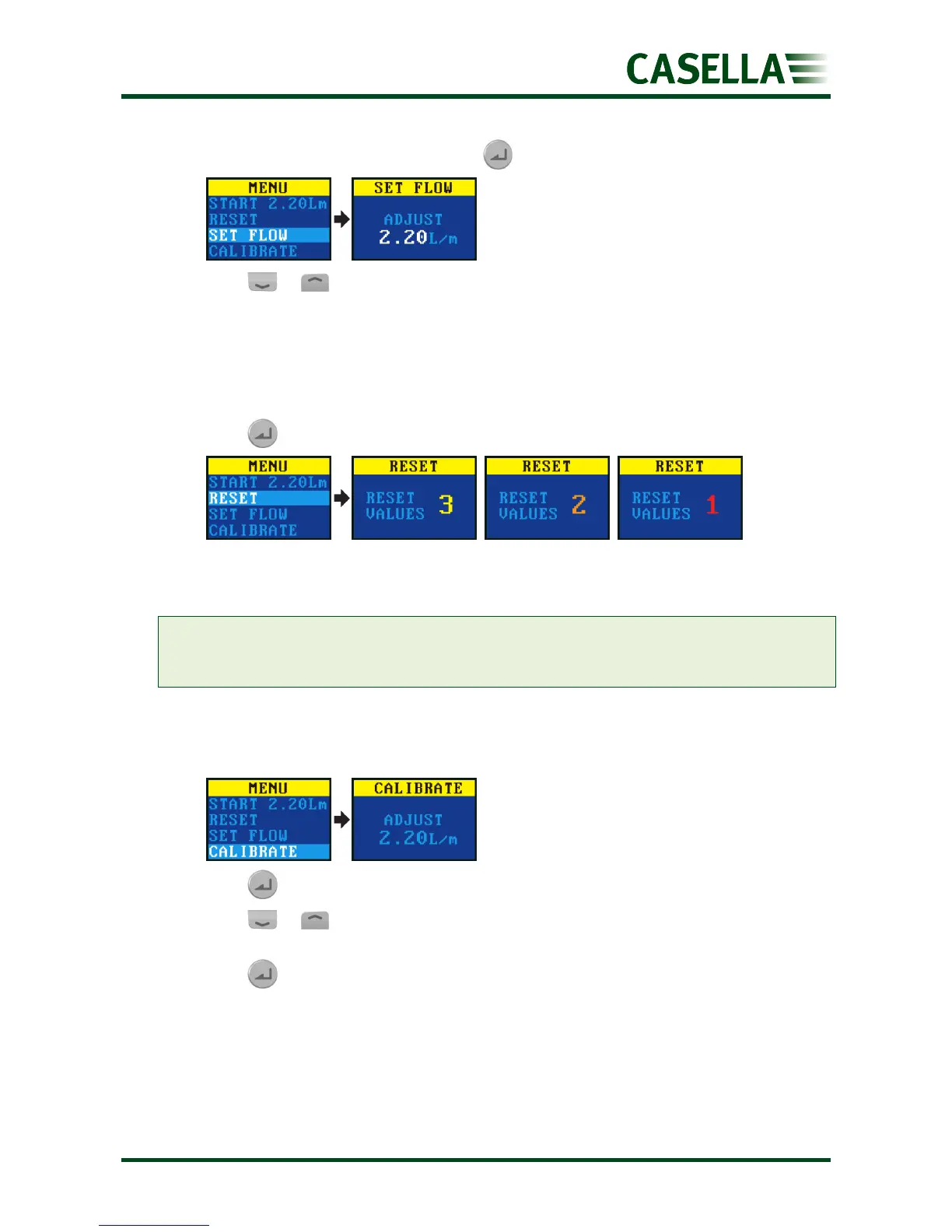
1. Navigate to SET FLOW, and then press .
2. Press or to change the flow rate, and then press the enter key.
Reset the data
Use this menu item to reset the accumulated run time, motion index and volume data to
zero.
1. Navigate to RESET.
2. Press for 3 seconds.
Calibrate the pump
Always calibrate the pump at the sampling flow rate for greatest accuracy.
Note: If using a filter with a small pore size or if operating at a high flow rate, which results in
a high back pressure, it may take the pump a little longer to stabilise when adjusting the
calibrated value.
1. Attach a sampling head or flow tube or other flow-measuring device to the pump’s
inlet nozzle. The flowmeter should be connected to the inlet of the sampling head.
2. Navigate to CALIBRATE.
3. Press to start the test.
4. Press or to change the pump speed until the meter flow rate and the pump
flow rate match.
5. Press to stop the test.


 To Next Page