Apex2
17
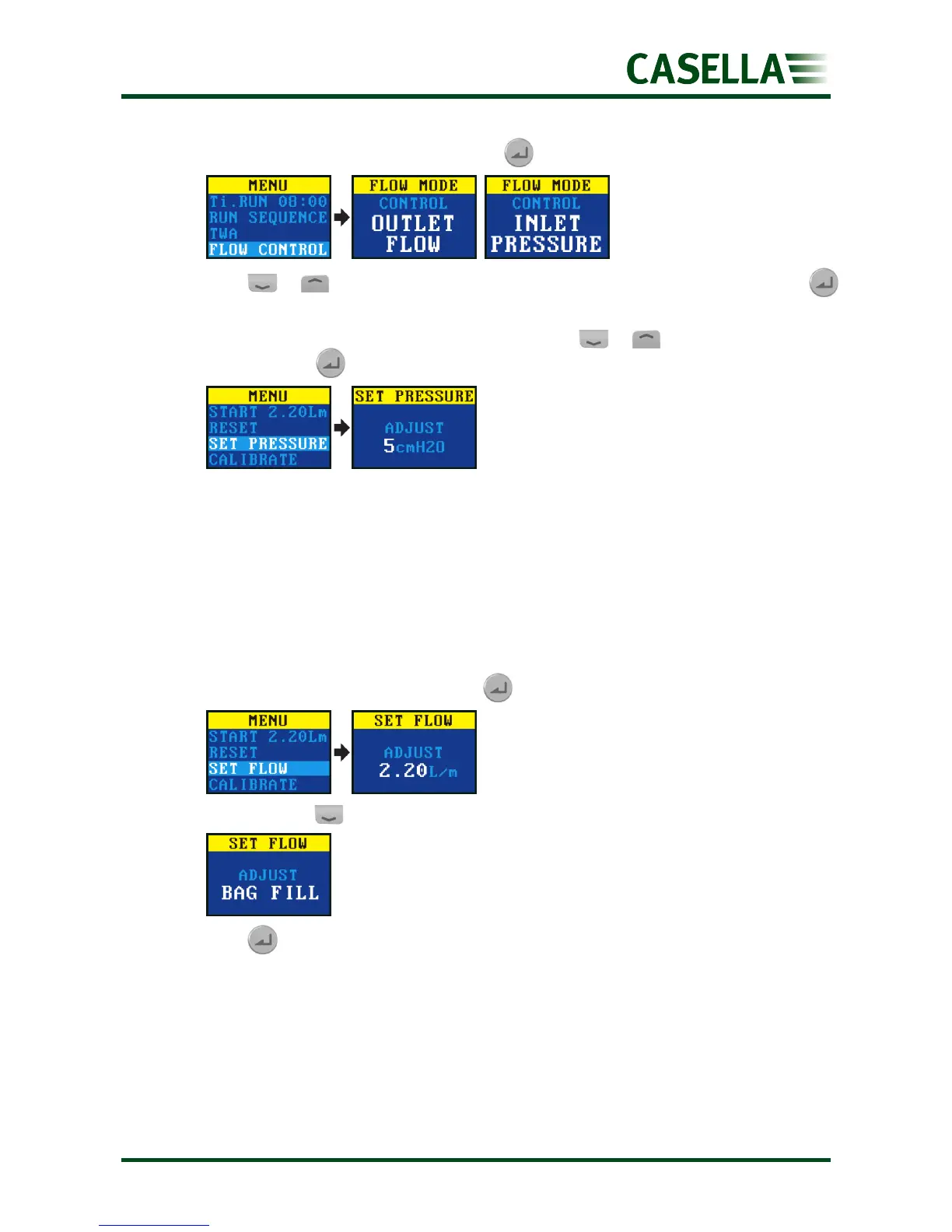
To set the flow mode:
1. Navigate to FLOW MODE, and then press .
2. Press or to select either OUTLET FLOW or INLET PRESSURE, and then press .
3. If you selected INLET PRESSURE, the last action takes you to the SET PRESSURE menu
option (which replaces the SET FLOW option). Press or to set the pressure,
and then press .
Gas sample collection
The pump has an outlet to which you can connect a gas sample bag. When operating in bag
fill mode the pump runs until the back pressure reaches 15 mBar and therefore it
automatically fills bags of any size.
To collect a gas sample:
1. Connect the gas bag (see Gas bag outlet connection on page 10).
2. Navigate to SET FLOW, and then press .
3. Press and hold until BAG FILL is displayed.
4. Press to save the setting.


 To Next Page