Apex2
16
Run Sequence (Pro model only)
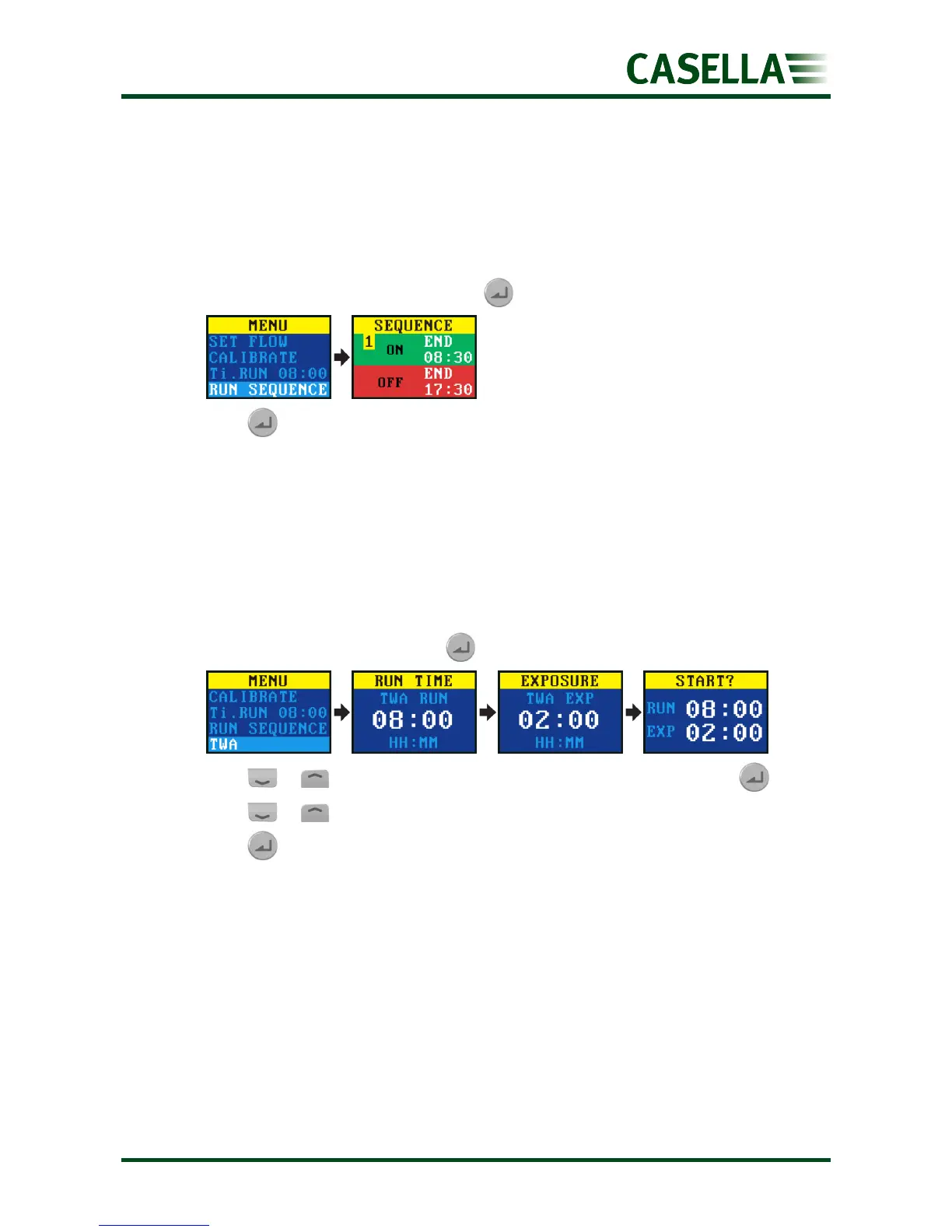
The RUN SEQUENCE timer allows nine ON and OFF events to be run in sequence. These may
be used to define daily or weekly sampling sequences. For example, sampling may start in
the morning then automatically pause for a worker’s lunch or rest breaks.
To set up the run sequence, see Sequencer on page 20.
To start the run sequence:
1. Navigate to RUN SEQUENCE, and then .
2. Press for 3 seconds to start the run sequence.
TWA run (Pro model only)
In time weighted average (TWA) mode the pump samples for a proportion of the specified
run time (called the exposure time). The pump calculates the required ON/OFF cycle to
spread the total sample time evenly over the run time. The ON time is always 1 minute and
the OFF time is varied according to the calculation. For example, with an exposure time of 2
hours and a total run time of 8 hours the pump turns on for 1 minute every 4 minutes.
To start a TWA sampling run:
1. Navigate to TWA, and then press .
2. Press or to set the run time in hours and minutes, and then press .
3. Press or to set the exposure time in hours and minutes.
4. Press for 3 seconds to start the pump immediately.
Flow mode
Flow mode enables the pump to be operated as follows:
• Outlet flow is controlled – this is the normal setting for air sampling in which the flow
rate is controlled by varying the back pressure.
• Inlet pressure control – use this setting to set the inlet pressure to a fixed value. This
would normally be used for sampling with sorbent tubes (e.g. charcoal). Further details
are available on using low flow adaptors with the inlet pressure control on the Apex2
product page at www.casellasolutions.com.


 To Next Page