Cavli Wireless C100QM/C10QM Hardware Manual
36
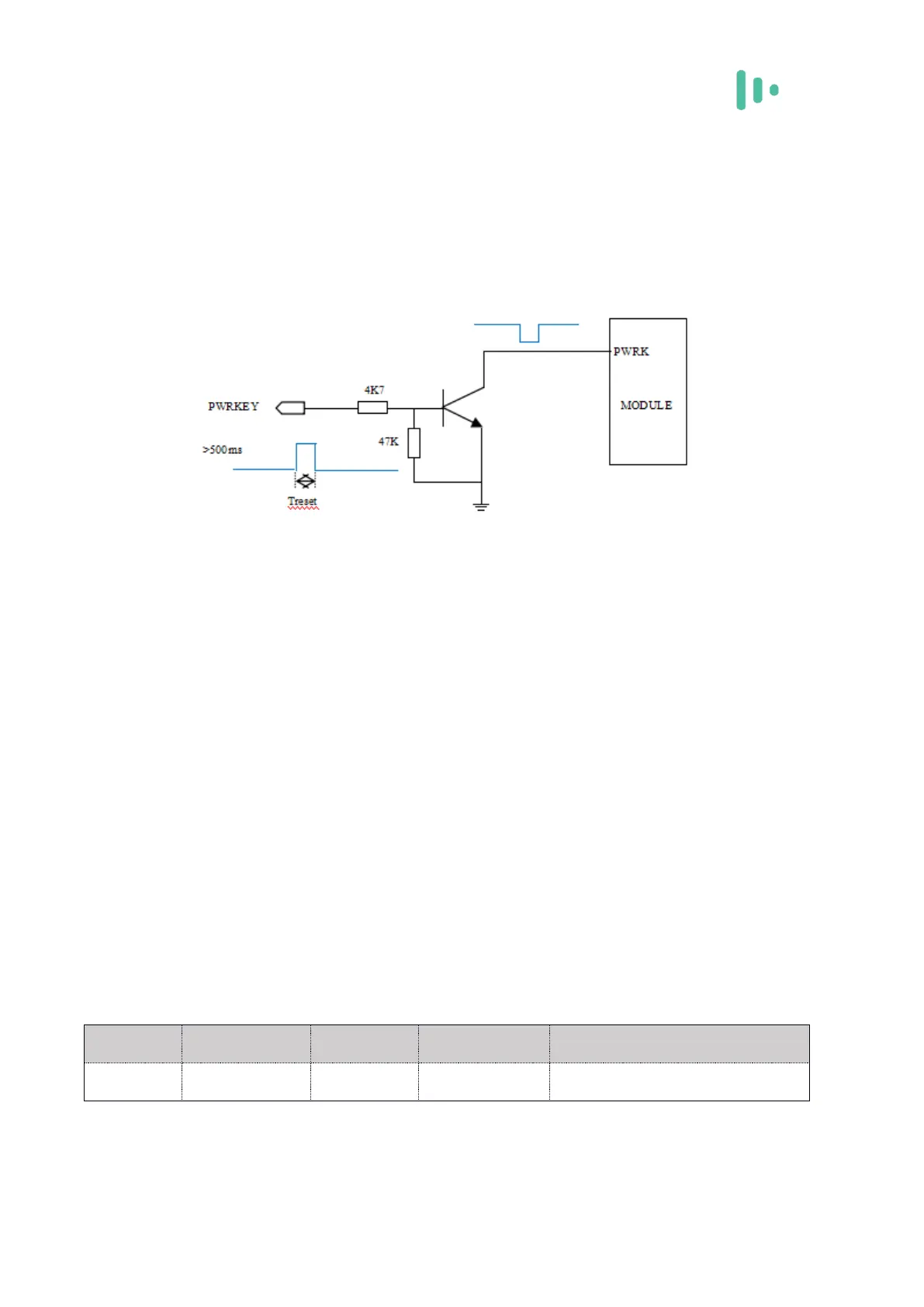
It is recommended to use the open-collector drive circuit to control the PWRKEY,
which can be released after the base level is pulled for 500ms. The switch can also be
designed with a push button. The button accessory requires a TVS tube for ESD
protection.
Figure 3-8 Power-on reference circuit
3.4.3 Power down
If the C100QM/C10QM module is to be shut down, the shutdown can be controlled
by the PWRKEY pin. At this time, the module performs a normal shutdown process. The
module can also be shut down via the AT command (this feature is under development).
3.4.4 Reset control
The C100QM/C10QM module PIN20 signal is the RESET pin. When the application
detects a module error, the module can be reset when the software is not responding. The
module can be reset by pulling the pin low for 100-450ms. The pull-up resistor 10K to
VDD_EXT is recommended outside the pin. The RESET pin is sensitive to interference. A
10nF to 0.1μF capacitor can be placed near the signal for signal filtering. Keep away from
RF interference signals when routing.
Table 3-7 Reset foot definition



 To Next Page