15
cdvi.com
cdvigroup.com
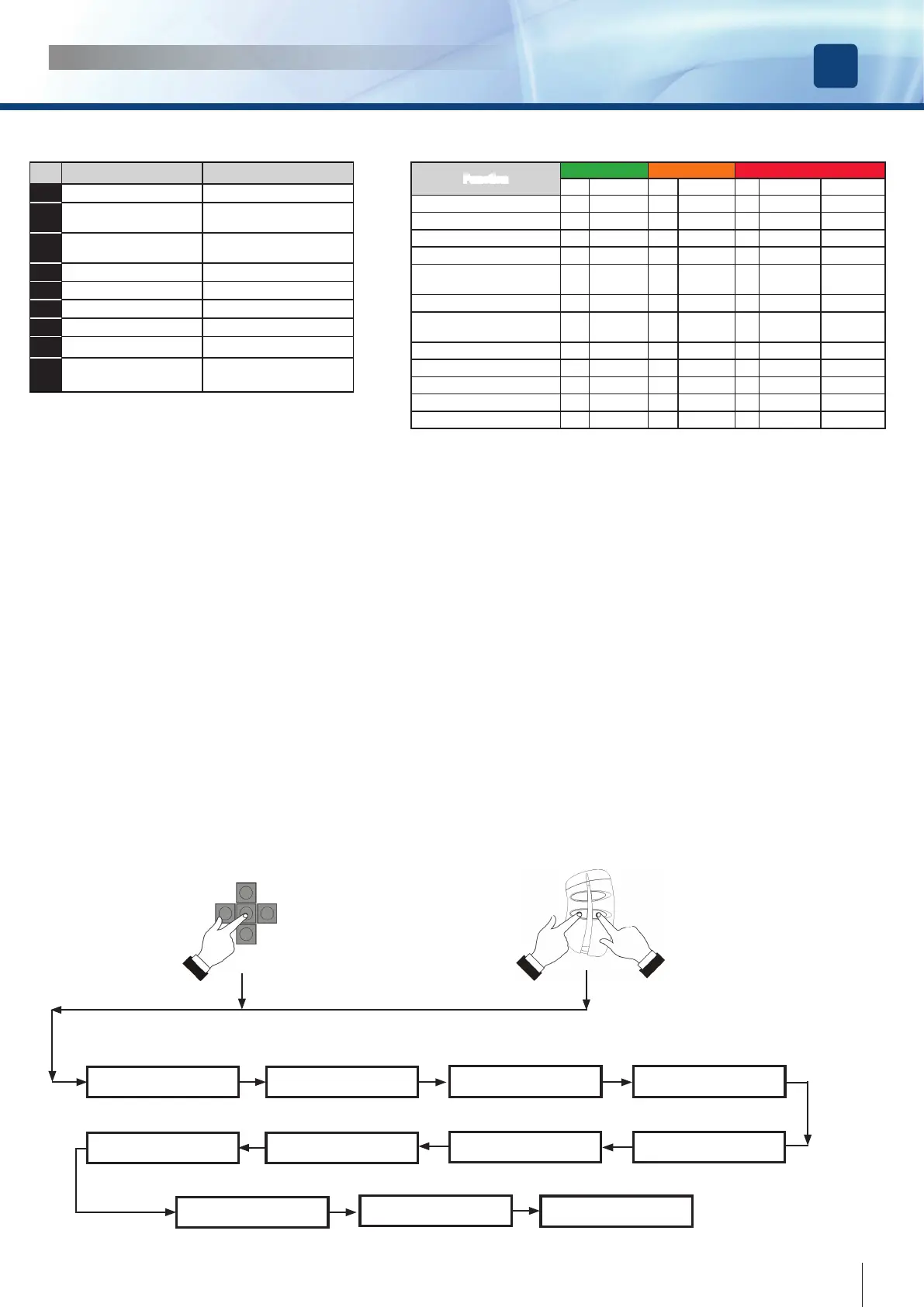
Meaning of LP LED messages
Function
LED GREEN LED ORANGE LED RED
ON blinking ON blinking ON blinking fast blinking
Everything OK O
Battery operated O
Fire alarm O (fast)
Night Mode O
Night Mode & battery
operated
O
Door free - - - - - - -
Current calculation in
progress
O
Selearning red/green
Battery test O
Battery unleaded O
Safety photocells malfunction O
Service required O (slow )
GETTING STARTED
Digiway Plus is equipped with a 2x16 characters LCD Display and by a 5-keys keyboard. The operating conguration can be set navigating
through several menus. The menu has a tree structure with a main menu and different sub-menus.
ACCESS to the MAIN MENU
Electronic card LED’s
LED ON LED OFF
L1 Fire voltage OK Fire voltage ABSENT
L2 NC contact stop photocells
closed
NC contact stop photocells
open
L3 NC contact re-open photo
-
cells closed
NC contact re-open photo
-
cells open
L4 Automatic mode -
L5 Door always open -
L6 External radar active -
L7 Internal radar active -
L8 Night mode Day mode
L9 Open/close command
active
-
C + D
OK for 4 sec
A
B
C
D
OR
Battery
Main features: Voltage : 12V
Rated charge : 1,3Ah
Authonomy in battery operating mode(*) : 270 cycles / 16 hours
Average charge and discharge cycles : 800
Average battery life : 2-3 years [in rated operating temperature ]
Cycles with battery at end-of-life : 100
(*): In case of main power failure ( 230 Vac ) the operator works in battery mode. The authonomy declared depends even by the number of
external devices connected ( radars, photocells, etc ).
The internal software executes periodically a test on the battery charge. ( Led LP blinks RED QUICKLY). If, at the end of the test, the battery
results unloaded, LP doesn’t stop blinking RED. If this happens, replace the battery with an equivalent one.
INSTALLATION MANUAL
EN
DIGIWAY PLUS
Main Menu
Door Calibration
Main Menu
TX management
Main Menu
Service
Main Menu
Information
Main Menu
Advanced Settings
Main Menu
Languages
Main Menu
Main Functions
Main Menu
Configuration
Main Menu
Exit
Main Menu
System Reset
Main Menu
Factory Defaults



 To Next Page