25
cdvi.com
cdvigroup.com
INSTALLATION MANUAL
EN
DIGIWAY PLUS
Information
Information
Display
Display
Expert / Normal
It’s possible to change the information displayed on the LCD by setting the operating
mode EXPERT or NORMAL
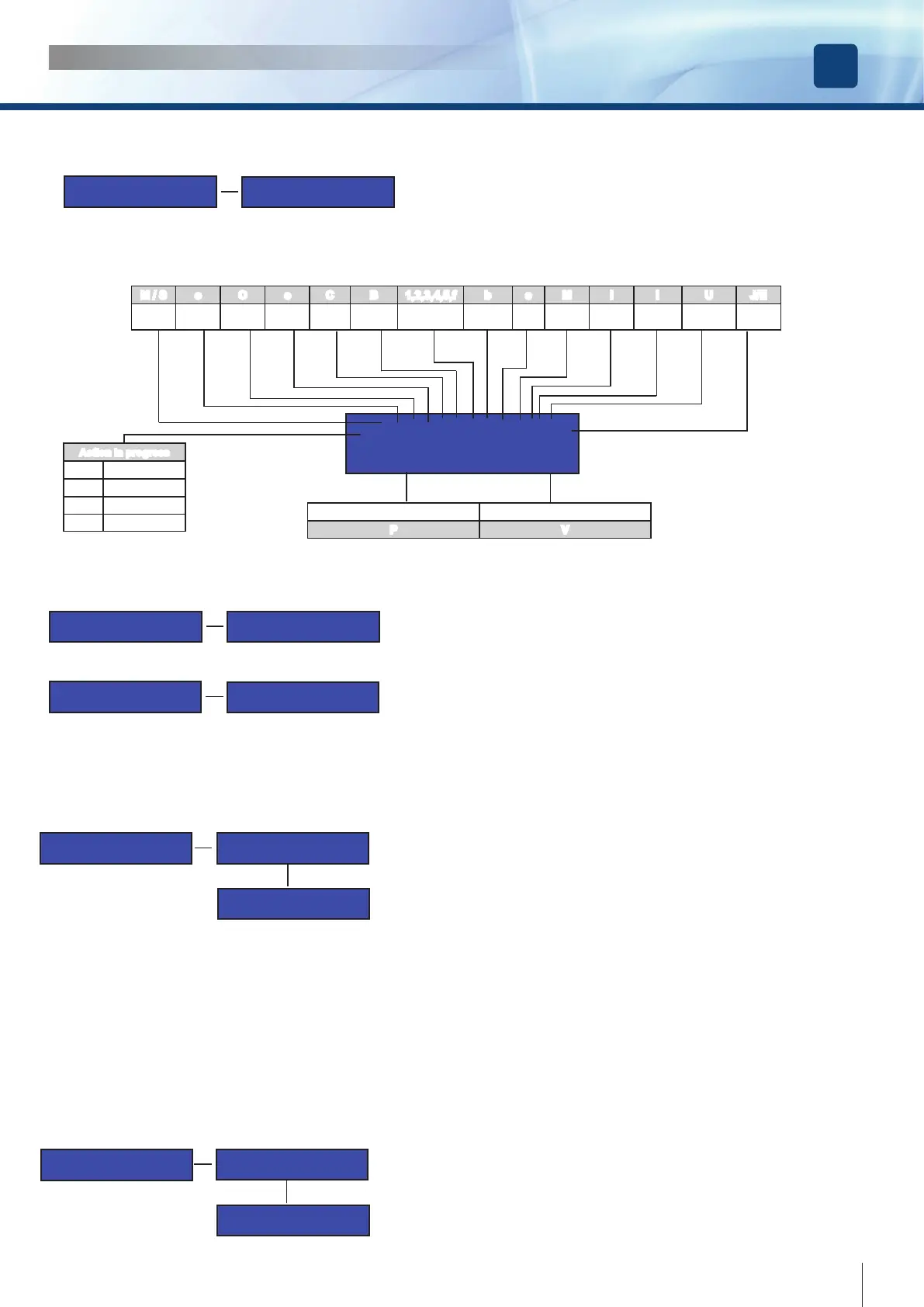
In EXPERT Mode all the main parameters of the motion will be displayed according to
the following diagram:
FMoOcCBXbsMiIUJ
P=-000.0 V=-00.0
LEGEND DISPLAY EXPERT MODE
M / S o O c C B 1,2,3,4,5,f b s M i I U J/E
Master /
Slave
Opening Open Closing Closed Obstacle Obstacle type
restart for
obstacle
Stop Motor
Opening
current
Closing
current
Electrolock
Opening
Jolt
Position (+/-) Speed: rpm/10
P V
Information
SW Release
WadoPlus v2.0a
dd/mm/yyyy
Gives the SW release number and date.
Information
Counter
Counter
00000
The absolute counter logs each cycle of the door ( OPENING +CLOSING). Its
value can be reset only by the factory.
Factory Defaults
If the set-up of the parameters hasn’t been successful, it’s possible to recover the factory settings using the sub-menu Factory defaults
from the Main menu. After the completion of this function, all the parameters will be reset to the factory value. See each function to know
the corresponding value
Menu Main
Factory Defaults
Reset to Factory
Defaults?
Are you sure?
Having reset the system to the factory settings, the operator can drive the door but without using the the acceleration and deceleration
values calculated during the Step III of Door Calibration. In order to revert to the previous operating mode it is necessary to repeat Step
III again. The door limits ( DOOR CLOSE and DOOR OPEN ) remain the same. The transmitters memory is completely erased, Master
transmitter included and reset to 1111 the System password for the partial counter.
System Reset
It is possible to give a restart to the system, equivalent to a “power-off + power-on”, using the option “System Reset” from the main menu.
After the system reset the LCD displays the sw release, the parameters condition and the free memory space for transmitters.
This function doesn’t change the value of any parameter except for the currents ( I and i ) which will be re-calculated during the next 2
cycles.
Answer OK to proceed or ESC to exit without any action
MENU MAIN
System Reset
Are you sure?
Confirm
System Reset?
Action in progress
F Forward
R Reverse
K Brake
I Idle



 To Next Page