10
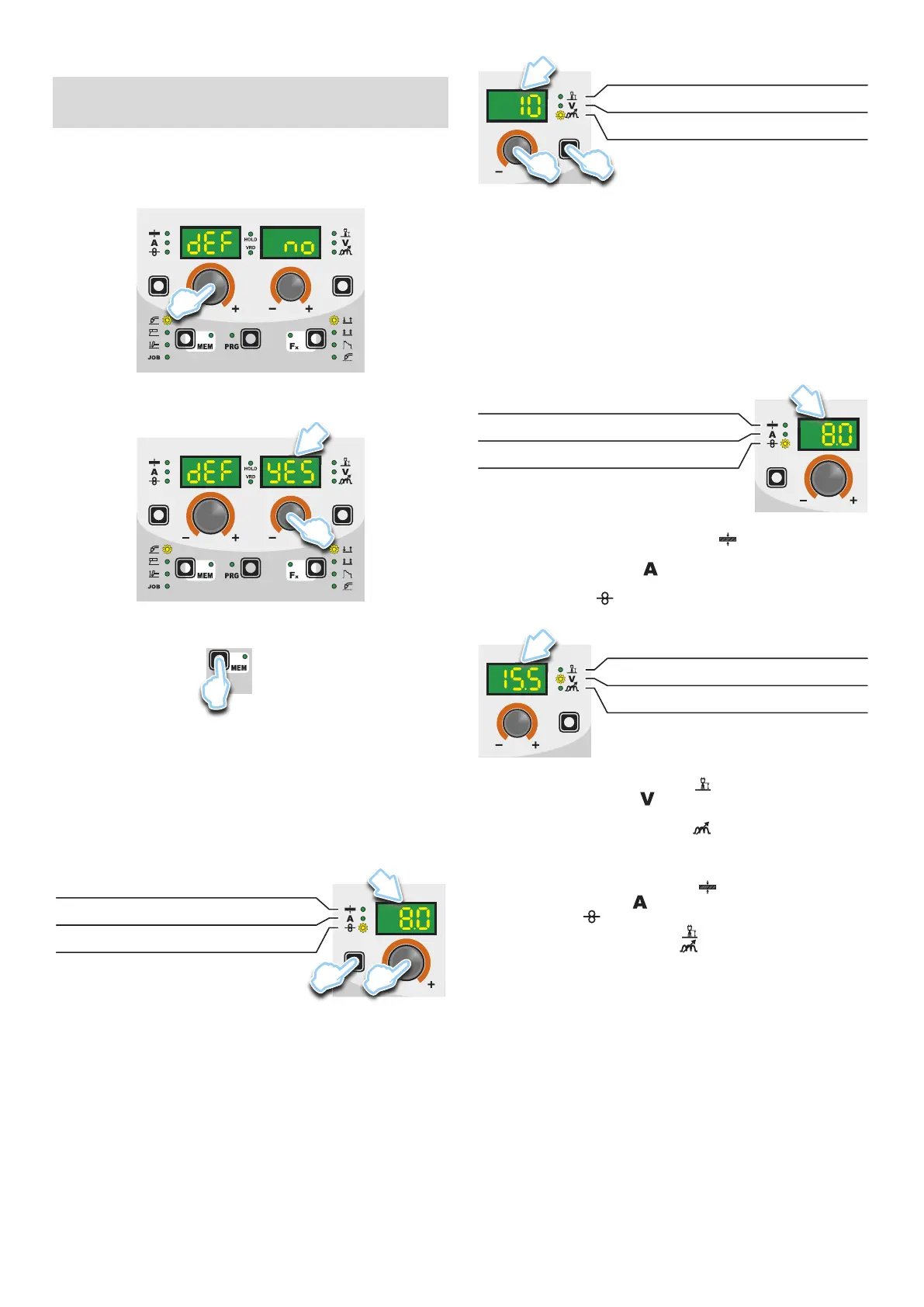
■ PROGRAM DEFAULT (dEF)
WARNING: If carried out, this operation resets the program
in use to the factory default settings.
To carry out the reset of the settings / parameters, proceed in the
following manner:
•
Rotate the ENCODER - A (E1) knob until both the displays read
dEF no (see figure).
E1
•
Rotate the ENCODER - V knob (E2) until the PARAMETERS
DISPLAY - V screen (D2) reads YES.
D2
E2
•
Hold the SAVE “MEM” key (T2) down for at least 2 consecu-
tive seconds.
T2
T ≥ 2 s
•
The program in use has now been completed successfully. To
confirmation the above, the control panel of the welder performs
a short operation of MACHINE CHECK (all of the LED stay lit
simultaneously so as to verify their actual operation), the gen-
erator itself starts, having memorised the new settings and is
again ready to weld.
5 - PRE-SETTING
Before welding it is possible to set the following parameters:
D1
T1
E1
THICKNESS OF WELDED ITEM
WELDING CURRENT
WIRE SPEED
Example: WIRE SPEED
Press the PARAMETER SELECTION - A key (T1) until the LED
that corresponds to the WIRE SPEED switches on. Turn the EN-
CODER - A knob (E1) to change the value shown on the PARAM-
ETER DISPLAY - A screen (D1).
D2
T4
E2
ELECTRONIC INDUCTANCE
WELDING VOLTAGE (*)
ARC LENGTH ADJUSTMENT
(*) The parameter is pre-set by means of synergy and can be changed
by varying the ARC LENGTH ADJUSTMENT parameter.
Example: ELECTRONIC INDUCTANCE
Press the PARAMETER SELECTION - V key (T4) until the LED
that corresponds to the ELECTRONIC INDUCTANCE switches
on. Turn the ENCODER - V knob (E2) to change the value shown
on the PARAMETER DISPLAY - V screen (D2).
6 - WELDING
During the welding the display shows:
• PARAMETER DISPLAY screen - A (D1)
D1
THICKNESS OF WELDED ITEM
WELDING CURRENT
WIRE SPEED
-
THICKNESS OF WELDED ITEM ( ): the value previous-
ly set.
-
WELDING CURRENT ( ): the measured value of the current
of what is being welded.
- WIRE SPEED (
): the value previously set.
• PARAMETER DISPLAY screen - V (D2)
D2
ELECTRONIC INDUCTANCE
WELDING VOLTAGE
ARC LENGTH ADJUSTMENT
- ARC LENGTH ADJUSTMENT ( ): the value previously set.
-
WELDING VOLTAGE ( ): the measured value of the voltage
of what is being welded.
- ELECTRONIC INDUCTANCE (
): the value previously set.
During the welding the operator can change the following param-
eters:
• THICKNESS OF WELDED ITEM (
).
• WELDING CURRENT (
).
• WIRE SPEED (
).
• ARC LENGTH ADJUSTMENT (
).
• ELECTRONIC INDUCTANCE (
).
• SPECIAL FUNCTIONS “Fx”.
WARNING: Remember that this process of welding is synergic
and for this reason the alteration of an individual parameter syn-
ergically also influences other parameters according to the pre-
defined settings that are not modifiable!










 To Next Page