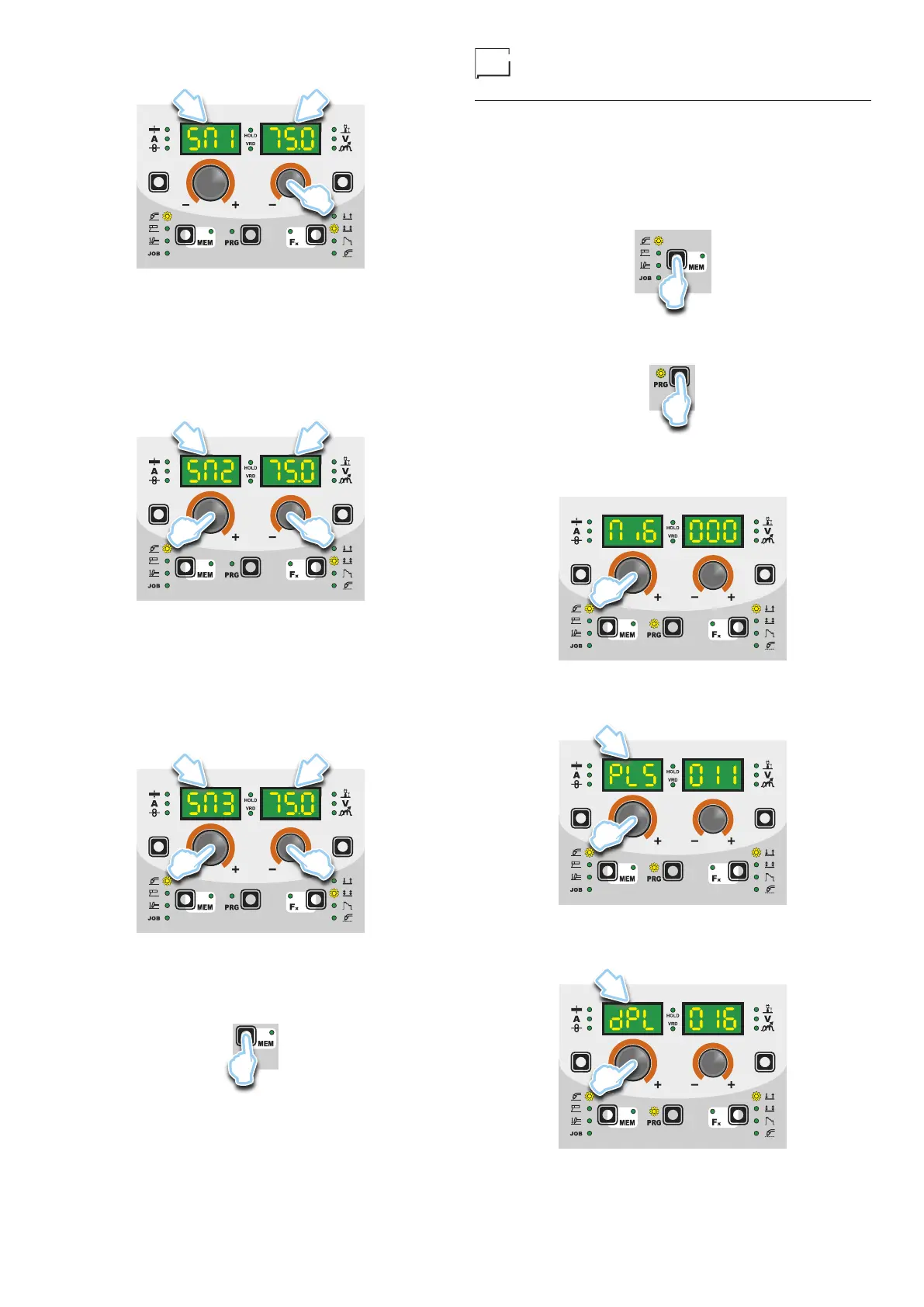
8
tion of the ENCODER knob - V (E2) appearing on the PA-
RAMETER DISPLAY screen - V (D2) is the desired value.
D1 D2
E2
2. CalibrationparameterSM2(MEDIUMSPEED)
Then turn the ENCODER - A knob (E1) until the PARAM-
ETER DISPLAY - A screen (D1) shows the SM2 parame-
ter. Push and release the torch button, and then wait for the
wire to stop automatically, and the End MiS message to ap-
pear. Measure (in cm) the dangling wire and insert the value
shown, in the software of the welder, by means of the rota-
tion of the ENCODER knob - V (E2) appearing on the PA-
RAMETER DISPLAY screen - V (D2) is the desired value.
D1 D2
E2E1
3. Calibration parameter SM3 (MAXIMUM SPEED)
Then turn the ENCODER - A knob (E1) until the PARAM-
ETER DISPLAY - A screen (D1) shows the SM3 parame-
ter. Push and release the torch button, and then wait for the
wire to stop automatically, and the End MiS message to ap-
pear. Measure (in cm) the dangling wire and insert the value
shown, in the software of the welder, by means of the rota-
tion of the ENCODER knob - V (E2) appearing on the PA-
RAMETER DISPLAY screen - V (D2) is the desired value.
D1 D2
E2E1
• At the end of the procedure, the software present in the welder
will immediately re-calculate the characteristic curve of the en-
gine, rendering it suitable to use.
•
To exit from the CALIBRATION menu, press and release the
SAVE “MEM” key (T2).
T2
• To interrupt measuring, push the SAVE “MEM” (T2) Key.
MIG-MAG synergic / MIG pulse
/ double pulsed MIG
Start the welder by pressing the switch, located on the back pan-
el, at the position I.
1 - WELDING PROCESS SELECTION
Select the MIG welding PROCESS this way:
1) Push the SELECT WELDING PROCESS (T2) key, even a
number of times if necessary, until the corresponding LED
switches on.
T2
2) Push the SELECT PROGRAM (T5) key. The corresponding
LED switches on.
T5
3A) To access the MIG-MAG synergic welding process: rotate the
ENCODER knob - A (E1) until obtaining on the PARAMETER
DISPLAY screen - A (D1) and the writing MiG.
E1
3B) To access the MIG pulse welding process: rotate the ENCOD-
ER knob - A (E1) until obtaining on the PARAMETER DISPLAY
screen - A (D1) and the writing PLS.
D1
E1
3C) To access the double pulsed MIG welding process: rotate the
ENCODER knob - A (E1) until obtaining on the PARAMETER
DISPLAY screen - A (D1) and the writing dPL.
D1
E1










 To Next Page