14
Electrode (MMA)
Start the welder by pressing the switch, located on the back pan-
el, at the position I.
1 - WELDING PROCESS SELECTION
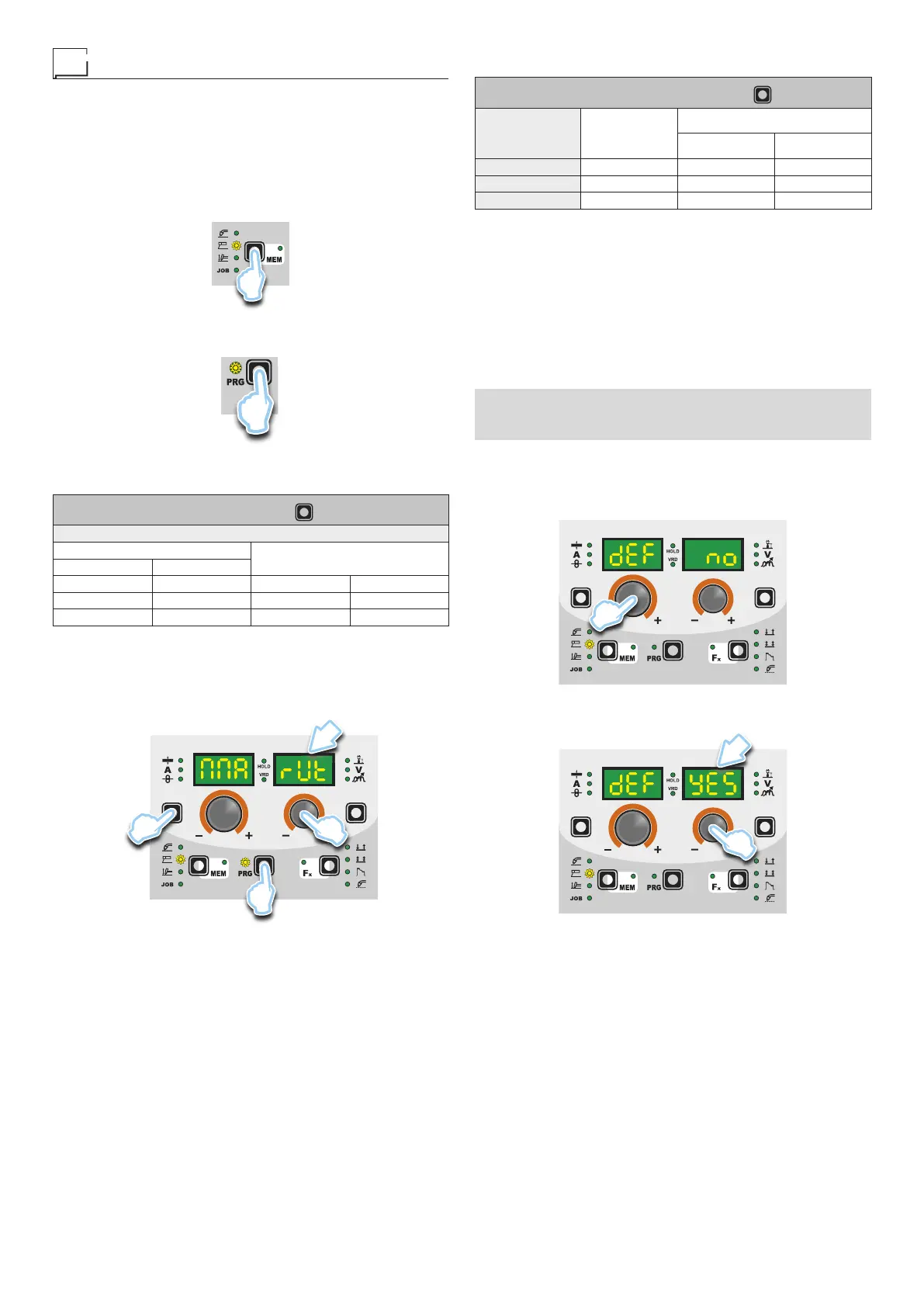
Select the ELECTRODE PROCESS of welding (for welding with
“HOT START” and “ARC FORCE” devices, programmable by the
user) pressing and releasing, even various times if necessary, the
WELDING PROCESS SELECTION key (T2) until the correspond-
ing LED lights up.
T2
Push the SELECT PROGRAM (T5) key. The corresponding LED
switches on.
T5
2-SELECTIONOFWELDINGPROGRAM
PROGRAM TABLE PRG
MMA PROCESS
MATERIAL
DISPLAY
TYPE CLASS
Basic E7018 MMA bAS
Rutil E6013 MMA rUt
Cr-Ni E316L MMA Crn
Select the welding PROGRAM by pushing the SELECT PRO-
GRAM (T5) Key, and then rotate the ENCODER - V (E2) Knob
until the VIEW PARAMETERS - V (D2) display shows the program
required, chosen according to the type of electrode to be used (ba-
sic, rutile, and chrome-nickel).
D2
E2
T1
T5
3 - SPECIAL FUNCTIONS “Fx” SELECTION
ADJUSTABLE FUNCTIONS “Fx” Fx > 3s
FUNCTION DISPLAY
SETTINGS RANGE
FACTORY RANGE
HOT START Hot 50 0 ÷ 100
ARC FORCE ArC 50 0 ÷ 100
PROGRAM DEFAULT dEF no no - YES
The SPECIAL FUNCTIONS “Fx” that are only available in the MMA
welding process are shown below. For all the other explanations
regarding this menu make reference to the relative paragraph.
•
HOT START (Hot) - At the start of the welding process it increas-
es the current, adjustable in percentage, reducing in such a way
the risk of low function at the start of the connection.
•
ARC FORCE (ArC) - During the welding process, it increases
the current in percentage, reducing in such a way the risk of fus-
ing the electrode to the piece.
■ PROGRAM DEFAULT (dEF)
WARNING: If carried out, this operation resets the program
in use to the factory default settings.
To carry out the reset of the settings / parameters, proceed in the
following manner:
•
Rotate the ENCODER - A (E1) knob until both the displays read
dEF no (see figure).
E1
•
Rotate the ENCODER - V knob (E2) until the PARAMETERS
DISPLAY - V screen (D2) reads YES.
D2
E2










 To Next Page