19
5 - HOLD
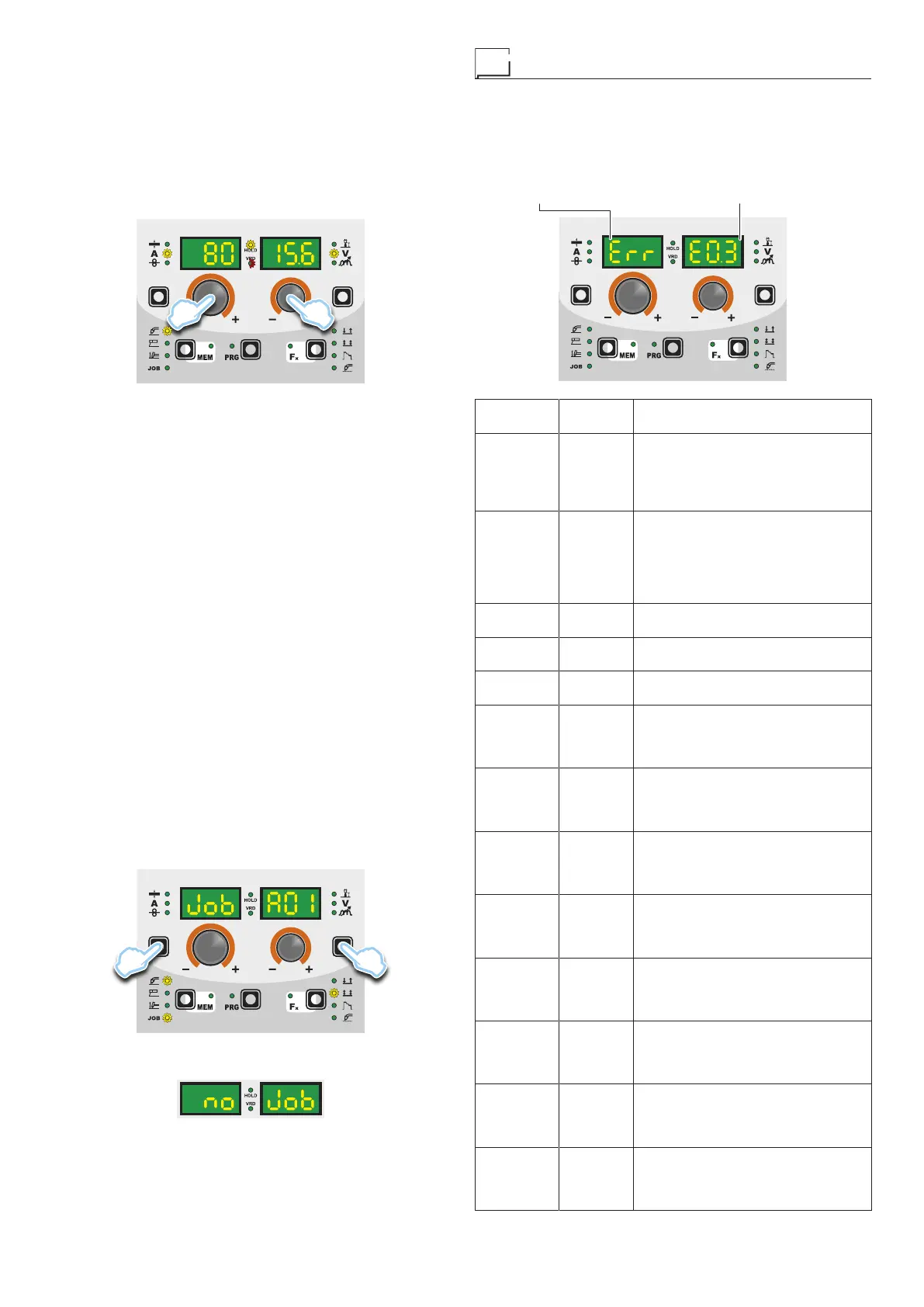
This function automatically starts itself at the conclusion of every
welding operation and it is indicated to the operator by means of a
flashing light of the HOLD FUNCTION LED for a specific amount
of time.
Once the welding has been terminated, for about 15 seconds, both
the DISPLAYS should show the same values of the parameters
during the welding.
To interrupt the HOLD function and go back to the PRESETTING
phase before 15 seconds have passed, simply turn one of the two
ENCODER (E1-E2) knobs.
E2E1
The HOLD function can be terminated ahead of time even once
again starting the welding.
Once 15 seconds have passed (HOLD FUNCTION) the control
panel goes back to the PRESETTING phase.
6 - MODIFICATION AND OVERWRITING OF A
MEMORISED JOB
To edit and overwrite a JOB proceed as follows:
1) Select JOB, pressing and releasing, even various times if nec-
essary, the WELDING PROCESS SELECTION key (T2) until
the corresponding LED lights up.
2) Select the individual JOB to modify and overwrite rotating the
ENCODER knob - V (E2).
3) Bring up and activate the JOB, loading its settings in the weld-
ing process it comes from, keeping the SAVE “MEM” key (T2)
pressed for a duration of about 2 seconds.
4) Acquire the parameters necessary for editing the JOB.
5) Hold the SAVE “MEM” key (T2) down for at least 2 consec-
utive seconds until both displays show the flashing wording
that represent the first AUTOMATIC WELDING POINT (JOB)
free and/or available to the operator that can be used for sav-
ing the data.
6) Rotate the ENCODER knob - V (E2) until identifying the indi-
vidual JOB that will be overwritten.
7) Keep pressed, for at least 3 consecutive seconds, the SAVE
“MEM” key (T2) to confirm and make the operation effective.
7 - DELETING A JOB SAVED
In JOB mode, holding down the PARAMETER SELECTION - A
(T1) and PARAMETER SELECTION - V (T4) keys down simulta-
neously for about 5 seconds deletes the current automatic weld-
ing point.
T4T1
The control panel automatically goes to the first JOB saved or
reads “no JOB” is no JOBS have been saved.
Error condition
This paragraph describes the error conditions that may arise on
the welding machine, the codes and messages shown on both op-
erator interface displays, and the diagnoses for attempting to cor-
rect and resolve them.
In an “error condition” the operator’s interface uses both displays
to display:
▪ ERROR DESCRIPTION display▪ ERROR CONDITION display
Error
condition
Error
code
Error description and possible
diagnosis
Err T°C
THERMAL PROTECTION
The welding stops due to an
excessively high temperature
(thermostat activated).
Automatic reset error.
Err E0.0
POWER SUPPLY FAILURE
NON automatic reset error.
This error can only arise when
switching on and not when the
welding equipment is working
normally.
Err E0.1
OVER AND UNDER VOLTAGE
Automatic reset error.
Err E0.2
OVER VOLTAGE
Automatic reset error.
Err E0.3
UNDER VOLTAGE
Automatic reset error.
Err E0.4
OVER CURRENT
NON automatic reset error.
Immediately contact technical
assistance dept.
Err E1.0
CONFIG. FILE MISSING
NON automatic reset error.
Immediately contact technical
assistance dept.
Err E1.1
USER FILE MISSING
NON automatic reset error.
Immediately contact technical
assistance dept.
Err E1.3
CALIBRATION FILE MISSING
NON automatic reset error.
Immediately contact technical
assistance dept.
Err E1.6
MMA DEFAULTS MISSING
NON automatic reset error.
Immediately contact technical
assistance dept.
Err E1.7
DEFAULTS MISSING TIG
NON automatic reset error.
Immediately contact technical
assistance dept.
Err E1.8
DEFAULTS MISSING MIG
NON automatic reset error.
Immediately contact technical
assistance dept.
Err E1.9
WELDER DEFAULTS MISSING
NON automatic reset error.
Immediately contact technical
assistance dept.
(continued)










 To Next Page