11
Operating Instruction for Thermal Imager
5-3.Power Off
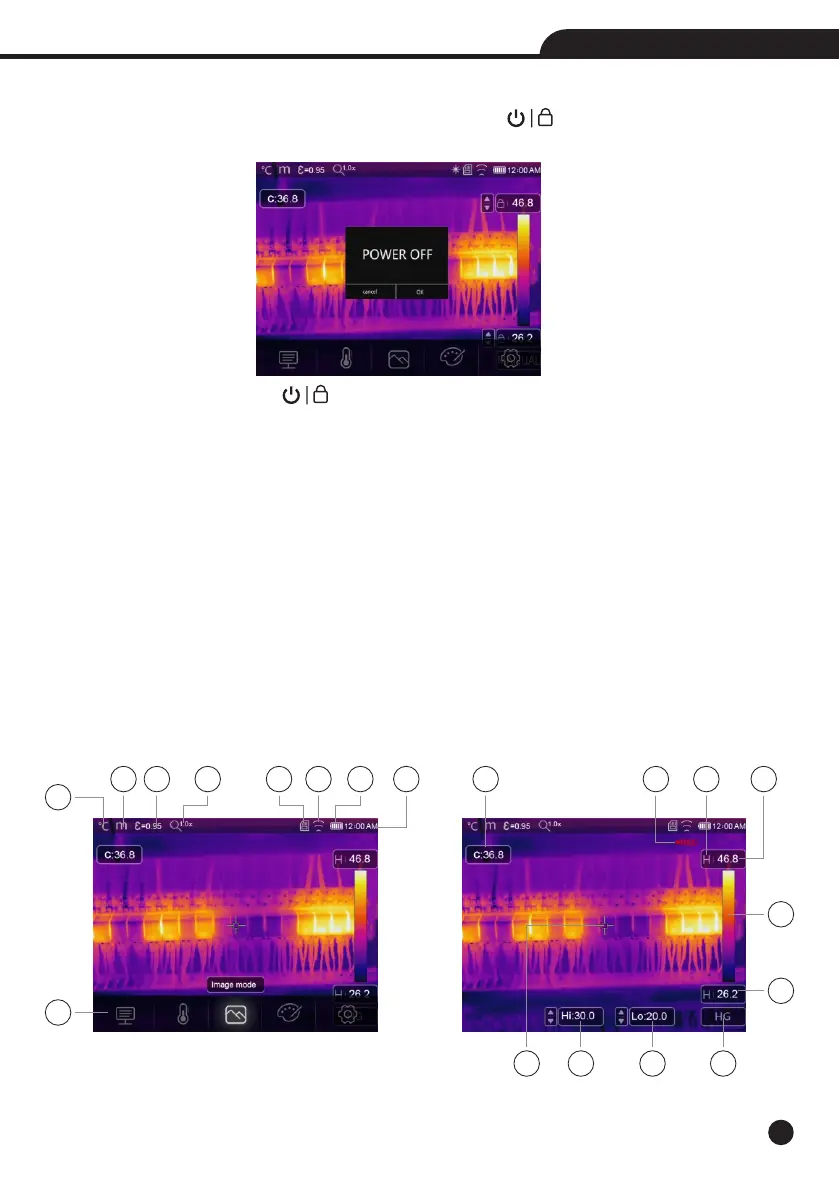
• When Thermal Imagers power on, Push and hold the Power/Lock “ ” Button for two seconds, then popup
the power off menu, press “OK” to power off the device.
• Push and hold the Power/Lock “ ” Button for twelve seconds, the device will be forced power off directly.
5-4.Desktop
The Desktop is as follow:
1-Temperature Unit
2-Distance Unit
3-Emissivity
4-Zoom Indicator
5-SD Card
6-Wifi Status
7-Battery Capacity Status
8-Time
9-Main Menu
10-Centre Point Temperature Readings
11-Video Recording Indicator
12-AGC Mode Status
13-Max Temperature of Current Scene
14-Centre Point Cross
15-Value Adjustment for High Alarm
16-Value Adjustment for Low Alarm
17-AGC Mode Select Button
18-Min Temperature of Current Scene
19-Color Bar
1
2 3
7
8
9
4 5
6
10
14 17
18
19
11 12 13
15 16



 To Next Page
 Loading...










