http://www.charmhigh.com
Charmhigh-V1.0-2016 | Hunan Charmhigh mechanical and electrical co., LTD
All Rights Reserved
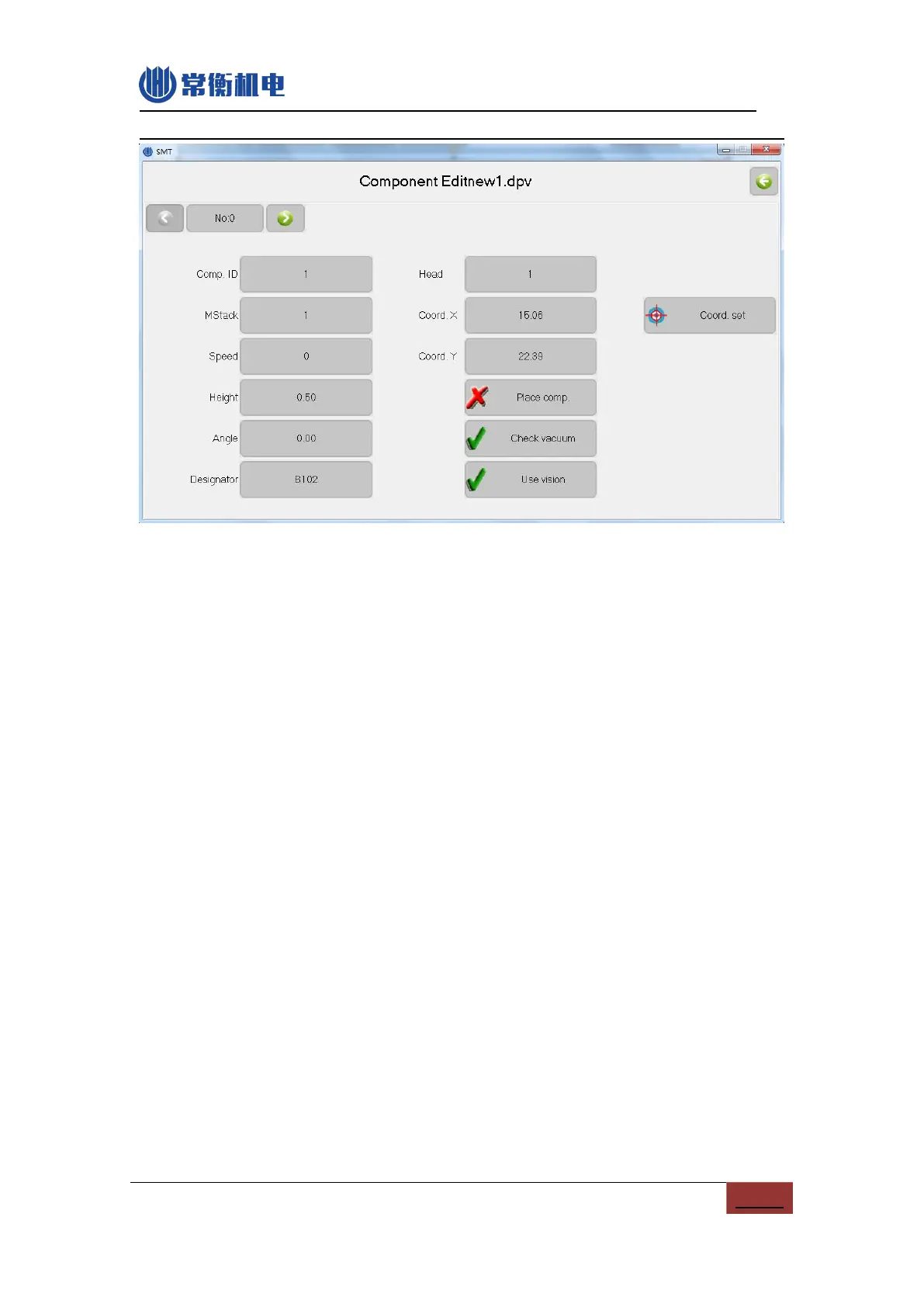
Figure.6- 3
(1)Component ID: set the component ID, there should not be the same ID in one work file.
(2)Material stack: The appointed material stack for component, when appointed a new
stack, the work file will be added a new stack.
(3)Speed: Set the mounting speed, 0 is for machine’s system speed, for mounting IC, you
can lower down the speed a little, it will be more accuracy, if lower the speed to 50%, the
machine work speed can’t be lower than 30%.
(4)Height: it is used for component height setting. The value is small for height means the
nozzle is more go down. (Note: machine general height is 0.5mm, the general PCB
thickness is 1.6mm, you can adjust the height according to the thickness of your PCB)
(5)Angle: Setting for rotate angle of component, anticlockwise is plus, clockwise is minus.
(6)Identification: component identification, such as R1,R2,C1,U1 etc.
(7) Comments: component information, such as 0402, 0805 etc.
(8)Machine head: nozzle for this component.
(9)Coordinate X: usually work file generated from software no need to change the setting.
(10)Coordinate Y: usually work file generated from software no need to change the
setting.
(11)Skip component: selected means not place this component, after skip, it will be grey.
(12)Vacuum detect: selected means forbid throwing materials due to lack of vacuum. Note:
if no component, this function also valid, if not absorbing the material, it will absorb again,
if still get the material, it will absorb 2 times, if still get it, the machine will be alarm and
stopping, when mounting the cylindrical glass component, please open this function.


 To Next Page