EasyManua.ls Logo

Check Point 4600 - Check Point 4000 Appliances Hardware; Front Panel Components; Check Point Front 4200

Check Point 4600
47 pages
Print Icon
To Next Page IconTo Next Page
To Previous Page IconTo Previous Page
Loading...
Page 29
Chapter 4
Check Point 4000 Appliances
Hardware
This chapter provides instructions for installing and removing hardware components on Check
Point 4000 Appliances.
In This Chapter
Front Panel Components 29
Rear Panel Components 34
Customer Replaceable Parts 34
Front Panel Components
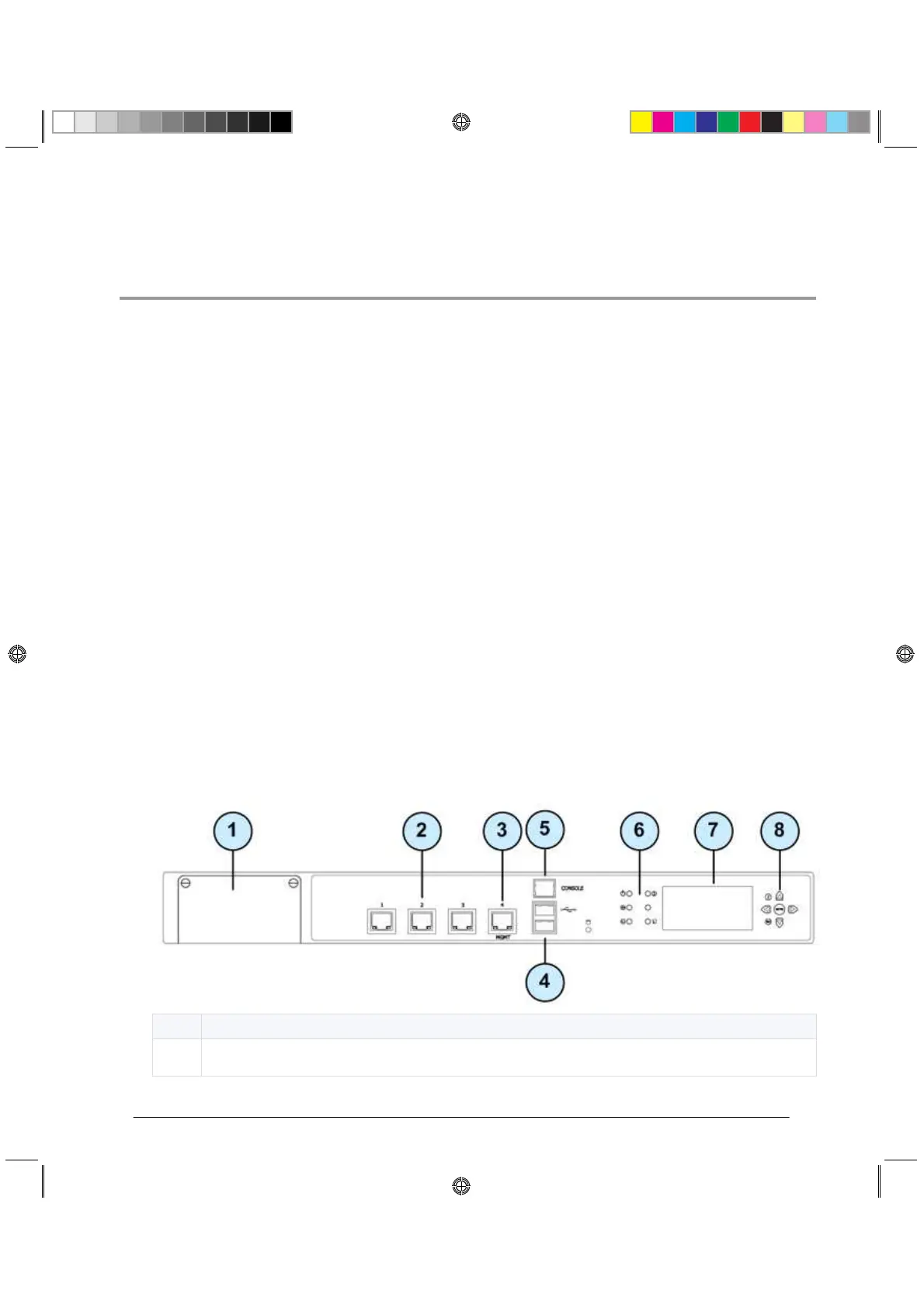
This section describes the features and components located on the appliance front panel.
Check Point Front 4200
Item
Description
1
Expansion line card slot
CP_Toxotai_GettingStartedGuide_429 29CP_Toxotai_GettingStartedGuide_429 29 05 July 2011 1:21:11 PM05 July 2011 1:21:11 PM

Other manuals for Check Point 4600

Related product manuals