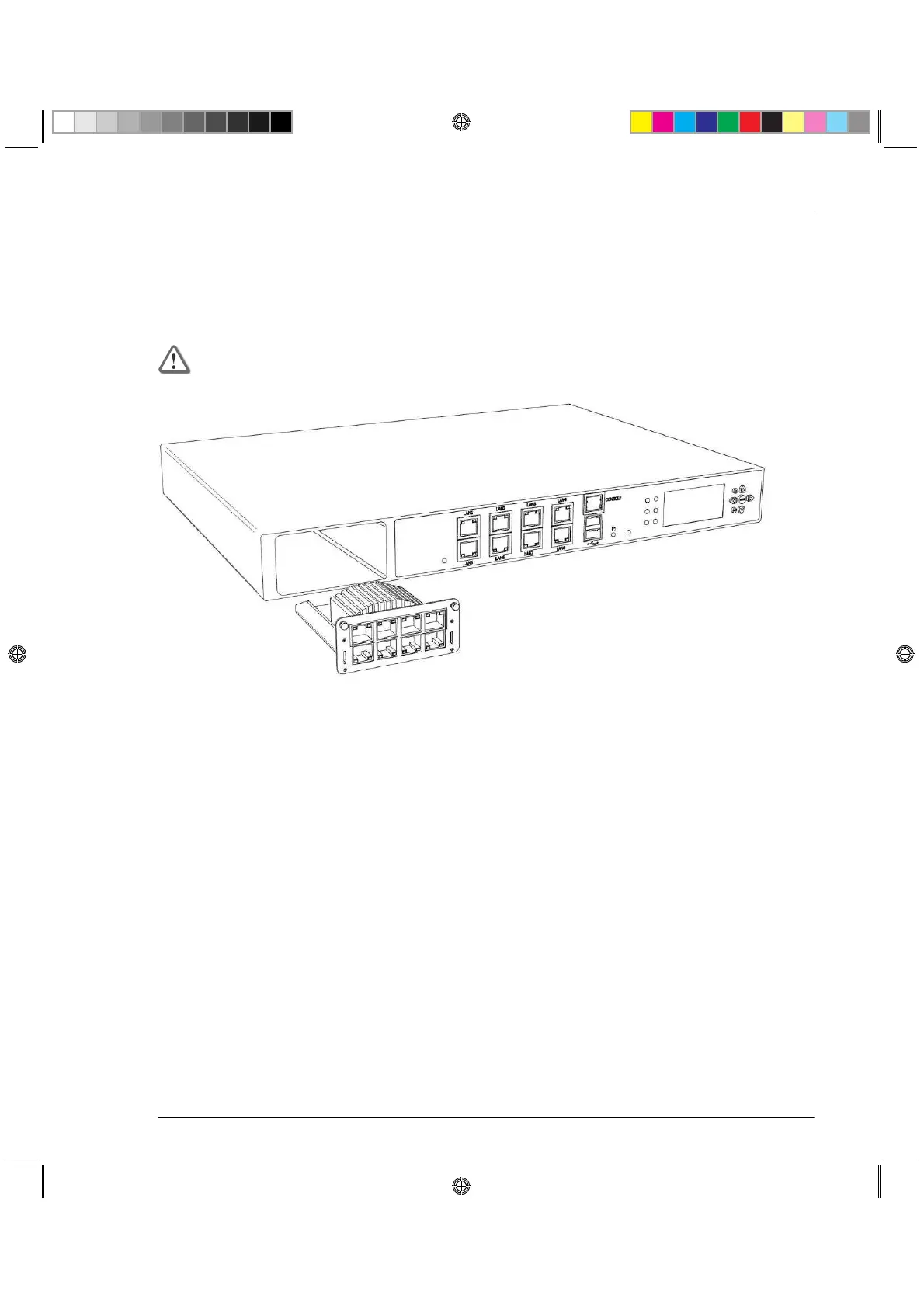
Expansion Line Card
This section presents the procedures for removing and installing an expansion line card unit.
There are two types of expansion cards that can be installed: Ethernet or Fiber Optic ports. The
built-in Ethernet ports (LAN1 - LAN8) are not customer replaceable.
Important - Make certain that you are electromagnetically grounded when
performing the following procedures. Static electricity can damage the appliance.
Installing Expansion Line Cards
To install an expansion line card:
1. Power off the appliance and remove the power cords from the power supply units.
2. Loosen the retaining screws on either side of the metal cover on the front of the appliance.
3. Holding the screws, remove the metal cover.
4. Insert the expansion line card into the expansion slot.
5. Push until the card clicks into place.
6. Tighten the retaining screws on either side of the expansion line card.
Removing Expansion Line Cards
To remove an expansion line card:
1. Power off the appliance and remove the power cords from the power supply units.
2. Loosen the retaining screws on either side of the expansion line card.
3. Holding the screws, pull the expansion line card out of the expansion slot.
4. Place the metal cover over the expansion slot.
5. Tighten the screws on either side of the metal cover.






 To Next Page