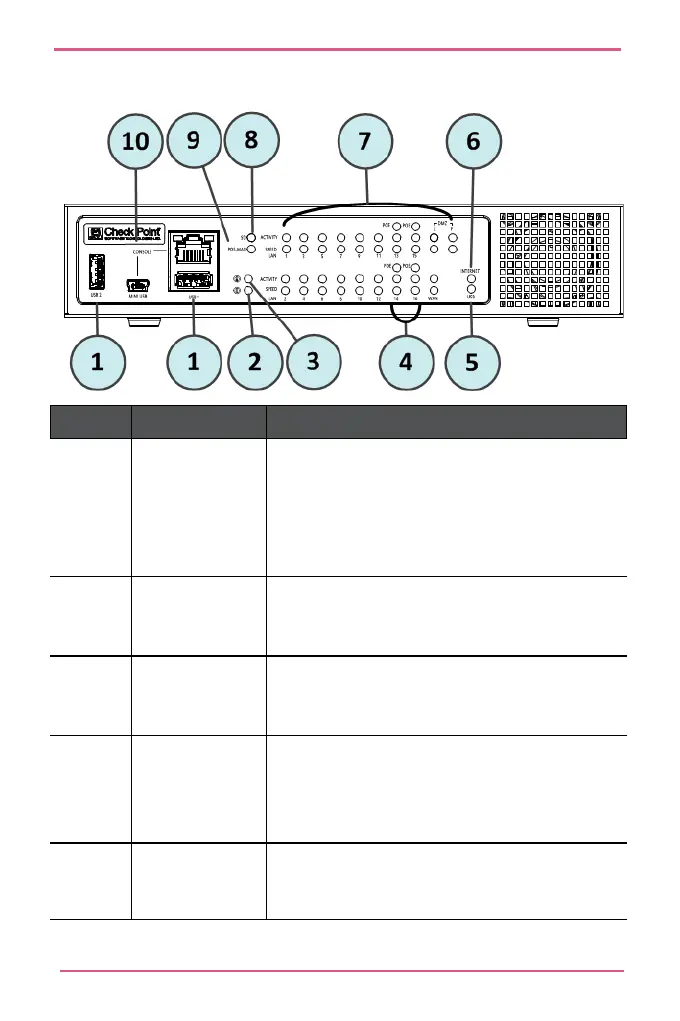
PoE Wired Model
Key Item Description
1 USB1 and
USB2 ports
USB 3.0 ports that are used for:
• Cellular and analog modems.
• Reinstalling the appliance with new firmware.
• Running a first-time configuration script.
2 Power LED
• Green when the appliance is turned on.
• Red when there is a boot error or the appliance is
3 Alert LED
• Blinking green during boot.
• Red when the appliance has a resource problem
such as memory shortage.
4 PoE LED
• Off – no power delivered
• Blue when the port is on and providing power.
•
Blinking blue when the port has a problem
5 USB LED Green when a USB device is
connected.












 To Next Page