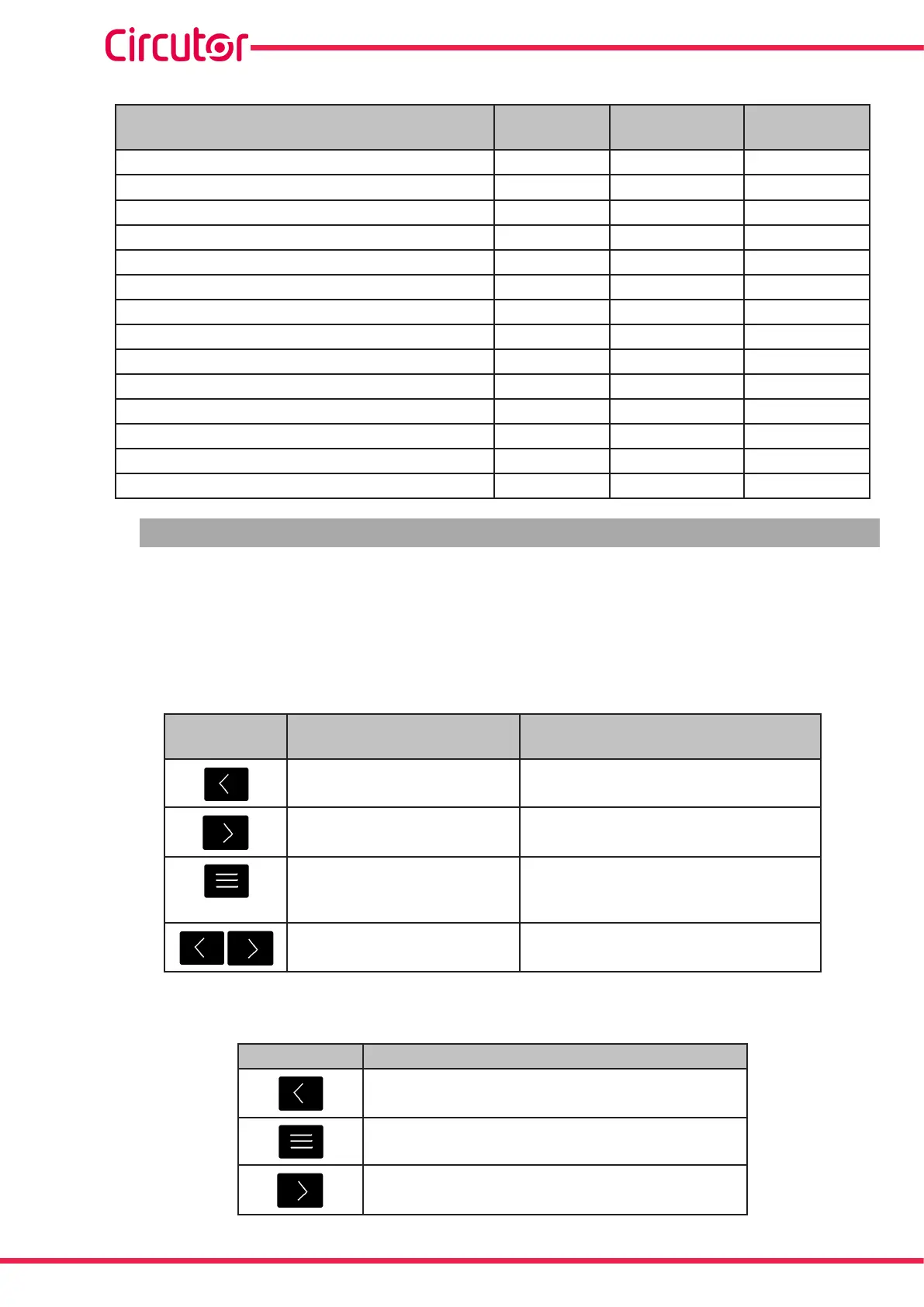
Table 4 (Continuation): CVM-5 measuring parameters�
Parameter Units
Maximum
value
Minimum
value
InductiveReactiveEnergyConsumedTari2 kvar
L
h 999999 000�000
InductiveReactiveEnergyGeneratedTari2 kvar
L
h 999999 000�000
CapacitiveReactiveEnergyConsumedTari2 kvar
c
h 999999 000�000
CapacitiveReactiveEnergyGeneratedTari2 kvar
c
h 999999 000�000
TotalApparentEnergyTari2 kVAh 999999 000�000
No�ofhoursTari1 hours 99999�9 00000�0
No�ofhoursTari2 hours 99999�9 00000�0
CostTari1 COST 9999�99 0000�00
CostTari2 COST 9999�99 0000�00
CO
2
EmissionsTari1 kgCO
2
9999�99 0000�00
CO
2
EmissionsTari2 kgCO
2
9999�99 0000�00
MaximumDemandofActivepower kW 9999 0�01
MaximumDemandofApparentPower kVA 9999 0�01
MaximumCurrentDemand A 9999 0�05
4�2�-KEYBOARDFUNCTIONS
TheCVM-C5has3keysthatallowyoutobrowsebetweenthevariousscreensandprogram
thedevice�
Therstkeystrokeonanyofthekeysafteraperiodofinactivityswitchesonthebacklight�
Keyfunctionsonmeasuringscreens(Table 5):
Table 5: Key functions on measuring screens�
Key Short keystroke
Long keystroke
(2 s)
Previousscreenofthein-
stantdataarea
Displayofminimumvalue
Nextscreenoftheinstant
data area
Displayofmaximumvalue
Browsingthedierent
screensoftheconsumption
data area
Accessingtheprogrammingmenu
DisplayoftheMaximumDemand
programmedandselected�
Keyfunctionsintheprogrammingmenu(Table 6):
Table 6: Key functions in the programming menu�
Key Keystroke
Movesaneditabledigit(ashing)
Increasesthedigits(0-9)orrotatesbetweenthe
dierentoptions�
Nextpage
20
CVM-C5-xxx-485
Instruction Manual













 To Next Page