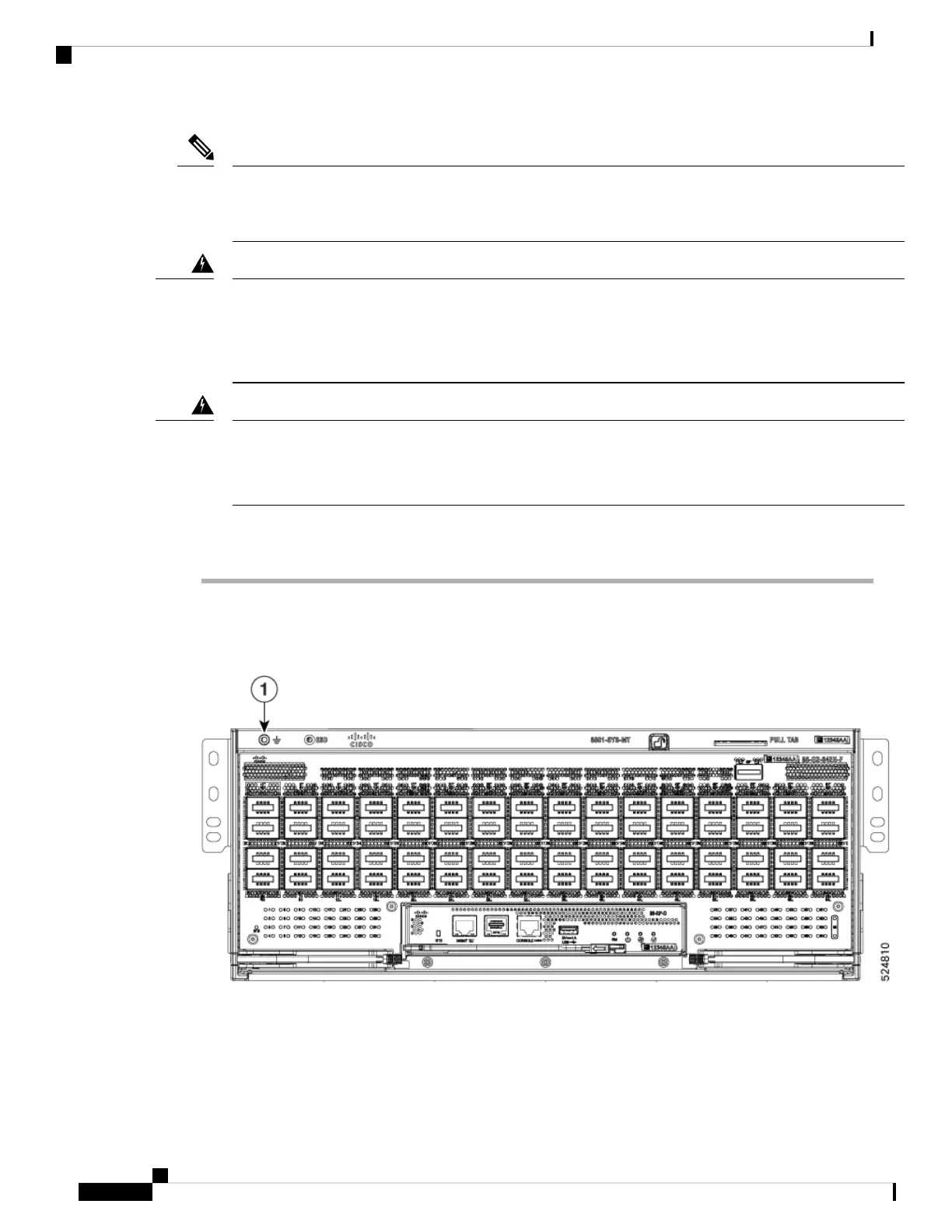
The Cisco 8501 does not rely on chassis ground for safety. The Cisco 8501 switch installed in the ORv3N
rack with the provided rack mount kit does not require direct chassis grounding via the chassis ground lug.
Instead, the ORv3N rack can be properly grounded, which will adequately ground the switch as well.
Note
Statement 1024—Ground Conductor
This equipment must be grounded. To reduce the risk of electric shock, never defeat the ground conductor or
operate the equipment in the absence of a suitably installed ground conductor. Contact the appropriate electrical
inspection authority or an electrician if you are uncertain that suitable grounding is available.
Warning
Statement 1101—Connected To Grounded Outlet
In the Scandinavian countries (Denmark, Finland, Iceland, Norway, and Sweden) the appliance must be
connected to a grounded outlet.
Warning
Procedure
Step 1 Locate the chassis grounding receptacle on the front or rear of the chassis, in rear end upper-right corner
adjacent to PSU 1 and in front upper-left corner.
Figure 25: Grounding Receptacle on the front of the Chassis
Hardware Installation Guide for Cisco 8500 Switches
36
Unpack and Install the Chassis
Locate and Ground the Chassis






 To Next Page