1-111
Cisco ONS 15454 SDH Troubleshooting Guide, R5.0
July 2005
Chapter 1 General Troubleshooting
1.8.2 Restore the Node to Factory Configuration
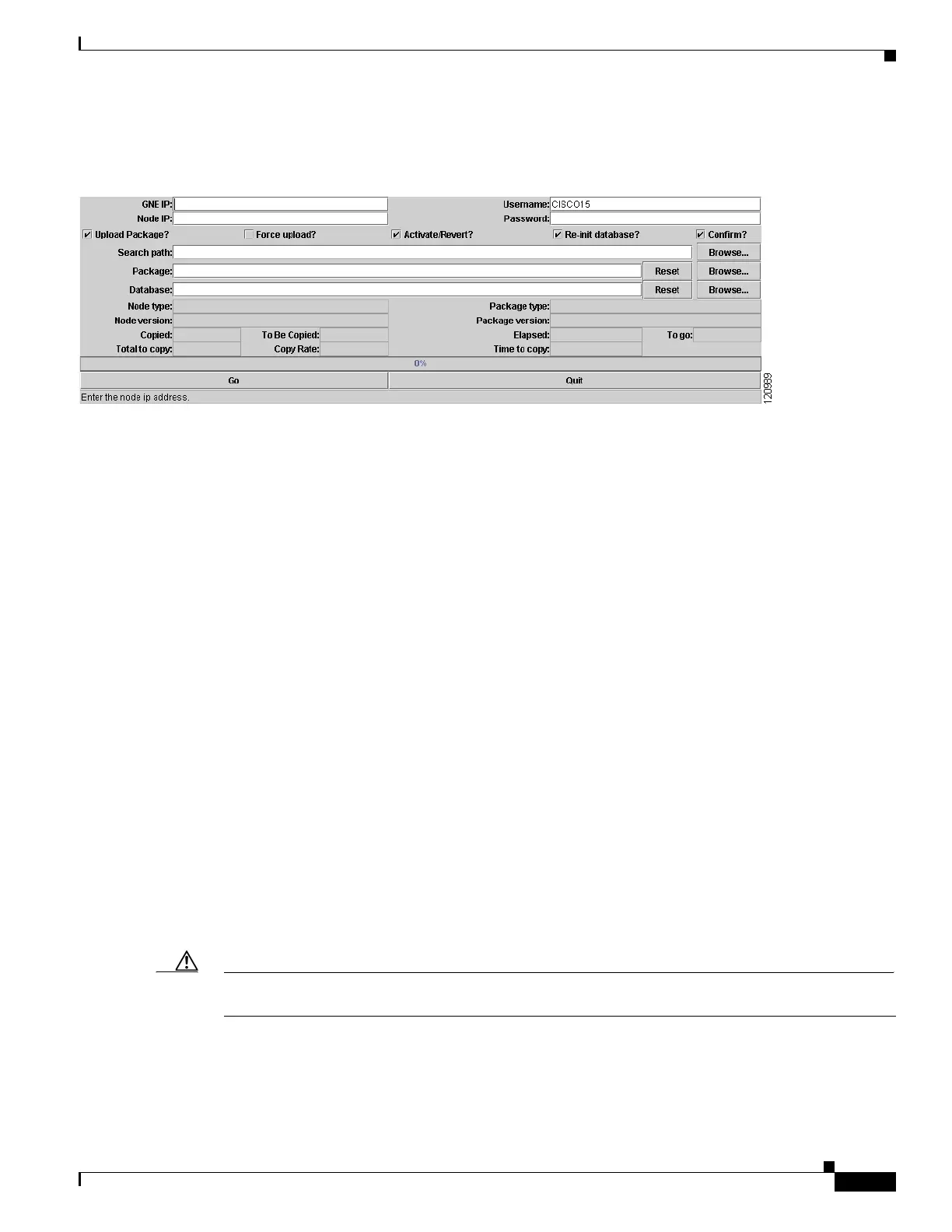
Step 4 Choose the RE-INIT.jar file and click Open. The NE Re-Initialization window appears (Figure 1-47).
Figure 1-47 Reinitialization Tool
Step 5 Complete the following fields:
• GNE IP—If the node you are reinitializing is accessed through another node configured as a gateway
network element (GNE), enter the GNE IP address. If you have a direct connection to the node, leave
this field blank.
• Node IP—Enter the node name or IP address of the node that you are reinitializing.
• User ID—Enter the user ID needed to access the node.
• Password—Enter the password for the user ID.
• Upload Package—Check this box to send the software package file to the node. If unchecked, the
software stored on the node is not modified.
• Force Upload—Check this box to send the software package file to the node even if the node is
running the same software version. If unchecked, reinitialization will not send the software package
if the node is already running the same version.
• Activate/Revert—Check this box to activate the uploaded software (if the software is a later than the
installed version) or revert to the uploaded software (if the software is earlier than the installed
version) as soon as the software file is uploaded. If unchecked, the software is not activated or
reverted after the upload, allowing you to initiate the functions later from the node view
Maintenance > Software tabs.
• Re-init Database—Check this box to send a new database to the node. (This is equivalent to the CTC
database restore operation.) If unchecked, the node database is not modified.
• Confirm—Check this box if you want a warning message displayed before any operation is
performed. If unchecked, reinitialization does not display a warning message.
• Search Path—Enter the path to the CISCO15454SDH folder on the CD drive.
Step 6 Click Go.
Caution Before continuing with the next step, verify that the database to upload is correct. You cannot reverse
the upload process after you click Yes.
Step 7 Review the information on the Confirm NE Re-Initialization dialog box, then click Ye s to start the
reinitialization.










 To Next Page