Removing a Fan for a UCS Intelligent Fabric Module (IFM) or X-Fabric Module
(XFM) Blank
Use the following procedure for removing a fan for a UCS Intelligent Fabric Module (IFM) or X-Fabric
Module (XFM) Blank.
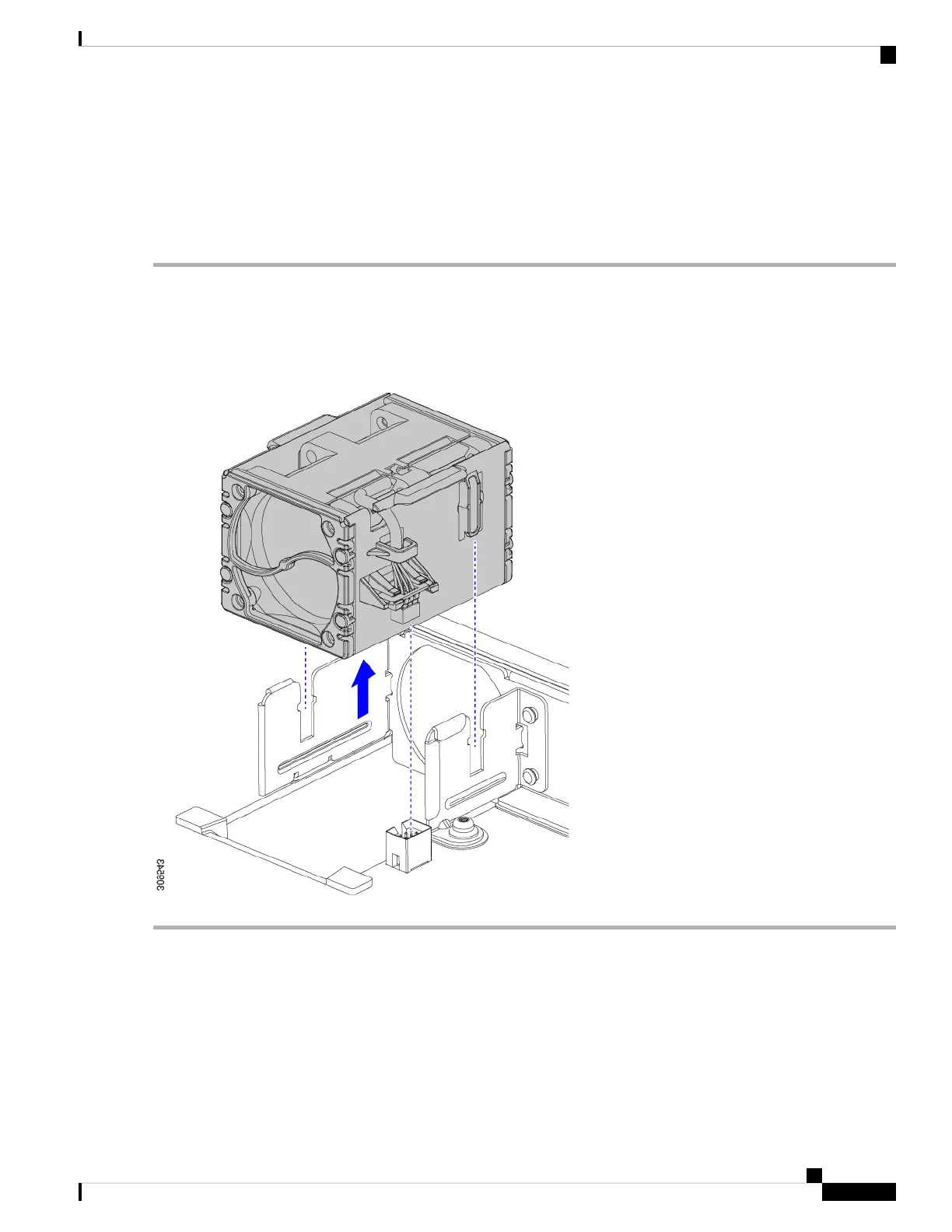
Step 1 Grasp the fan by the tabs on each long side wall.
Step 2 Pull the fan straight up.
This step disconnects the fan from the power connector and lifts the fan off of the board.
Figure 45: Removing the Fan from a UCS X9508 Module or Module Blank
What to do next
Insert a fan module. Go to Installing a Fan for a UCS Intelligent Fabric Module (IFM) or X-Fabric Module
(XFM) Blank, on page 88.
Cisco UCS X9508 Server Chassis Installation Guide
89
Installing and Removing Components
Removing a Fan for a UCS Intelligent Fabric Module (IFM) or X-Fabric Module (XFM) Blank



 To Next Page