Disassembly
2 - 6 Removing the Hard Disk Drive
2.Disassembly
Removing the Hard Disk Drive
The hard disk drive can be taken out to accommodate other 2.5" serial (SATA) hard disk drives with a height of 7mm
(h). Follow your operating system’s installation instructions, and install all necessary drivers and utilities (as outlined in
Chapter 4 of the User’s Manual) when setting up a new hard disk.
Hard Disk Disassembly Process
1. Turn off the computer, and remove the battery (page 2 - 5).
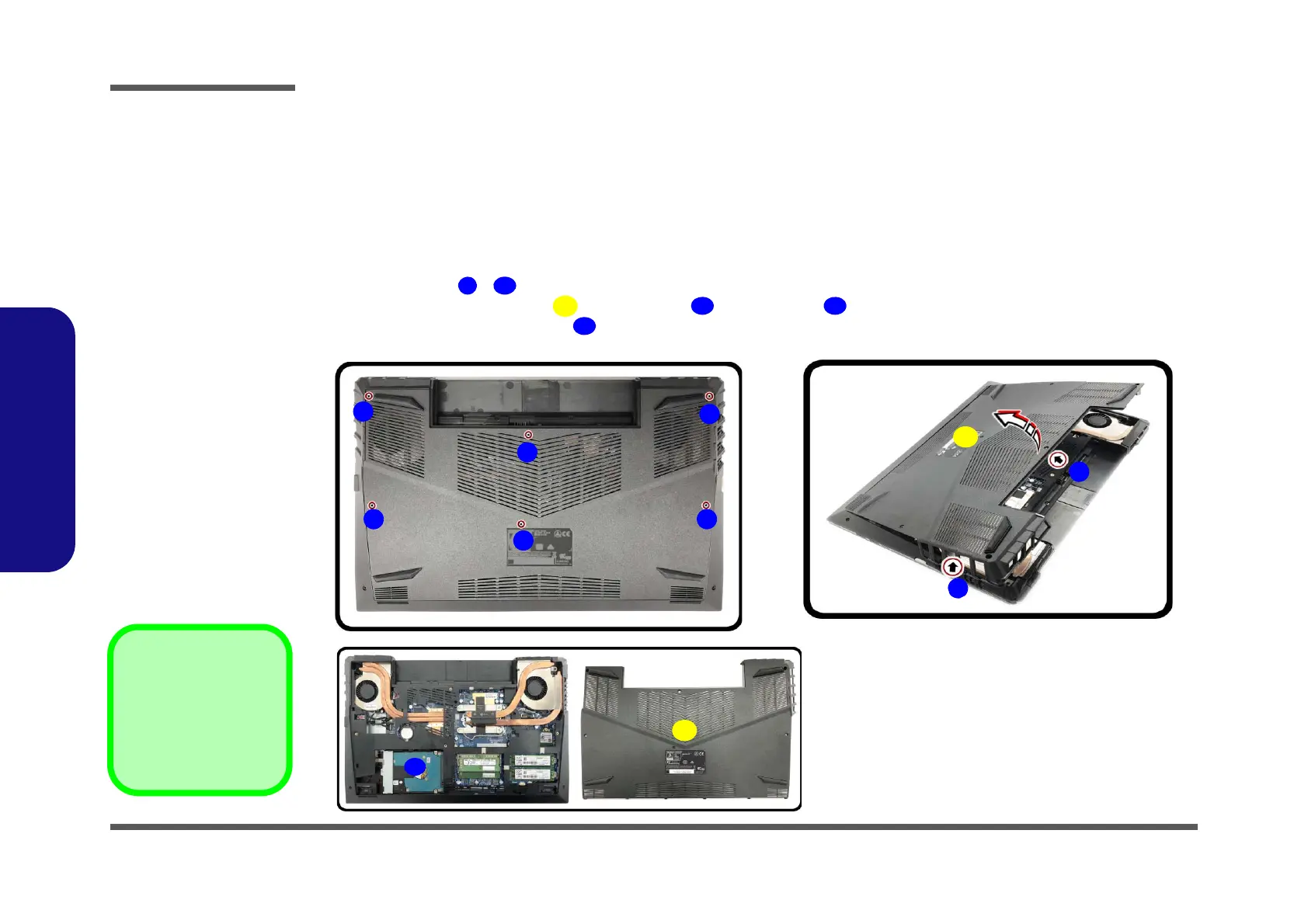
2. Remove screws - (Figure 2a).
3. Carefully lift the bottom case
up from point first and then to remove it (Figure 2b).
4. The HDD will be visible at point on the mainboard (Figure 2c
).
Figure 2
HDD Assembly
Removal
a. Remove the SD card
cover and screws.
b. Remove the bottom
case.
c. Locate the HDD.
7. Bottom Case
•6 Screws


 To Next Page