Advanced M52 Microprocessor User's Guide
ADVANCED M52UMCT2019 COLOR
14
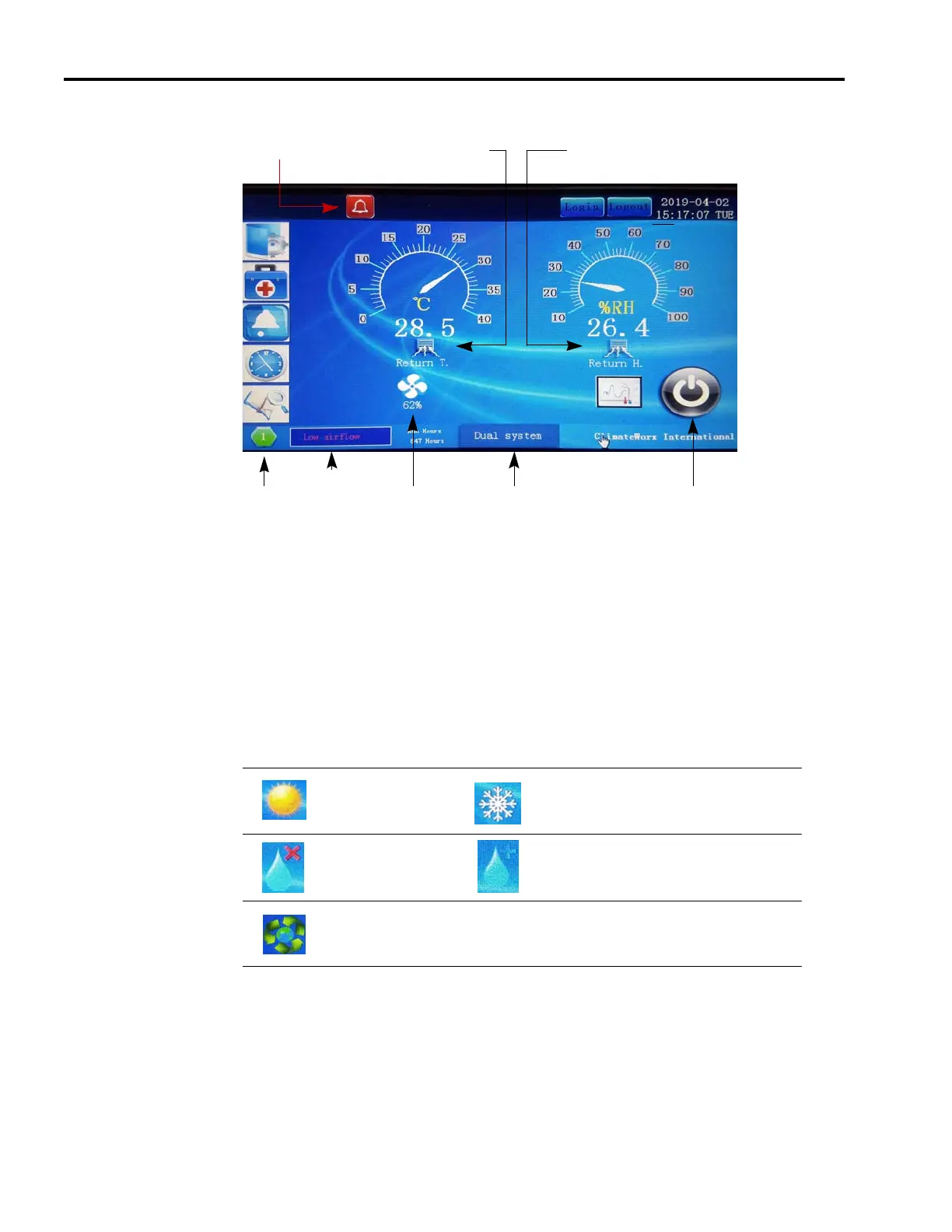
Operating Status
Main air humidity
Alarm description
Main air temperature
Co Work address icon
System Type
Alarm Icon
Unit fan on/off icon
On/Off Switch
Main Air Temperature & Humidity Readout
The main temperature & humidity readout shows the values of the sensor set to control the
system “Control Sensor”. Temperature readout can be displayed in either °C or °F depending
on the setting “Temp units”.
Process Status Display
This region shows the current operating status of the system by means of graphic icons and
analogue bar.
Cooling Heating
Dehumidifying Hum idifying
Free Cooling
shows when active)
Network Address
This shows the Network address set in setting “Network address”. Every unit in the network
must be set to a unique address. This address relates to the RS485 serial communication buss.
The terminal connection is P501 on main board with a native output protocol MODbus RTU.
Follow the field wiring diagram as shown on page 70.



 To Next Page