Advanced M52 Microprocessor User's Guide
ADVANCED M52UMCT2019 COLOR 21
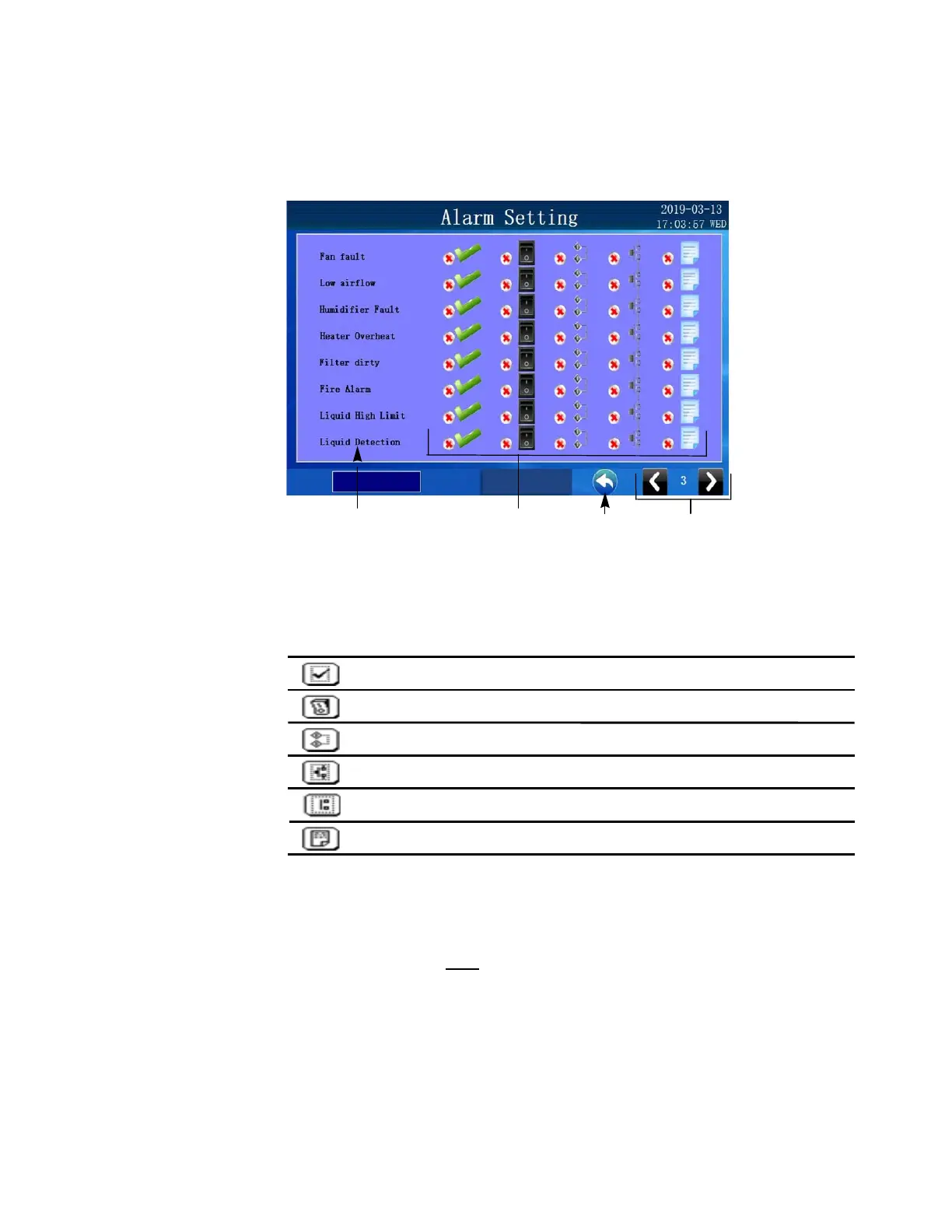
Alarm Configuration
The alarm configuration screen is under the alarm tab beginning on page 3. You can switch to
alarm configuration screen by pressing the [Change page] key in the alarm tab and will appear
after the 2 pages of alarm status screens.
Change page
Alarm description
Configuration icons
Home key
Every alarm has a number of configuration options. You can customize the way alarms are
reported and what automatic actions will be performed.
The “x” indicates the alarm feature is in active.
Standby enable option key
- if this options is selected,
standby enable output will be activated under alarm condition.
Common alarm option key
Critical- if this options is selected,
common alarm output will be activated under alarm condition.
Enable option key
- alarm will only be monitored if this option
is selected.
Unit shutdown option key
- if this option is selected, unit will
be automatically shutdown under alarm condition.
Event log option key
- if this options is selected, the alarm
events will be logged in the historical event log.
Common alarm option key
Non Critical -if this options is selected,
common alarm output will be activated under alarm condition.
Alarm configuration will NOT
synchronize across the Co-Work network.



 To Next Page