Page 21
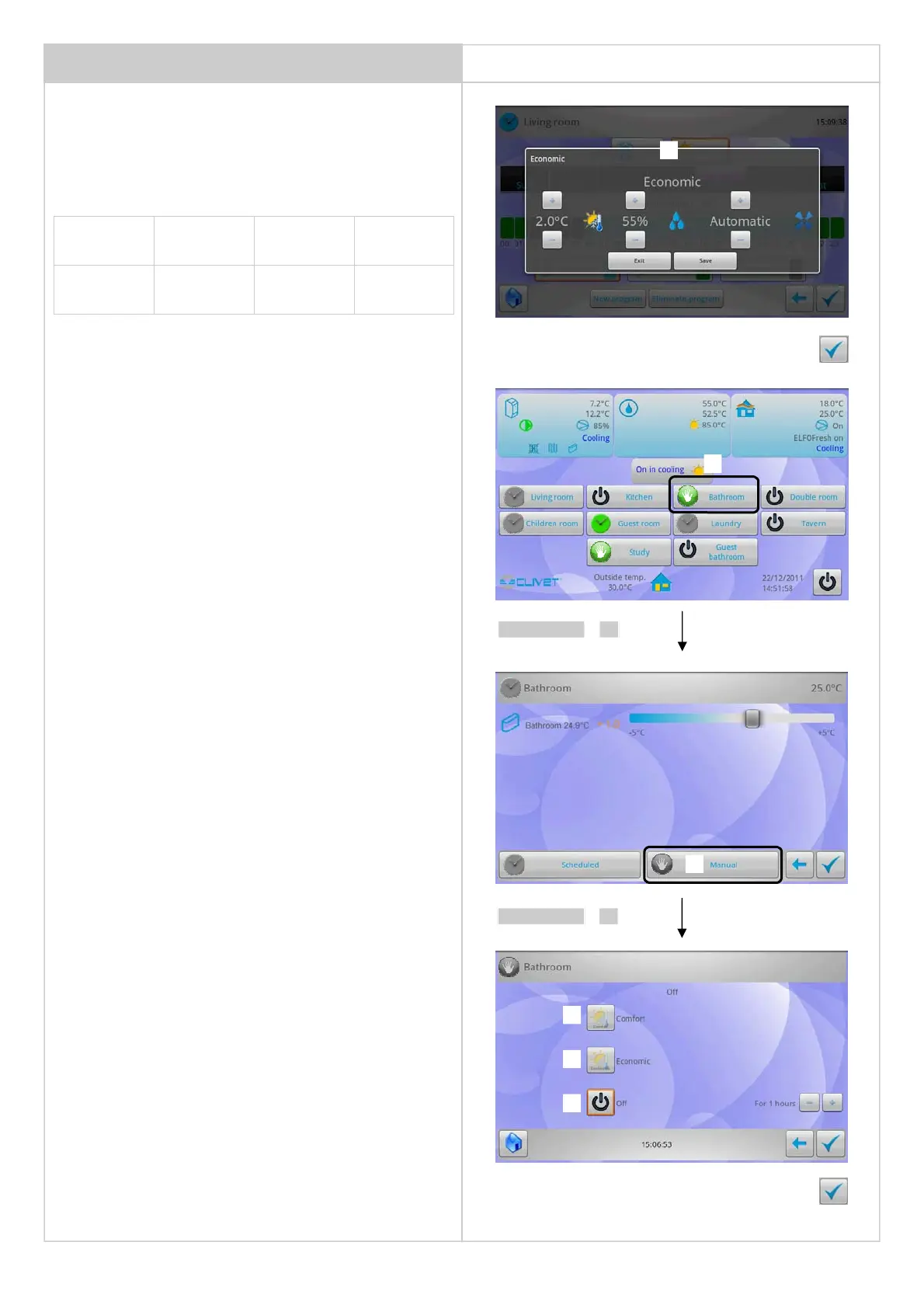
ZONE IN MANUAL MODE
The zone can be forced for a certain period of time in the desired
mode, ignoring the time schedule.
At the due time, the program previously stopped is restarted.
Temperature must be selected for both Summer and Winter (section 7)
ZONE SCHEDULING
Set:
• temperature difference compared to the "Comfort" mode
• humidity %
• automatic / manual / silenced / off ventilation
Example
Confirm the modification
Summer Comfort difference Economical
Temperature 25 °C +2 °C 27°C
Winter Comfort difference Economical
Temperature
21 °C -2 °C 19°C
11
Set the Zone manually in one of the following operation modes:
3 - Comfort:
• for ever (it does not return to the programming)
• for 1,2….3 hours...
4 - Economic
• for ever (it does not return to the programming)
• for 1,2….3 hours...
5 - Off:
• for ever (it does not return to the programming)
• for 1,2….3 hours....
The minimum setting interval to force the preset time schedule is 1
hour.
The zone in “for ever” mode, enter into the programming to return to
the normal programming.
1
2
select 1
Confirm the modification
3
4
5
select 2


 To Next Page