Page 60
SYSTEM COMPONENT ADDRESSING
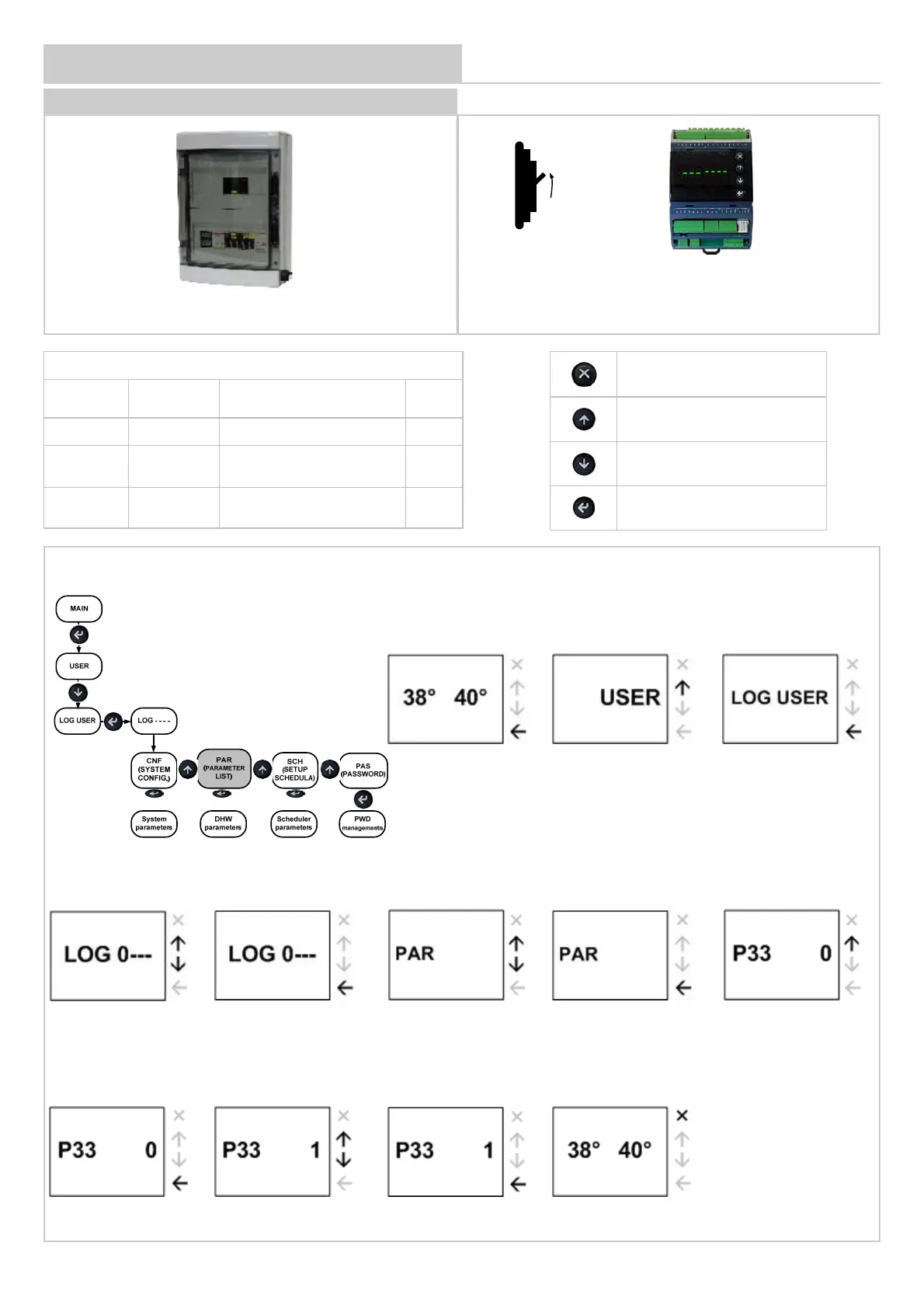
DOMESTIC HOT WATER MODULE
1 min. OK
Once powered, – – – LOAD are displayed. Wait
1 minute to load the software.
Parameters to be modified
Parameter
Mnemonic
Name
Description Value
33 Index Device address 1
34 Baud Rate
Baud Rate 0=4800 1 :9600
2 :19200
1
35 Parity
Parity 0=NO / 1=Odd 2=Even
supervision serial
0
Return to main menu
Scroll up
Scroll down
Confirm
How to modify the parameters of PARAMETER LIST menu
2 Select Log User
1 initial screen 3 Confirm
4 Enter password
5 Confirm password
6 Select menu
7 Confirm
8
Select parameter
9 Confirm
10 Modify parameter 11 Confirm
12 Main menu (twice X)
For module RS485 refer to page 55


 To Next Page