OPERATING MANUAL
800.749.2761 www.coachcomm.com
58
Adding a Prole
Use the procedures below to add a prole to your X-System conguration. For information on assigning proles, see
““Assigning New Proles” on page 52 and ““Assign Proles from the Control Unit” on page 68.
1. Open X-Ware and access the Advanced Settings window.
Note: You can add a prole to a “live” system or to an “ofine” system. If you make the change while
ofine, you’ll have to rst open a saved .ccf le to edit.
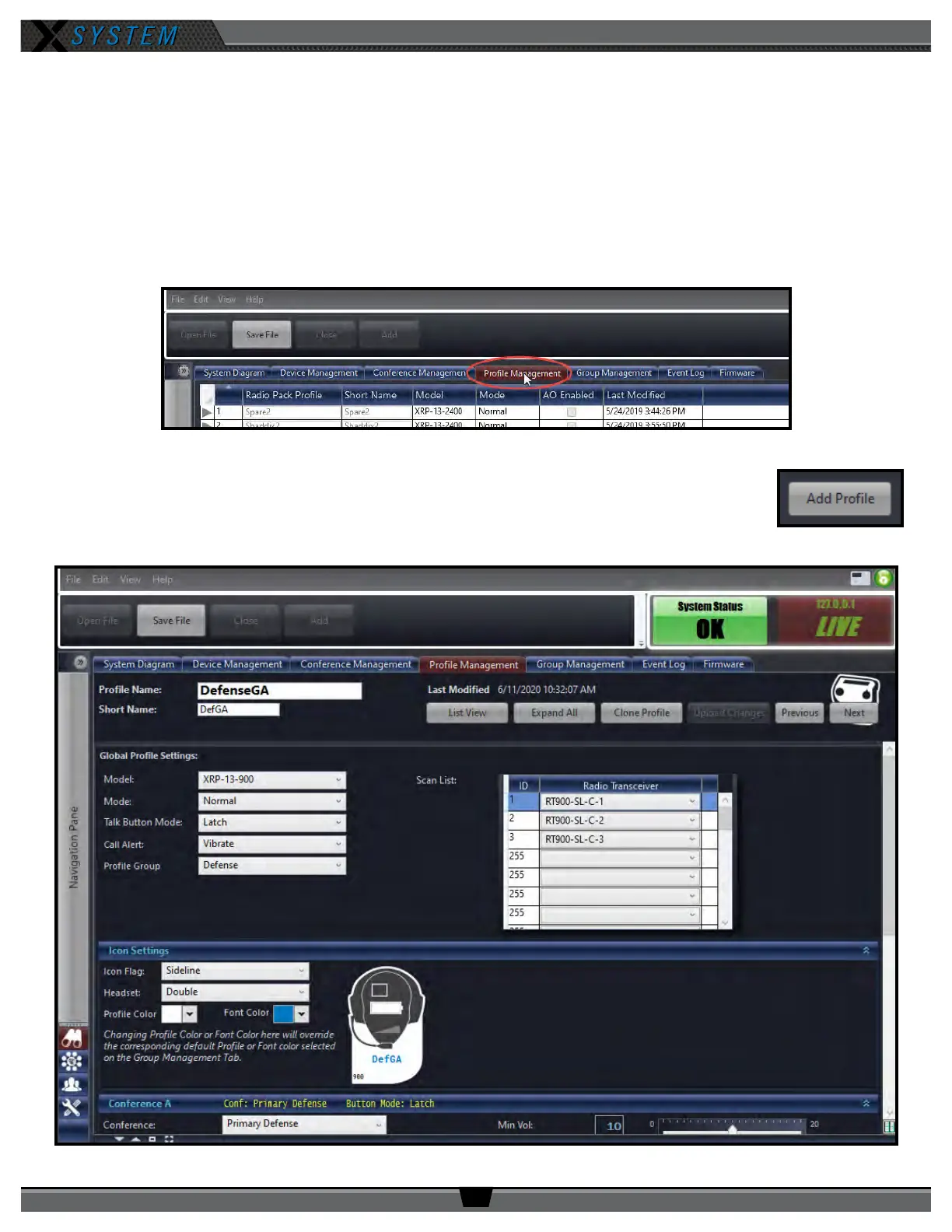
2. Click the
Prole Management
Tab. This tab displays a list of the proles in the open system conguration le.
3. Click the
Add Prole
button in the bottom left corner of the screen. A new prole will appear
in the list.
4. Double-click on the newly created prole. The prole’s detail screen will display.
Figure 77: X-Ware Prole Management Tab
Figure 78: Add Prole Button
Figure 79: X-Ware Prole Detail Screen



 To Next Page