Chapter 2: Operation
Multiple receivers 37
22222
Operation
Multiple receivers
The SAILOR 6588 DGNSS Receiver can be configured to act as primary,
secondary or tertiary GNSS receiver, where each receiver can be controlled
on the same SAILOR 6004 Control Panel.
Refer to the installation manual, where setup of such a system is explained
in details.
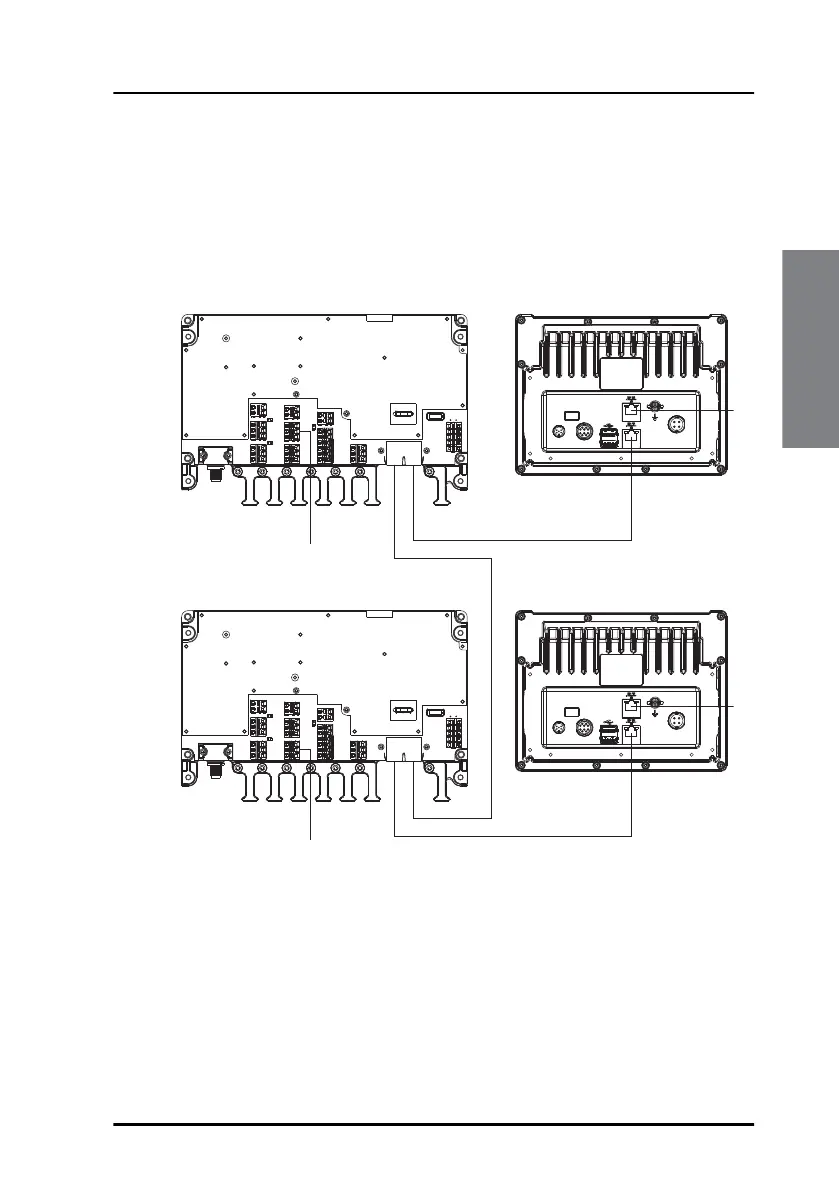
When configured with multiple receivers the start screen will look different
from a stand-alone system. Two or three GNSS or DGNSS icons are shown,
each with a number in the bottom left corner, corresponding to the device
role of the receiver from which the alert is reported.
Figure 31: Multiple receivers in one system
SAILOR 6004 Control Panel
ACC
AUX
TEST
PWR
SAILOR 6588 DGNSS Receiver
J22
J15
J13
J17
J18
J19
J21
J16
J14
J12
J2
ON_OUT
ON_IN
SHIP GND
12-24VDC +
12-24VDC -
J6
ALARM ACK
IN 2
IN 1
LOG
OUT 2
OUT 1
IN/OUT
PPS
ALARM
W4
W3
W5
SAILOR 6588 DGNSS Receiver
J22
J15
J13
J17
J18
J19
J21
J16
J14
J12
J2
ON_OUT
ON_IN
SHIP GND
12-24VDC +
12-24VDC -
J6
ALARM ACK
IN 2
IN 1
LOG
OUT 2
OUT 1
IN/OUT
PPS
ALARM
W4
W3
W5
NMEA OUT
NMEA OUT
LAN
SAILOR 6004 Control Panel
ACC
AUX
TEST
PWR
LAN
LAN



 To Next Page