23
1300 663 907
After Sales Support
help@cocoonproducts.com.au
Model number:
HE210303
02/2022
8CH 1080P SECURITY CAMERA SYSTEMADVANCED SETTINGS
Record
Enable tab
• Enable or disable recording function for each camera
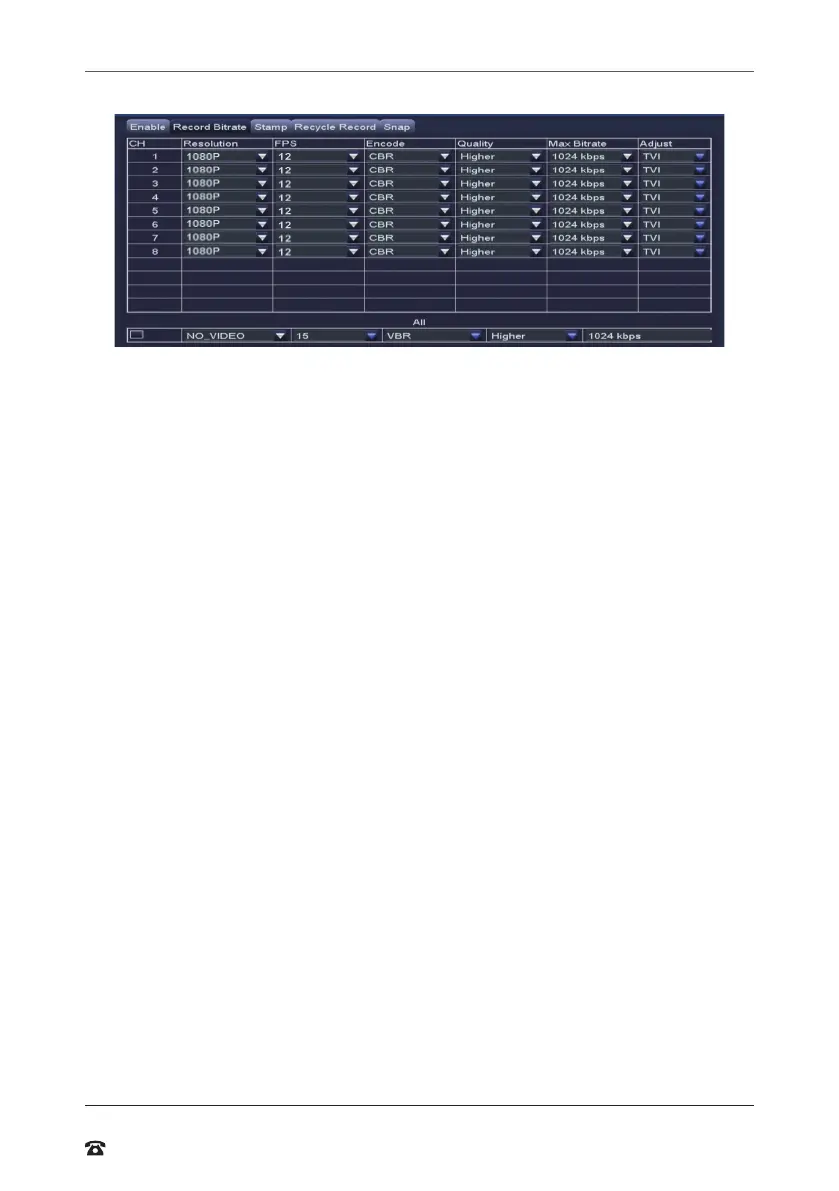
Record Bitrate tab
Allows you to adjust the recording stream for all eight cameras
• Resolution: Suppors 1080p
• FPS (Frames per Second): Choose from 1 to 12.
• Encode: Suppors VBR (Variable Bit Rate) and CBR (Constant Bit Rate)
• Quality: Depending on camera
• Max Bitrate: Higher bit rates use more hard drive space
• Adjust (resolution): Depending on camera
Stamp tab
• Camera Name: Toggle the display of the camera name for each channel
• Time Stamp: Toggle the display of the time stamp for each channel
• Position: Use the mouse to drag the camera name and time stamp to any position on
the live image. Right-click mouse to exit back to ‘Record’ page
Recycle Record tab
• If ticked: When the hard drive is full, the DVR will automatically overwrite the earliest
recorded iles and continue recording
• If unticked: When the hard drive is full, a warning message ‘The remaining space is
insuicient’ will display and the DVR will stop recording
Snap tab
Display snapshot settings



 To Next Page