Horizon Imager User’s Manual 10-9
3UHYHQWLYH0DLQWHQDQFH
If a color ribbon is loaded, go to step 4. Otherwise, go to step 7.
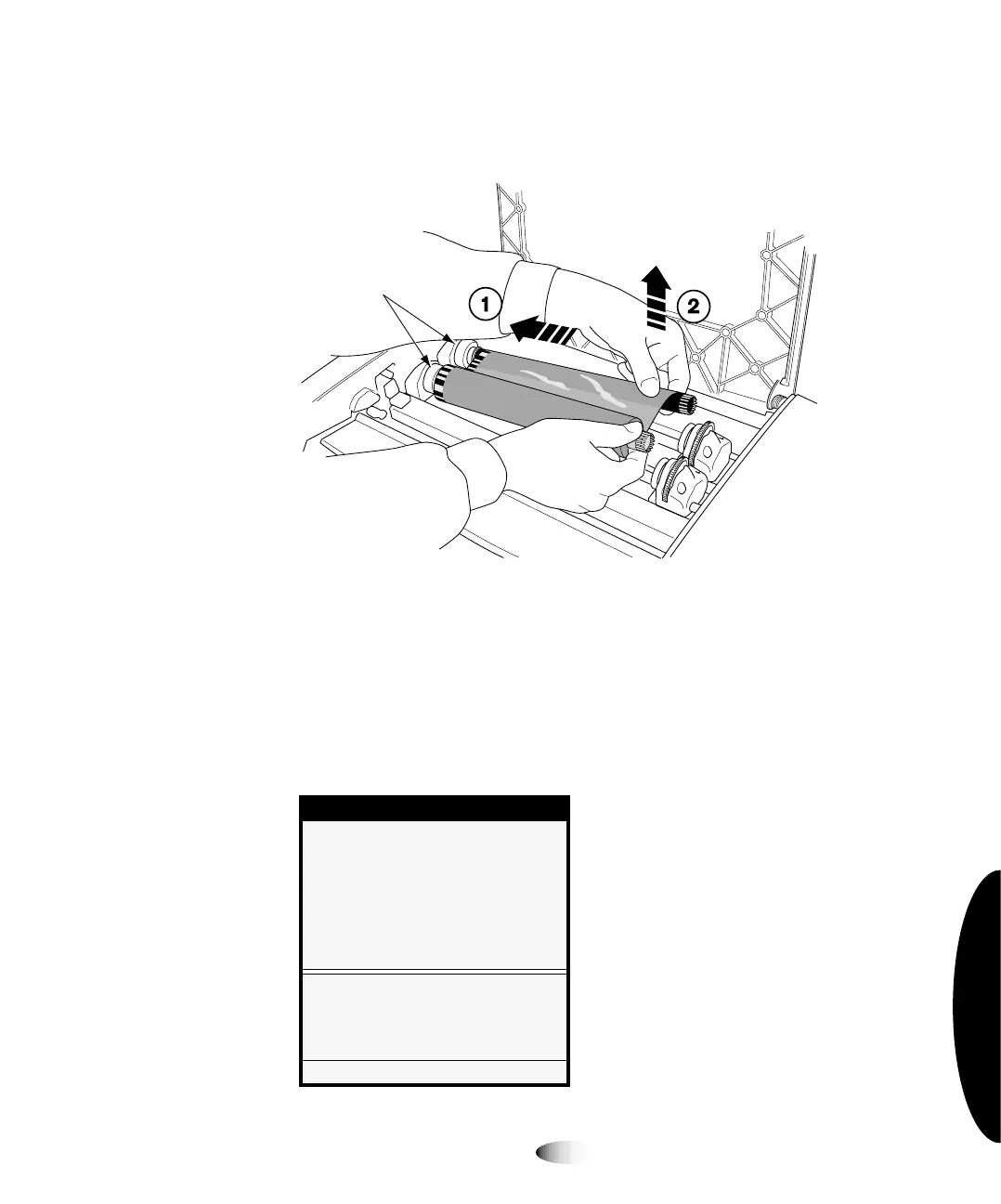
4. Remove the ribbon, as shown in the following figure.
127(
&DUHVKRXOGEHWDNHQZLWKWKHULEERQWRSURWHFWLWIURPGXVWDQGGLUWZKHQLWLVQRW
ORDGHGLQWKHLPDJHU$YRLGUHVWLQJLWRQDWDEOHVWDWLFFKDUJHZLOODWWUDFWGXVWIURPWKHWDEOH
WRS
5. From the Open Top Cover menu, select the
0RYH5LEERQ
&DUULDJH
option.
The Move Ribbon Carriage menu displays.
0HQX
2SHQ7RS&RYHU
0RYH5LEERQ&DUULDJH
0RYHVFDUULDJHXS
0RYHVFDUULDJHGRZQ
0RYH5LEERQ&DUULDJH
&DXWLRQ:DWFKILQJHUVKDLUDQG
ORRVHFORWKLQJZKHQPRYLQJ
3UHVV0(18WRH[LWPHQXV
Spring-loaded
spindles
3



 To Next Page