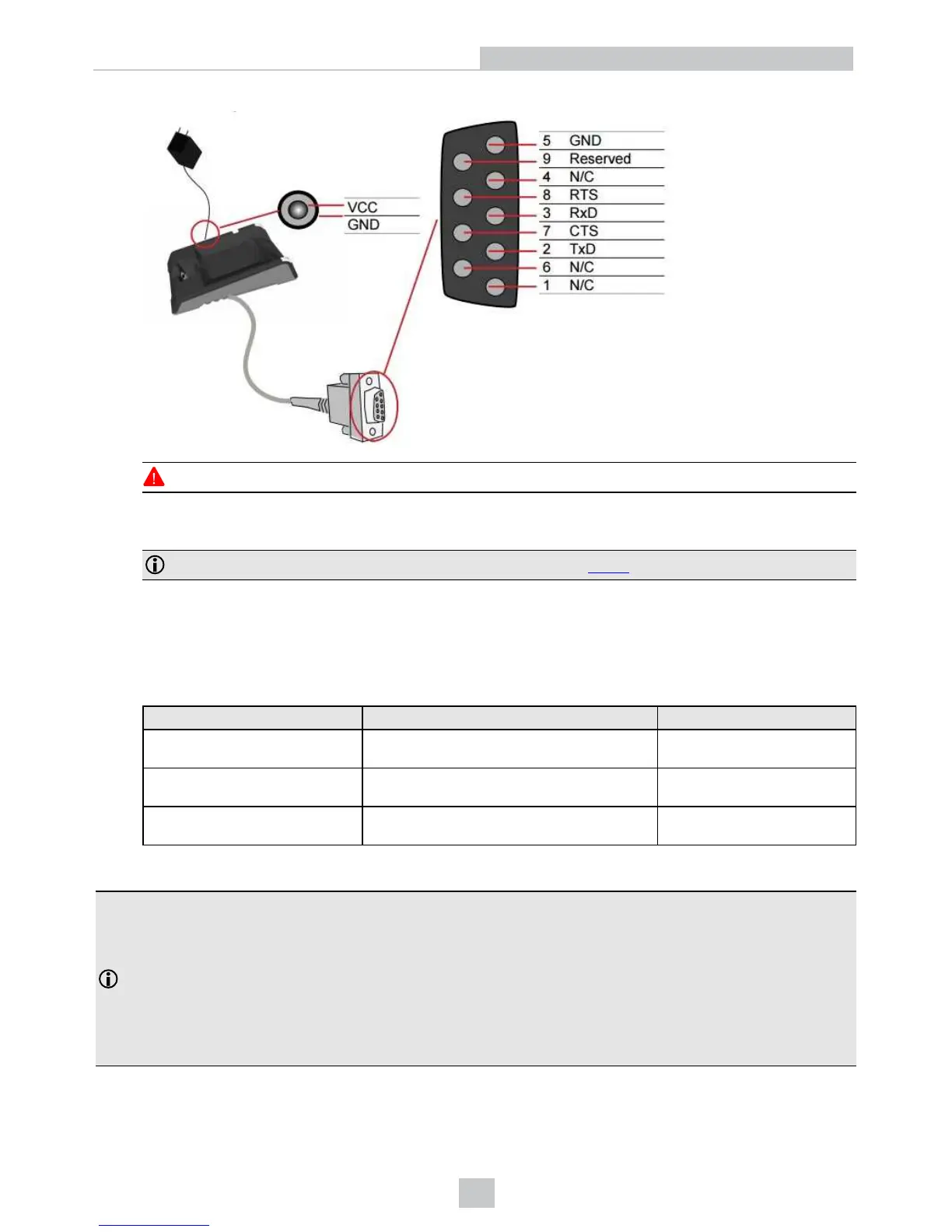
Observe the following electrical requirements when connecting the base station through RS-232:
WARNING: For proper RS-232 operation, do not apply any voltage to pin 9.
Power to base station can be supplied by either the DC power plug or by wiring in 24V. DO NOT use both in
parallel. The DC power plug is a 24VDC power supply (DMA-24VPWR-xx), 3.5 mm x 1.3 mm.
Note: Be careful to use the appropriate connector for RS-232. See Step 6 above.
7. When the base station is powered up, scan the Pair scan code and place your reader into the base station. The
base station’s status indicator becomes green. When the wireless reader is removed from the base, a wireless
connection is established. The status indicator of both the base station and the reader become blue and you can
hear a beep. Blue lights indicate that the reader and the base have successfully paired and are communicating.
8. Connect to your base station or to the wireless reader. You have the following connection options:
Base Station Connection Type Connect to Reader in the Setup Tool Connection Channels
RS-232
Wireless reader appears: COM port
(Base Station does not appear)
terminal program Setup Tool
USB
Base Station appears: COM port 1
Wireless reader appears: COM port 2
terminal program Setup Tool
Ethernet
Base station appears: Network device 1
Wireless reader appears: Network device 2
terminal program Setup Tool
9. Lift your reader up from the base station and start reading codes.
Note:
l When the reader is on the base station, communication is established by
means of cradle contacts. Wireless communication is disabled.
l Configure wireless communication settings by connecting to the base station. In order for the changed
settings to be synchronized between the DataMan 8050 wireless reader and the base station, place your
reader in the base station after your changes are saved. To assign a static IP address to the base station or
the reader when communicating via Ethernet, connect to the base station in the DataMan Setup Tool. The
base station, however, auto-assigns the IP address to the reader when they become paired.
20
Connection Options













 To Next Page