Trigger Types
The DataMan 8050 trigger mode determines when the reader attempts to read a code. Use the DataMan Setup Tool or
the appropriate reader configuration codes to change trigger types.
The following trigger types are supported:
l Presentation: The LED aimer is always on.
l Manual (default): The reader begins acquiring images when you press the trigger button on the reader, and
continues acquiring images until a symbol is found and decoded or you release the button.
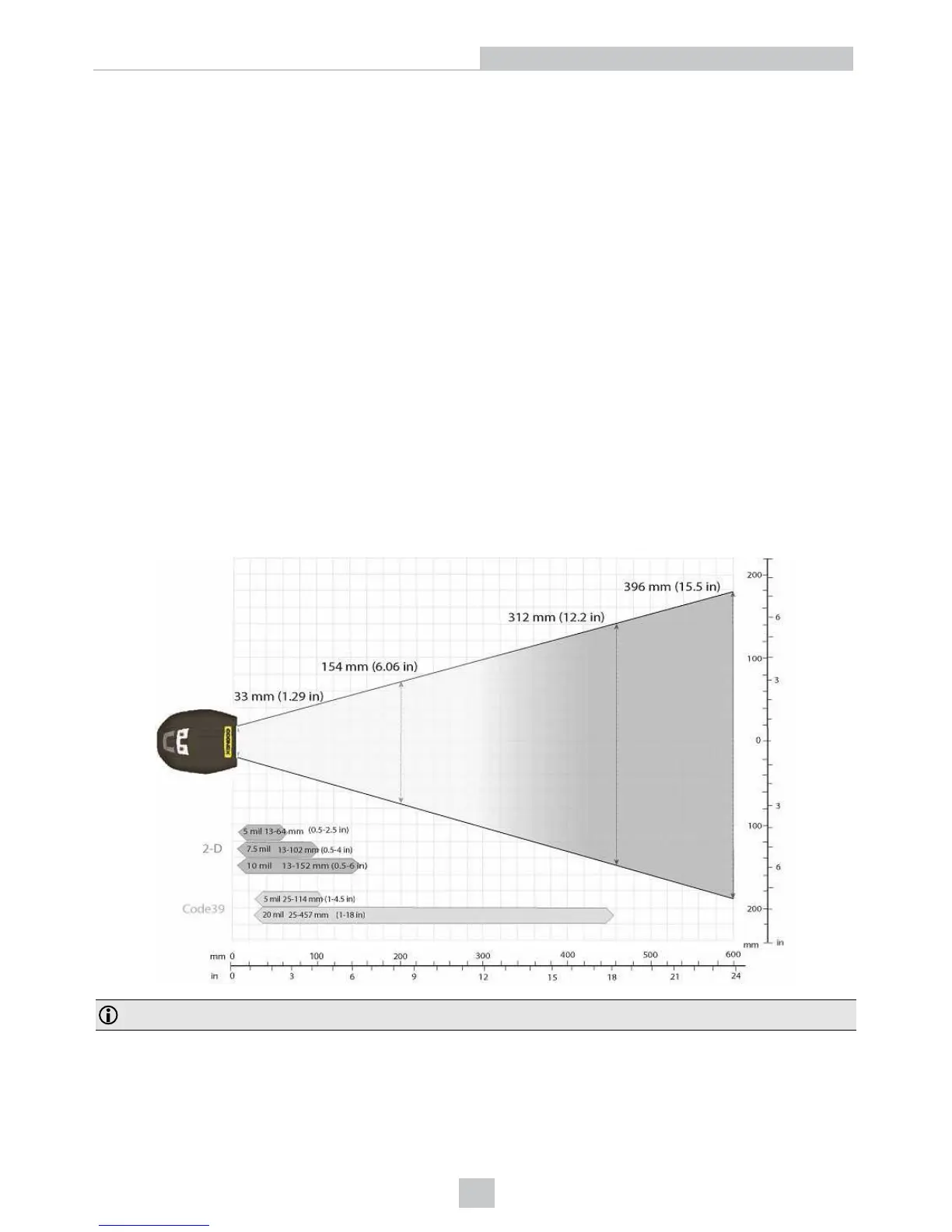
Field of View and Reading Distances
There is a range of reading distances available for different code sizes and focus positions. Select a focus position that
allows you to read the desired code sizes at the desired working distance.
l If your application has a consistent reading range, set the focus range to a limited depth of field with no steps (for
example, set it to 20) or with limited steps (for example, set it to 2 steps between 0 and 30). This way you can
achieve fast performance.
l If your application has a variety of code types and sizes, set the focus range to a wider depth of field with
increased number of steps (for example, set it to 6 steps between 0 and 200). This way you can get better
coverage.
Map of Field of View and Reading Distances
Note: Due to tolerances, ranges can vary by +/- 5 mm for small codes to +/- a couple of centimeters for large codes.
33
Reading Codes with the DataMan 8050













 To Next Page